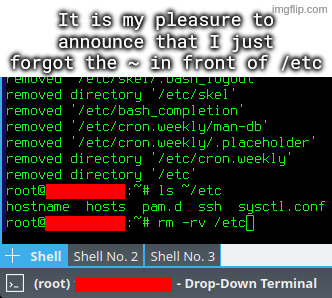
βJust a little off the top pleaseβ
linuxmemes
Hint: :q!
Sister communities:
Community rules (click to expand)
1. Follow the site-wide rules
- Instance-wide TOS: https://legal.lemmy.world/tos/
- Lemmy code of conduct: https://join-lemmy.org/docs/code_of_conduct.html
2. Be civil
- Understand the difference between a joke and an insult.
- Do not harrass or attack users for any reason. This includes using blanket terms, like "every user of thing".
- Don't get baited into back-and-forth insults. We are not animals.
- Leave remarks of "peasantry" to the PCMR community. If you dislike an OS/service/application, attack the thing you dislike, not the individuals who use it. Some people may not have a choice.
- Bigotry will not be tolerated.
3. Post Linux-related content
- Including Unix and BSD.
- Non-Linux content is acceptable as long as it makes a reference to Linux. For example, the poorly made mockery of
sudoin Windows. - No porn, no politics, no trolling or ragebaiting.
- Don't come looking for advice, this is not the right community.
4. No recent reposts
- Everybody uses Arch btw, can't quit Vim, <loves/tolerates/hates> systemd, and wants to interject for a moment. You can stop now.
5. π¬π§ Language/ΡΠ·ΡΠΊ/Sprache
- This is primarily an English-speaking community. π¬π§π¦πΊπΊπΈ
- Comments written in other languages are allowed.
- The substance of a post should be comprehensible for people who only speak English.
- Titles and post bodies written in other languages will be allowed, but only as long as the above rule is observed.
6. (NEW!) Regarding public figures
We all have our opinions, and certain public figures can be divisive. Keep in mind that this is a community for memes and light-hearted fun, not for airing grievances or leveling accusations. - Keep discussions polite and free of disparagement.
- We are never in possession of all of the facts. Defamatory comments will not be tolerated.
- Discussions that get too heated will be locked and offending comments removed. Β
Please report posts and comments that break these rules!
Important: never execute code or follow advice that you don't understand or can't verify, especially here. The word of the day is credibility. This is a meme community -- even the most helpful comments might just be shitposts that can damage your system. Be aware, be smart, don't remove France.
TIL rm -v is a thing
Well at least you got to watch
Your first mistake was attempting to unarchive to / in the first place. Like WTF. Why would this EVER be a sane idea?
that was my reaction when I saw a coworker put random files and directories into / of a server
I feel like some people don't have a feeling about how a file system works
What's so bad about that? Except that is trigger me to not have it organized.
Maybe they do and don't fear the HFS? I mean do you use the HFS in a docker container?
This is why you should setup daily snapshots of your system volumes.
Btrfs and ZFS exist for a reason.
Wish ZFS didn't constantly cause my proxmox to need to be forcefully restarted after the ZFS pool crashed randomly.
I get months of uptime on a ZFS NAS, though I'm not using Proxmox. I don't think it's the filesystem's fault, you might have some hardware issue tbh. Do you have some logs?
That or make your system immutable
That's my current approach. Fedora Atomic, and let someone else break my OS instead of me.
Rest in peace my granny,she got hit by a bazooka
(got no clue why, but really FEELS like an appropirate reaction to have, I salute to you and your pain sir!)
Welcome to the "I have shot myself in the foot with rm" club! Take a seat anywhere!
(Mine was trying to delete the old System 9 "System Folder" by typing rm -rf System\ Folder, but instead hitting the return key when it came time to hit the \, thereby starting a deletion of the running macOS 10 operating system inside the "System" folder. It got through the c's in the second and a half or so before my frantic control-C attempts halted it. Amazingly, OS X would still boot, but no longer run Carbon apps, necessitating a complete OS reinstall, lol.)
I try to always put the -rf at the end for this reason. Not sure what works on Mac but it does allow it on most Linux shells
You use btrfs, right? Right???
Tried the terminal emulator for the first time today, but I kinda can not get used to the fact, that I cannot move it around :(
Linux will do what you tell it. :)
Reusing names of critical system directories in subdirectories in your home dir.

I agree with this take, don't wanna blame the victim but there's a lesson to be learned.
except if you read the accompanying text they already stated the issue by accidentally unpacking an archive to their user directory that was intended for the root directory. that's how they got an etc dir in their user directory in the first place
[OP] accidentally untarred archive intended to be extracted in root directory, which among others included some files for /etc directory.
I dunno, ~/bin is a fairly common thing in my experience, not that it ends up containing many actual binaries. (The system started it, miss, honest. A quarter of the things in my system's /bin are text based.)
~/etc is seriously weird though. Never seen that before. On Debians, most of the user copies of things in /etc usually end up under ~/.local/ or at ~/.filenamehere
I think the home directory version of etc is ~/.config as per xdg.
I use ~/config/* to put directories named the same as system ones. I got used to it in BeOS and brought it to LFS when I finally accepted BeOS wasn't doing what I needed anymore, kept doing it ever since.

never heard of ~/etcΒ
I accidentally untarred archive intended to be extracted in root directory
HAH rookie, I once forgot the . before the ./
o.7
DId you try CRTL-Z?
instructions on clear, switched to vi mode in bash and cant exit
Great! Now you can enjoy that freshly assembled directory feeling, knowing that now you only have the configs in there that you need.
Oof. I always type the whole path just because I have made this mistake before.
That doesn't protect you from typos.
rm -rv /home/schmuck /etc
"Whoops, I accidentally added a space."
I have three ways around this:
ls ~/etc... <press up arrow, replacelswithrm -rv>ls ~/etc...rm -rv !$- Add the commands to a simple script and use variables to remove the danger of a command line.
As a noob, those little wrappers are great.
Let he who has not wrongly deleted system critical files in Linux cast the first stone.
I can do one better. A similar 'rm' command but while a Windows disk was mounted read/write. So, 2 OSes damaged in one command.
Amateurs. You all did it accidentally. I deleted system critical files intentionally believing it was beneficial.
/dev is just all bloat with stupid recursive directories
Whelp, time to restore the latest snapshot.
Is there any reason to use a root account? If you had used sudo for each privilege needing command in stead it would have stopped you.
Is there any reason to use a root account?
if you just borked your /etc and need to rebuild because you don't have sudo anymore
When I make a mistake like this, and have to do some important cleanup I'll sometimes jump into mc
Make an alias in .bashrc (or equivalent) so that rm always have the -i flag to prompt for βyou really wanna do it !?β.
That just trained me to automatically add -f to avoid the prompts.