pelya

joined 2 years ago
[–] pelya@lemmy.world 5 points 16 hours ago (1 children)

There is a whole lot of demand from industrial equipment manufacturers. When you attach a computer to your twenty thousand bucks robot arm or CNC drill, you need it small, reliable, readily-available, and brand-new, so you slightly overpay for Pi 5 for $200 and an SSD drive for another $200 to not rely on faulty SD cards, and if it breaks you can buy and replace it in 15 minutes, and future Raspberry Pi 6 will most probably boot from the same SSD and work with zero modifications, even contacts placement will be the same. Does it need 16 GB? Probably not.

Also, drone manifacturers. 16 GB RAM is just enough to run a computer vision AI model, and you won't haul a used HP laptop on a drone.

[–] pelya@lemmy.world 2 points 17 hours ago (1 children)

My coworker has a separate monitor tilted vertically to have a permanently open terminal window.

[–] pelya@lemmy.world 2 points 19 hours ago

Install Wallhaven plugin, then you can have two different wallpapers that are changed each ten minutes.

[–] pelya@lemmy.world 5 points 19 hours ago

THE SKELETAL HAND!

And the veiny hand. Looks like there are several imaging modes.

[–] pelya@lemmy.world 2 points 1 day ago (1 children)

But, but, eighty bucks! TI boards are seriously overpriced.

[–] pelya@lemmy.world 4 points 1 day ago (1 children)

Yup, it would be super convenient to have one or two pins for ADC. Technically you have a DAC on Pi 4, if you repurpose the analog audio output, but on Pi 5 all you have is digital HDMI audio.

Oh well, an AD7705 voltmeter board costs only $2, and uses only six wires for SPI connection, including one of two precious precious 3V3 pins. And you'll also need around three days to dig Github to find a working Python driver for it. But at least you don't have to worry about burning your 3.3V Raspberry pins with 5V input voltage.

And at this point you are asking yourself - why not pay $3 for an ESP32 or a STM32? you can program it to use just three wires - power, ground, and UART TX, and you don't need to read it 500 times per second like AD7705 and use 25% CPU of your Raspberry Pi Zero, you can program it to calculate an average RMS voltage once per second, and you can read a total of six ADC channels on ESP32, and on STM32 half of all the pins can be configured as ADC, and it's also quite precise and low-noise, while on ESP32 ADC is more ... consumer-grade.

[–] pelya@lemmy.world 11 points 1 day ago (7 children)

Their original goal was to provide an affordable and customizable computing device with generic IO ports for a classroom, which they very much did.
14 years later, classrooms have a crapload of alternatives, ranging from $3 ESP32, which you can literally solder and throw away, to $500 Jetson, and all Raspberry Pi clones, like NanoPi or OrangePi, all with GPIO, UART, SPI and I2C ports, for all your microcontroller needs.

As for the embedded developers community (or 'makers' as kids call themselves nowadays) - these are the kind of people who dump two thousand bucks for a 3D printer and then use it twice a year. I think they will survive raising Raspberry Pi 5 price to $45.

And Raspberry Pi foundation pivoting towards business is a predictable move - those kids who used Raspberry Pi 14 years ago in a classroom are now business owners or technical leads in many businesses.

[–] pelya@lemmy.world 53 points 1 day ago* (last edited 1 day ago) (7 children)

Y'all need a price chart. You are literally getting what you are paying for.

Raspberry Pi 5, 16 GB RAM

  • Price: $205 (don't trust the price on RPi website, no way you are buying it for $145).
  • Generic desktop PC: runs Blender and video editors.
  • AI agent: yes.
  • Computer vision: yes, with face recognition and real-time AI filters.
  • SDR signal processor: you can broadcast an HD TV station on it.
  • Servers: whatever you want, can host Amazon and Netflix.

Raspberry PI 5, 1 GB RAM

  • Price: $45.
  • Generic desktop PC: you can edit office documents.
  • AI agent: lol no.
  • Computer vision: a movement sensor for your surveillance camera.
  • SDR signal processor: you can broadcast FM radio.
  • Servers: home file server and torrents.

Raspberry PI 4, 1 GB RAM

  • Price: $35.
  • Does everything that Raspberry Pi 5 does, but 0.6 GHz slower.
  • Does not throw a tantrum when your power supply outputs 4.999 volts instead of 5 volts 5 amperes.
  • The ultimate Raspberry Pi for all your hardware projects.

Raspberry PI Zero 2, 512 MB RAM

  • Price: $15 on a website, $19 in shops.
  • Generic desktop PC: probably runs Solitaire.
  • AI agent: dream on.
  • Computer vision: a movement sensor for your surveillance camera, and it won't support HD cameras.
  • SDR signal processor: you can record FM radio, not much else.
  • Servers: online garage door opener.
  • Ethernet adapter sold separately, if you don't want your garage door opener to drop offline at random because of unstable WiFi.

Raspberry Pi Pico, 264 KB RAM

  • Price: $4.
  • Generic desktop PC: nope.
  • AI agent: absolutely impossible.
  • Computer vision: nope.
  • SDR signal processor: nope.
  • Servers: unsecure garage door opener.
  • Ethernet adapter requires soldering skills.
  • You don't need 40 programmable pins to control one garage door.
  • Just buy ESP32 instead.

ESP32-C6-Zero, 400 KB RAM.

  • Price: $3.50.
  • Does everything that Raspberry Pi Pico does, but better.
  • Works for a year from three AAA batteries.
[–] pelya@lemmy.world 15 points 1 day ago (9 children)

Raspberry Pi Zero is still very much available, and costs less than the original Pi 1/2/3/4. It's enough for most microcontroller tasks, if you want cozy Linux with Python and don't want to dive into RTOS and C microcode.

[–] pelya@lemmy.world 1 points 1 day ago

I seem to figure it out. The bug happens only when selecting a feed from Favorites in the left-side menu. When selecting the same feed from Feeds, it loads fine.

[–] pelya@lemmy.world 2 points 5 days ago

1.0.388, not beta.

12
Frontpage is broken (lemmy.world)
submitted 5 days ago* (last edited 5 days ago) by pelya@lemmy.world to c/lemmyconnect@lemmy.ca
 

When I open Lemmy Connect, I see this. No frontpage posts are loading, however I can open my profile and read my own posts.

I am posting this from a mobile web browser like a savage. Please help!

[–] pelya@lemmy.world 2 points 1 week ago

Could have made that taskbar vertical. Screens are getting narrower and narrower, but now we have a status bar at the top and a task bar at the bottom, plus each window has a titlebar


Components:

  • ESP32-S3-Zero with RGB LED. I've selected it over more energy efficient ESP32-C6 because bigger chip looks better, and it's placed symmetrically.
  • two CR1220 3V batteries.
  • copper wire from Ethernet cable (single-strand obviously).
  • lead-free solder (it's a ring, don't wear lead on your fingers).
  • hot glue gun, because I could not make a battery holder using just wire.
  • a piece of small diameter heat-shrink tube for copper wire.
  • a jewellery file (optional, only needed if you actually going to wear the thing).

Instructions:

  • flash the firmware first, because batteries will obstruct the USB port.
  • it is recommended to file off all sharp edges on the board before you start soldering, it will be harder to smoothen the edges afterwards without scratching the copper wire.
  • smoothen your wire, wrap it around some finger-size object like a tube of flux, cut the wire spiral into rings.
  • solder wire rings into one side of the board, use every hole except for 5V and GND, and TX/RX on the other side.
  • put the board onto your finger, measure and cut the other side of the wire rings to match your finger size, solder wire rings to the board.
  • Glue two batteries together in sequence, then glue them to the top of the USB connector. Watch out for polarity - CR1220 has positive charge on the body and negative charge on the contact plate, you need to put the negative electrode onto the USB connector.
  • wrap a stripped copper wire around another wire with isolation on it.
  • bend both wires so that the stripped wire will go into 5V hole, and the isolated wire will go into GND and RX holes. The isolated wire is only needed as a mechanical support, because you should not solder another end of 5V wire to the TX or RX hole, or you risk frying the chip.
  • add a piece of heat-shrink tube to the stripped wire. You need to make contact with the battery at the top and prevent the wire from contacting the battery at the bottom. You can try to leave a bit of isolation on the wire, but it's easier to use the tube.
  • solder wires to the board.
  • do not to make a common mistake of connecting 3V3 and GND together, or GND and 5V, like I did. 3V3 wire goes under the board onto the finger, GND wire goes above the board to hold the batteries.
  • keep wire ends from sticking out of the mounting holes when soldering, they are going to scratch you when you wear the ring. You can file them off afterwards, but it's easier to not make them stick out in the first place.

Firmware: https://github.com/pelya/esp32-led-cycle-colors

The only thing it does is cycle LED with random colors. It shuts off power by pressing BOOT button or after 5 minutes. To turn it back on, press RESET button. There's no WiFi, Bluetooth, or LCD screen, but at least the LED is bright.

I did not measure how long will these two batteries last. When they are empty, I'll need to rip off hot glue blobs from the board, which would be pretty easy since I only put hot glue onto metallic surfaces.

And it's absolutely not waterproof, hopefully the finger grease will keep to the underside of the board and won't short the battery.

Full video: https://youtube.com/shorts/QZi4RBir2cE


For those who want to try it at home:

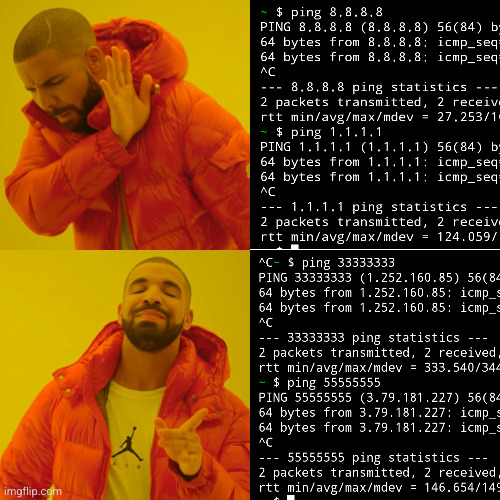
ping 33333333
ping 55555555

I am sorry, two random Internet users in Korea and Germany, your IP addresses are simply special.
 

Google had removed my X server app from Play Store, because it was too old (is 2022 too old?)

But no more! I have recompiled it for the newest Android version and published it back. And you can use it to run GUI apps from Termux. Launch X server first, then run these commands in Termux, then switch back to X server:

pkg install x11-repo
pkg install xfce4
export DISPLAY=127.0.0.1:0
export PULSE_SERVER=tcp:127.0.0.1:4713
xfce4-session

Termux now has it's own X server, my app is pretty similar, except that it's landscape by default.


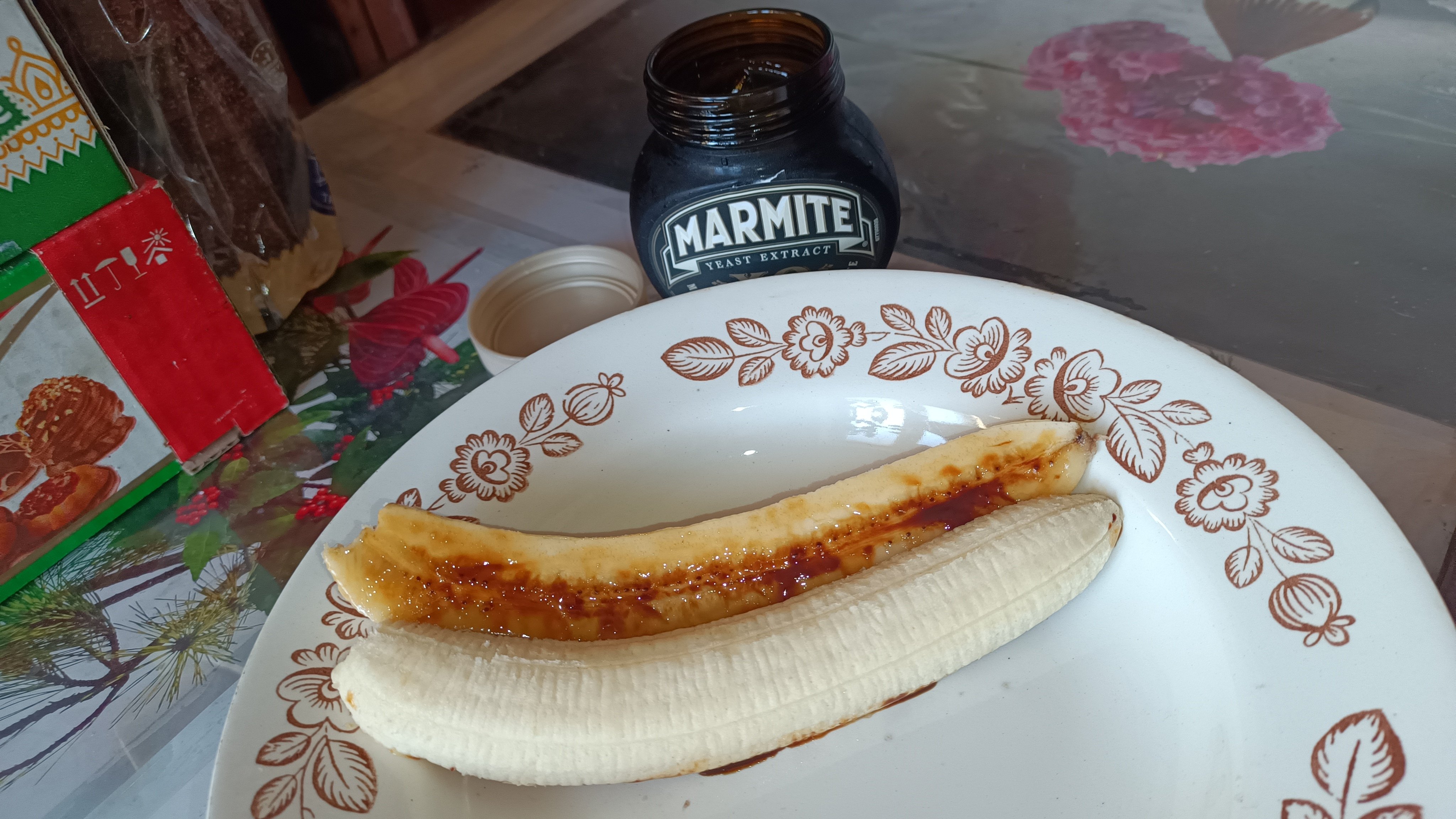
I have mixed sour cream with Marmite to make it spread more evenly over banana, and the taste is... not good. The salt overpowers all other components. It's even worse than plain Marmite banana, because you can actually taste the banana before Marmite diffuses over your tongue. The best combination was cream banana without Marmite, to no surprise.
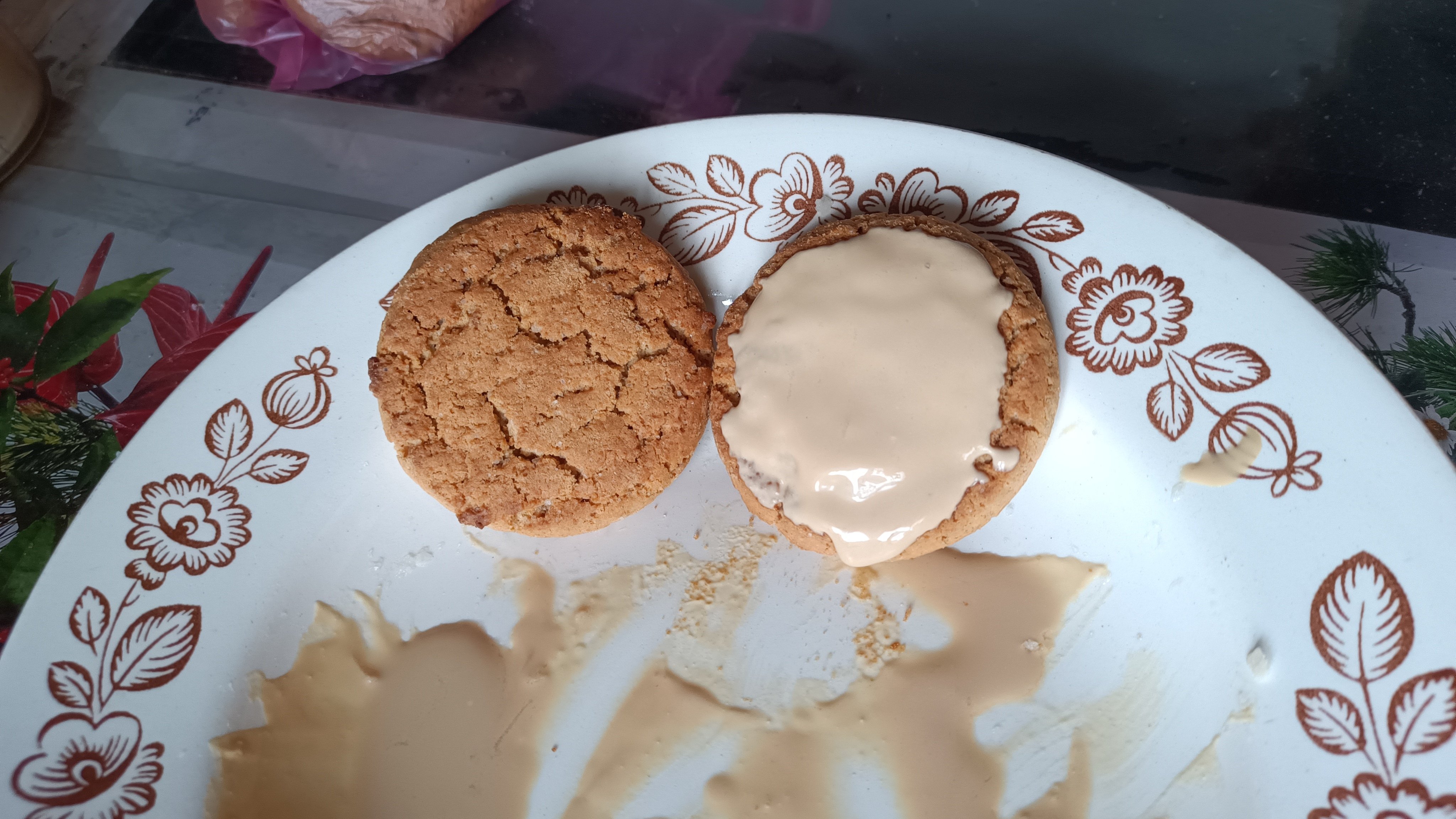
Marmite cream oat cookie is a surprising discovery. The overpowering saltness of Marmite is balanced by the overpowering sweetness of the oat cookie, the same way salted caramel works. I don't think the cream is even necessary, you can rub Marmite on the cookie's hard surface much easier than on the soft banana.


If combining two things from a fridge could be called a new recipe. It tastes good, I promise.
 

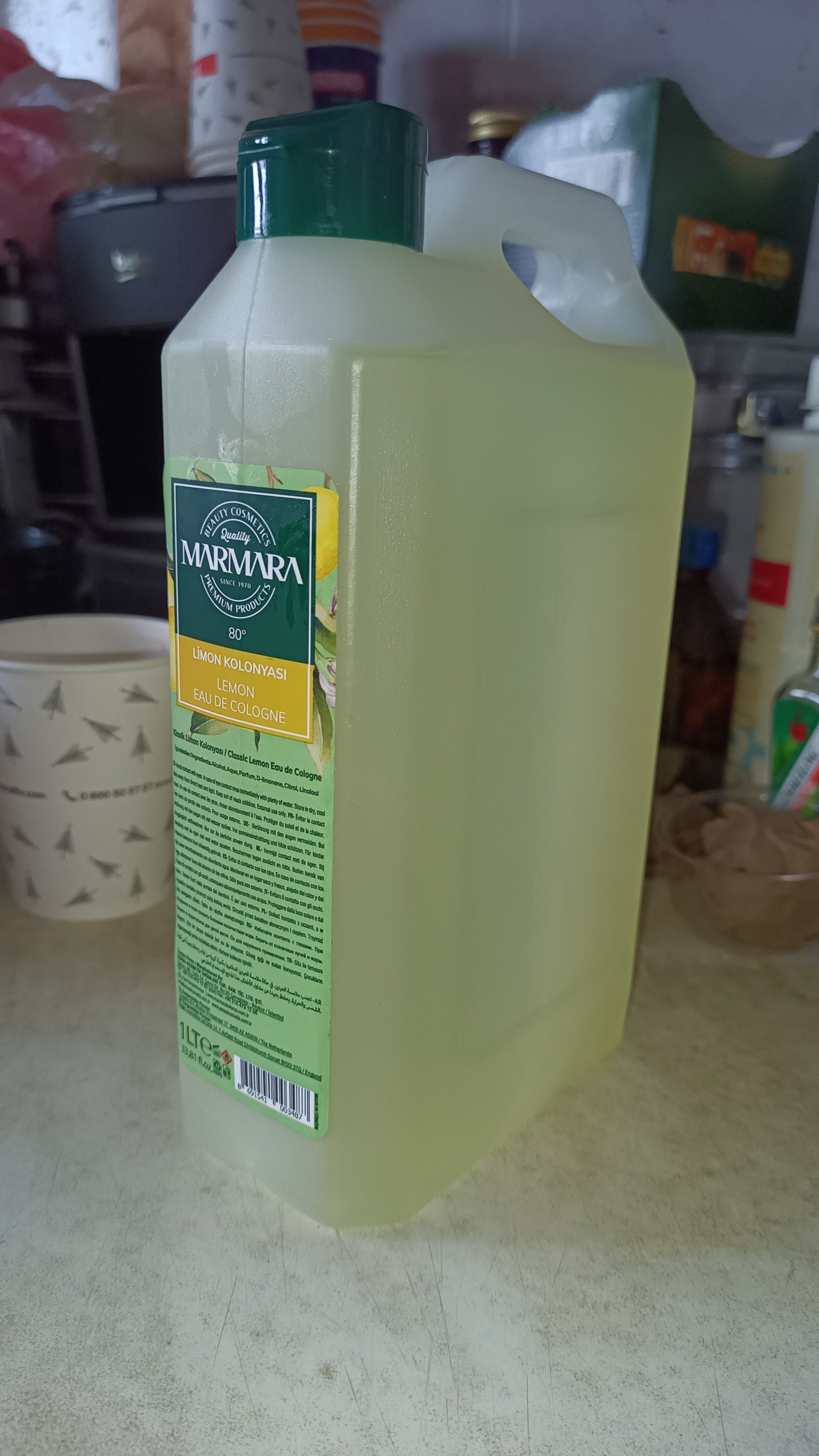
The shop also had regular sprink bottles with the same cologne, but this bottle is shaped like a fuel can, so it looked manlier to me. It contains 80% alcohol, so it's also a disinfectant and an after-shave.
 

I don't need any fancy tiling window managers. One fullscreen window per desktop, and 12 virtual desktops, that was my workflow for 10 years. Then I incorporated KDE activities into my workflow, which are exactly like virtual desktops but switched with Meta-Tab not with Ctrl-F1 - Ctrl-F12. Wonderful!

And then, Plasma devs broke it. Switching activities now puts my foreground fullscreen window (one per desktop) into background, and switches keyboard focus to the desktop. Give me back my keyboard shortcuts, and you could also rename Plasma back to KDE while you're at it, thank you very much.

At least there is a bug opened, but it's doubtful that Plasma devs will fix it before Debian 13 release. I can't even find motivation to update my OS anymore.


Also works for searches 'Times new roman' and 'Courier new font', but not for 'Lucida console font' or 'Dejavu sans font'.

32
submitted 1 year ago* (last edited 1 year ago) by pelya@lemmy.world to c/cooking@lemmy.world
 

Washed tomatoes and pasta

  1. Get half-kilo of fresh tomatoes, three onions, and three carrots. You can use the cheapest tomatoes for this, the heat treatment will average the taste. Wash everything. Chop onions and carrots, dump into the frying pan. Add salt.

Onions and carrots

  1. Fry diced onions and carrots in a pan, using a generous finger-thick layer of oil, preferrably olive, until the onions don't sting anymore and carrots start to soften.

Simmered tomatoes and hot pepper

  1. Cut tomatoes in 2 pieces each, you'll mash them anyway so thin slices do not matter. Dump tomatoes into the pan. Cover with a lid, cook on a slow fire for about 10 minutes until they become sauce. Mash and stir each 3 minutes so they won't burn. Cooking less will preserve taste of fresh tomatoes, cooking longer will make it taste closer to canned pasta sauce. But they won't have that taste of the can that you will get with canned tomatoes.

The secret ingredient and spices

  1. Add the secret ingredient - half-kilo of canned pork. This is an optional step - if you prefer taste over calories, it's better to prepare a separate meat dish instead. If you want to add hot pepper, add it now so it will spread uniformly.

The secret ingredient

  1. Boil pasta while tomatoes are cooking - the standard 500 gram package will do, preferably something with a lot of surface like penne so it can soak up more sauce.

  2. Dump Italian or French spice mix into the pan. Turn off the heat, let it simmer for 1 minute so the herbs will soften.

Finished pasta

  1. Dump pasta into the pan. Done! Plating is optional, you can eat it straight from the pan. And the next day you can prepare another wonderful dish - yesterday's pasta re-heated until it's crusty.
 

Lemmy Connect attempts to add ?format=webp to the image URL when loading .gif image, this makes many Lemmy servers return an error. When opening the post in the web browser, without the extra addition to the image URL, the image loads correctly.

Post where the bug is present: https://lemmy.world/post/19556846

20
submitted 1 year ago* (last edited 1 year ago) by pelya@lemmy.world to c/imaginaryfairies@lemmings.world
 
view more: next ›