33
Designed a simple photo frame on FreeCad. Why are some layers peeling in my print?
(programming.dev)


3DPrinting is a place where makers of all skill levels and walks of life can learn about and discuss 3D printing and development of 3D printed parts and devices.
The r/functionalprint community is now located at: or !functionalprint@fedia.io
There are CAD communities available at: !cad@lemmy.world or !freecad@lemmy.ml
No bigotry - including racism, sexism, ableism, homophobia, transphobia, or xenophobia. Code of Conduct.
Be respectful, especially when disagreeing. Everyone should feel welcome here.
No porn (NSFW prints are acceptable but must be marked NSFW)
No Ads / Spamming / Guerrilla Marketing
Do not create links to reddit
If you see an issue please flag it
No guns
No injury gore posts
If you need an easy way to host pictures, https://catbox.moe/ may be an option. Be ethical about what you post and donate if you are able or use this a lot. It is just an individual hosting content, not a company. The image embedding syntax for Lemmy is 
Moderation policy: Light, mostly invisible
You might try adding a small fillet or chamfer to the inside corners of the model. 3D printers don't like making sharp, pointed turns; rounded edges (or wider angled turns) tend to print much better.

The rounded (fillet) corners will probably be less visible, and will prevent the start / stopping point where the problem is occurring
ah. I'll try that, thanks.
I would also try to increase the printing temperature a little bit, that can make stuff stick together better.
Avoid fillets and use chamfers if at all possible. Fillets will often call for printing supports or just look bad. But the common 45 degree chamfer will be easily printed and look better when done.
Chamfers are to be preferred over fillets.
The corner is laying down. The would be no supports in either case, and the fillet avoids hard turns while the chamfer still has two (less sharp) angles.
Like 99% of things in 3D printing, "Xs are to be preferred over Ys" is an entirely circumstantial statement that is never going to be true all of the time.
"Preferred" doesn't mean "all the time". But chamfers are easier to get nicer results with the majority of the time because they are easier for the printer to make.
Fillets are easier to print horizontally than chamfers as they spread the acceleration (i.e. the thing that makes sharp corners bad) over the while fillet instead of just splitting it into two stages like a chamfer would.
Chamfers are easier to print vertically than fillets as the overhang is limited and consistent.
There's no overhang for a horizontal corner as you're printing the same shape onto the layer below, and no acceleration for a vertical corner as it's entirely separate layers so the toolhead never has to follow the path of the corner.
It sounds like you've read (or only remembered) half a rule. It's not the case that either half of the rule is used the majority of the time because 3D printers are used to print 3D objects, so they always produce objects with both horizontal and vertical edges.
It depends on the orientation you print in.
I'm in agreement with the others. This is a printer issue, not a model design issue. Any current printer in good working order and running non-insane settings should be able to print a 90 degree inside corner like that with no problem.
Some possibilities:
Your Z offset may be set too high, so that your first layer height is too tall. This will result in the first layer's extrusions not sticking to the bed and each other, peeling off in strings like you see here.
Flip this over and show us the bottom of it. The effects of a too-high first layer should be readily apparent. That's where my money is.
Your printer may also be attempting to round the corners too fast. You could slow down your print speed, or adjust your linear advance settings. If you are using Prusaslicer or a derivative thereof (Orca, Qidi, etc.) there are built-in calibration prints you can run that will provide you a range of values to inspect by physically printing them, and allowing you to choose from the value that produces the best looking result. Ideally your linear advance/pressure advance setting should be tuned for each spool of filament, but in reality most people (myself included) don't bother until they observe an issue. I use the same settings for all PLA, and a different set of settings for all PETG, and another for ABS, etc.
It was printed lying down. I'll add the model and slicer screenshot after I get home
You could also try increasing your temperature and/or lowering your print speed. I had issues like this when I switched to using Orca Slicer. It's pursuit of speed comes at a cost in terms of adhesion.
Is that separation happening between the first and second layers?
What printer, what settings, what nozzle size, what filament are you using?
sorry, ender3v3 corexz, polyterra matte pla, 0.4 mm nozzle size
What temps? what wall thickness? What slicer?
Looks like first layer adhesion issues, but given the print finished with no other issues, I’d call this a success. You might try adding a raft or brim next time to isolate the first layer issues from the print itself.
This looks like bed level being off, which is notorious for the v3, can you send a picture of your auto level screen?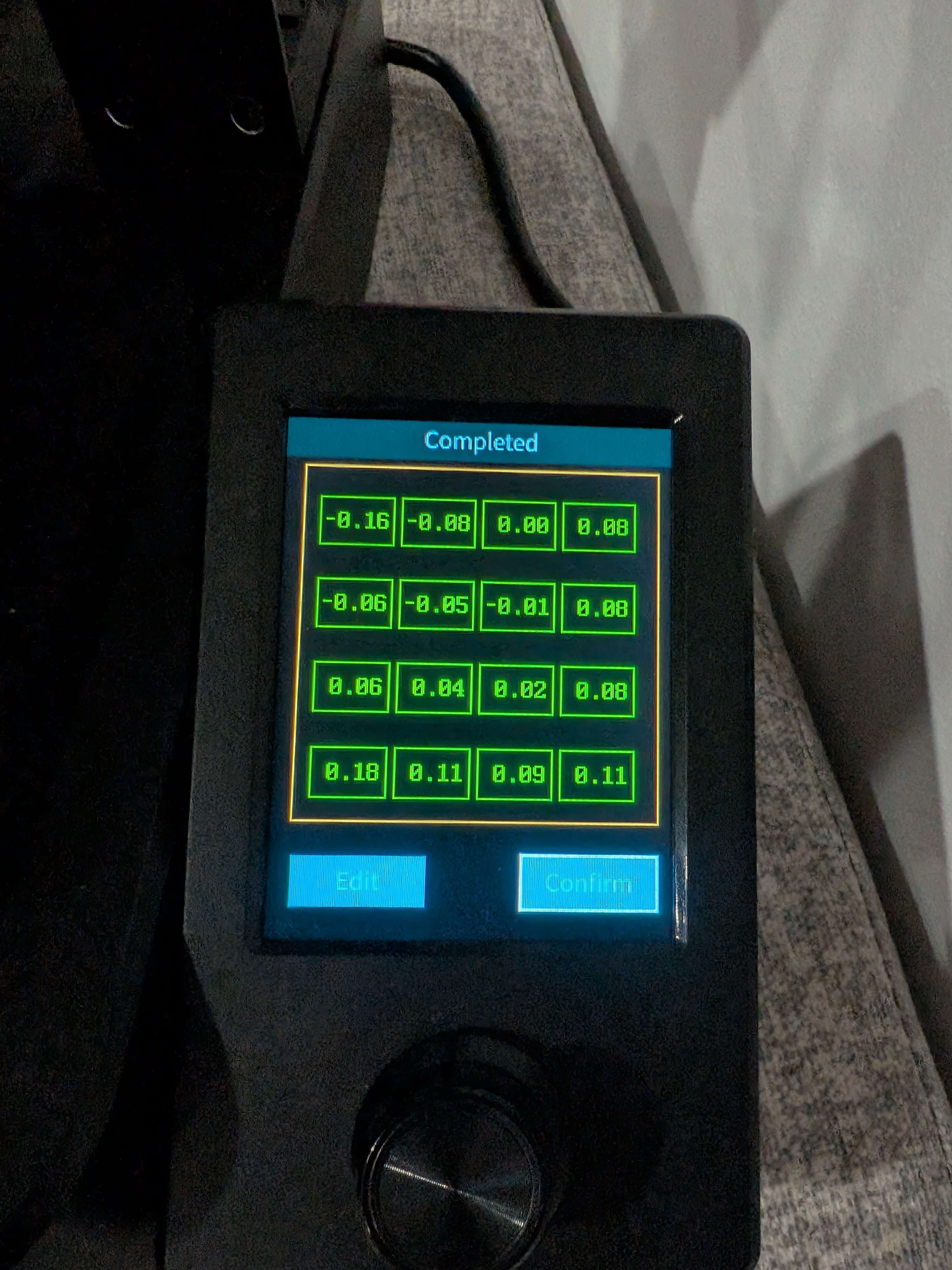
Either not the right distance (try releveling) or not hot ehough (try to increase the temp). Those were the issues I had. If neither work Idk
Every time i see something like this, the answer is usually drying your filament. fixes all kinds of weird issues like this. Even fresh rolls sometimes need it.
This is just plainly wrong