this post was submitted on 23 Dec 2025
15 points (89.5% liked)

3DPrinting

20639 readers
259 users here now

3DPrinting is a place where makers of all skill levels and walks of life can learn about and discuss 3D printing and development of 3D printed parts and devices.

The r/functionalprint community is now located at: or !functionalprint@fedia.io

There are CAD communities available at: !cad@lemmy.world or !freecad@lemmy.ml

Rules

If you need an easy way to host pictures, https://catbox.moe/ may be an option. Be ethical about what you post and donate if you are able or use this a lot. It is just an individual hosting content, not a company. The image embedding syntax for Lemmy is ![](URL)

Moderation policy: Light, mostly invisible

founded 2 years ago
MODERATORS
 

Like where is a good place to buy stl files online, so far ive only printed free files but i think i want to try those neat paid ones, im just not sure where to buy stl files from?

I mostly like useful prints like tools or anything that can help in day to day living.

What site would you suggest i checkout and why so?

top 31 comments
sorted by: hot top controversial new old
[–] daannii@lemmy.world 1 points 5 hours ago

Cults3d.com

I find their site loads slow though after browsing for a while. Just clear cache.

It's been like that for years.

I do think they have pretty high quality $$ models.

I mostly use free ones.

Makerworld has best free quality models. This is because creators are highly incentivised to post free models.

That's where I post mine. Earn points. Buy printers and filament with it.

I've so far earned 3 printers and 2 ams sets. From my hobby models. Not too shabby.

[–] the16bitgamer@programming.dev 1 points 8 hours ago

Printables has paid models now if you want to support a designer. I remember being recommended MyMiniFactory for more premium print a while ago.

With that said, I think it depends on what you are looking for and what you are trying to make. I see a lot of comments recommending Blender and FreeCAD. So I wanted to give you alternatives.

With that said, Blender is for 3D Modeling (think molding with Clay), where as FreeCAD is more like blueprints. Both have a high learning curve, and Blender has a large community to help new users. FreeCAD is getting there, but has a steep learning Curve. TinkerCAD and Fusion from Autodesk may get some hate here (for many good reason), but are the easiest softwares to get into if you want to make mechanical design.

[–] HelloRoot@lemy.lol 12 points 23 hours ago* (last edited 23 hours ago) (2 children)

I'll probably get downvoted to hell for what I say but anyway:

  1. I use blender for all my 3d print designs (I find freecad extremely unwieldy)
  2. If you need something custom, just write me a pm, I'll do it for about 5$ per hour. You'll get an orcaslicer 3mf, an stl and a blend file.
[–] ifmu@lemmy.world 2 points 9 hours ago

I think this is fine. Blender and CAD are better in different use cases. But at the end of the day use what you’re comfortable with.

I’ve used blender for the longest time simply because I know it and I’ve used it for other things. Recently I learned FreeCAD to the point where I’m comfortable doing basic things with it.

[–] Bluewing@lemmy.world 4 points 20 hours ago (3 children)

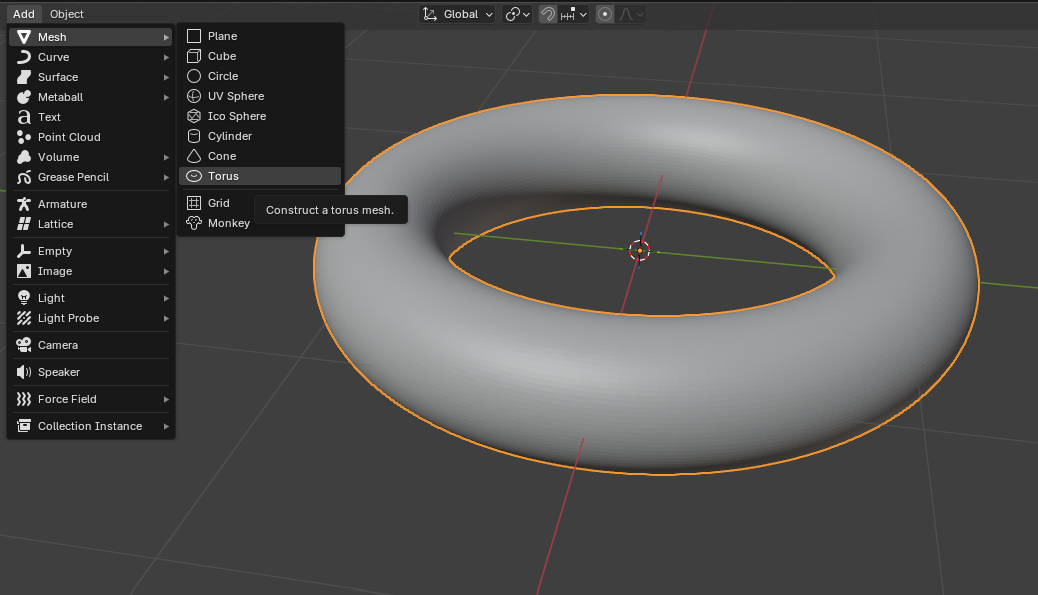
I've been trying to make that damnable doughnut in Blender for 15 years. And I STILL fail at it somehow. But I can make that stupid doughnut in FreeCAD, OnShape, SolidWorks, Solid Edge, and (shudders) Fusion.

I evidently have a mental block with Blender that doesn't exist with any CAD I've used. So, one has to use the tools that work for you.

[–] soulsource@discuss.tchncs.de 2 points 13 hours ago

I'm new to both, FreeCAD and Blender, but what I've been doing up to now:

  • Draw the to-measure parts in FreeCAD
  • Export them as STL
  • Import STL in Blender
  • Add decorative elements there in Sculpt Mode.
  • Profit
[–] icelimit@lemmy.ml 2 points 18 hours ago

Don't worry about it. The way we get into cad is defined by the first cad suite we get familiar with. If you start with parametrics like freecad/solidworks like me, we're sort of 'doomed' to stay there, whilst blender folk have to stay with blender and similar.

[–] HelloRoot@lemy.lol 2 points 20 hours ago (1 children)

You mean this:

Or like a realistic looking food doughnut?

[–] Bluewing@lemmy.world 4 points 19 hours ago (1 children)

The realistic one. I have tried the YouTube beginners lesson almost every time Blender has a new release. I just cannot do it.

[–] HelloRoot@lemy.lol 1 points 19 hours ago* (last edited 19 hours ago)

Aaah thanks for explaining, I didn't even know that was a thing, cause I never did any tutorials, I just started rawdogging it at some point when I needed to do a project.

I do mostly functional designs and I agree that Blender is not the best for it tbh. it can be fiddly and unintuitive. I guess I just know my way around it rather well by now.

There is this plugin that can make it more interesting for people that come fom the CAD workflow: https://www.cadsketcher.com/ (but you won't be making realistic doughnuts with it either)

[–] nulluser@lemmy.world 16 points 1 day ago (1 children)

If your interest is in useful prints, I would highly recommend learning FreeCAD and just making your own to solve your own problems.

Nothing beats the feeling of trying to do something, wishing some tool exists to simplify the process, visualizing what that tool would look like in your own head, designing it yourself, and then watching it (a thing that, as far as you know, has never existed before) get printed into existence for the first time ever.

...

And then realizing that your design has some flaws and iterating over multiple versions as you make improvements. 😉

There are lots of excellent FreeCAD tutorial videos online targeting 3D printing.
[–] Grumpy404@lemmy.zip 2 points 1 day ago (2 children)

How does freecad compare to tinkercad, i heard tinkercad is more for newcomers?

[–] Wfh@lemmy.zip 9 points 1 day ago* (last edited 1 day ago)

TinkerCAD is ok for simple shapes and basic functional parts. It works by adding or subtracting simple shapes together (cubes, cylinders etc) to make more complex shapes. It's quick, easy and instinctive but anything slightly more complex than a dozen shapes grouped together and/or iterative designs quickly become a time consuming nightmare. It's like trying to format a magazine in Word.

FreeCAD (or Fusion, OnShape, SolidWorks or any "serious" CAD software) use a parametric workflow. You start with a technical drawing by setting shapes, dimensions, angles and relationships ("constraints"), extrude or revolve this shape to create a solid, then continue by drawing another sketch on a face and adding more constraints, extruding this sketch, then.. you get it. It has a much steeper learning curve, but once understood it's much quicker and easier to build very complex shapes. Plus iterative designs are usually a breeze since everything is constrained together, so changing any dimension or angle in any sketch means the whole design will follow. It's also trivial to add chamfers, filets, working with mirror and central symmetry etc. When designing functional parts, parametric design is the proper tool for the job.

[–] nesc@lemmy.cafe 4 points 1 day ago

They are vastly different, in tinkercad you mkstly operate with 3d primitives to make your model end result being an stl file. Freecad supports this workflow as well but their main loop is completely different, you draw your part in one dimension, then extrude it, then draw details in other dimensions and do operations on them, in the end you ideally get an model that can be easily modifable in every step. You can change for example hole diameter in your drawing and it will automatically propagate into model.

[–] tyrant@lemmy.world 10 points 1 day ago (1 children)

I just model nearly everything I print. The one time I purchased was from cults3d. I'm sure printable or anywhere else is fine too. Most of the paid ones just have better pictures but some are great designs imo

[–] Grumpy404@lemmy.zip 3 points 1 day ago (3 children)

I really should learn 3d modeling for printing?

[–] nullroot@lemmy.world 2 points 15 hours ago

It's definitely not necessary, but it becomes very empowering when you can go from idea in your head to 3d mock-up to printed object in a matter of minutes or hours.

[–] Bluewing@lemmy.world 1 points 20 hours ago

It's OK to not rush in to learning a design program of any kind. Take your time if you want. There are millions of things to print at the click of a button.

And when you are ready to learn something new and extra, you will know when you are ready and then you can start learning. And it will be a fun process, not a chore because 'you have to learn this.' This is a journey, not a job for you

[–] neidu3@sh.itjust.works 3 points 1 day ago* (last edited 1 day ago) (1 children)

I think so. While it may seem daunting and very complex at first, getting the basics down in blender will get you pretty far. FreeCAD is another popular choice. They're two very different ways of modeling, so I recommend trying out a tutorial for each and see which style works for you.

[–] tyrant@lemmy.world 2 points 1 day ago

There's also onshape which has a free tier (your files are public) and it's web based so you can model on any platform. Or fusion 360 which comes from an annoying company but fine for little things. I've been using onshape for little things lately. I

don't think I'd recommend blender to a newbie. It's more involved and really takes time to learn. Similar for free CAD. I love the idea but it's really clunky to use.

The best (imo) modeling software has a simple workflow with easy to find tools. Create a sketch, extrude that sketch, then do it again if needed, add holes etc...

[–] cosmicrookie@lemmy.world 6 points 1 day ago (1 children)

Why do you think that the paid files are better than the free?

[–] Grumpy404@lemmy.zip 3 points 1 day ago (1 children)

Good question! I don’t automatically think paid files are better than free ones. I’ve just mostly printed free stuff so far and now I’m curious to see if some of the paid designs have better fit, features, or instructions for more “everyday use” tools. I’m mainly looking for well‑designed functional prints, so I’m asking where people buy STLs and why they like those sites, not saying free files are bad.

[–] TheButtonJustSpins@infosec.pub 1 points 18 hours ago

If you're looking for paid files, I'd recommend the Patreon of a designer you trust to make good designs.

[–] stealth_cookies@lemmy.ca 5 points 1 day ago

I've never really found anything unique enough that I've felt the need to purchase it over a free option that is available. Frankly, these days I tend to get frustrated by all the obviously bad models out there and just use my CAD skill to properly design exactly what I want.

Also I'd never purchase just a STL file, I'm opposed to the format because it is so difficult to modify. I might consider buying a STEP file if it does something unique and useful to me while saving a bunch of modeling work.

[–] flynnguy@programming.dev 3 points 1 day ago

Pretty much all the functional models I use are free. I get them from https://www.printables.com/ https://makerworld.com/ https://www.thingiverse.com/ https://thangs.com/ or I design them myself. Back when I was on Mac I would use Fusion but lately I've been 100% Linux so I've been using FreeCAD and it's way better since v1.0.

As far as paid models, it's mostly been things from https://www.myminifactory.com/ and generally sculpts because I want to support authors. Sometimes it's through patreon but they usually send myminifactory links to redeem.

But yeah, get yourself a pair of calipers and learn a CAD program.

[–] Kolanaki@pawb.social 3 points 1 day ago* (last edited 1 day ago)

I bought the printer so I wouldn't have to pay as much to repair things that just had some stupid plastic bit break. I ain't paying for the models. If I need something not freely available "off the rack," I engineer it myself in a cad program or slicer (depending on complexity).

For free stuff I generally use Thingiverse.

[–] BakedCatboy@lemmy.ml 2 points 1 day ago

I similary only print useful things and tools, and my impression was that paid models seem to be mostly decorative things, whereas the most useful functional prints seem to usually be free. I don't think I've ever paid for a model, but cults has a lot of paid stuff if you want to look.

[–] BentiGorlich@gehirneimer.de 1 points 1 day ago

https://myminifactory.com/ is the only one I know 🤔 The trench crusade guys use it. Thats how I know it

[–] ikidd@lemmy.world 0 points 1 day ago (1 children)

Are you coming from a CNC background? I ask because it seems like everybody in the CNC world wants people to pay for designs, and everyone in 3D printing just uploads it to Printables or Thingiverse for free. I'm always surprised at the difference between the two hobbies that are so closely related.

[–] Bluewing@lemmy.world 1 points 19 hours ago (1 children)

Yeah, as an old toolmaker, we have it pounded into us that time is money and seconds have a cost. Plus it also tends to eliminate the riff raff. If you are willing to pay for something I designed, then you are far less likely to ask for freebies, (If I had a nickle for every time). Also there is the years of learning and development of skills involved that has value.

I used to upload free designs, but I got tired of all the clowns that wanted me to do this "little" change here or there for free, (I would release CAD files also). Or they complained about how their poorly calibrated and operated printer couldn't hit the tolerances of +/-.1mm and I was a bad person and should be shunned.

I got tired of it all and pulled all my designs down. Now everything I design will never see that light of day. If you want it, do it yourself. I did......

[–] ikidd@lemmy.world 1 points 17 hours ago
  • writes the guy on the platform he uses for free.