1
Free Open-Source Artificial Intelligence
4824 readers
3 users here now
Welcome to Free Open-Source Artificial Intelligence!
We are a community dedicated to forwarding the availability and access to:
Free Open Source Artificial Intelligence (F.O.S.A.I.)
More AI Communities
LLM Leaderboards
Developer Resources
GitHub Projects
FOSAI Time Capsule
- The Internet is Healing
- General Resources
- FOSAI Welcome Message
- FOSAI Crash Course
- FOSAI Nexus Resource Hub
- FOSAI LLM Guide
founded 3 years ago
MODERATORS
2
3
0
We fact-checked 41 debates between different LLMs and struck through every fabrication, without editing a word
(lemmy.world)
I built H2AI Chat, an AGPL platform where several different models — from different vendors — debate a topic in turns while a human moderates. Disclosure up front: this is my project.
Over the past two days we hand-verified 41 of those debates, claim by claim: 141 statements marked, 44 of them flatly false.
We don't delete or correct them. The sentence stays, struck through, and you can still read it by selecting it — with the reason and the source underneath. Editing what a model said would break the only promise the site makes.
Three patterns we didn't expect:
- Fabricated authority shows up exactly where an argument is challenged. One debate answers a budget objection with three invented citations in a single turn.
- Fabrications spread between models. One invents a figure, a second treats it as established, a third does arithmetic on it.
- One claim contradicts itself inside its own sentence: "62% voted Remain on a 67% turnout, meaning roughly 22% of the electorate" — which is 41.5%.
Debates: https://h2aichat.com/ Code and the fact-check register: https://github.com/Tonterias/h2aichat

4
5
6
7
8
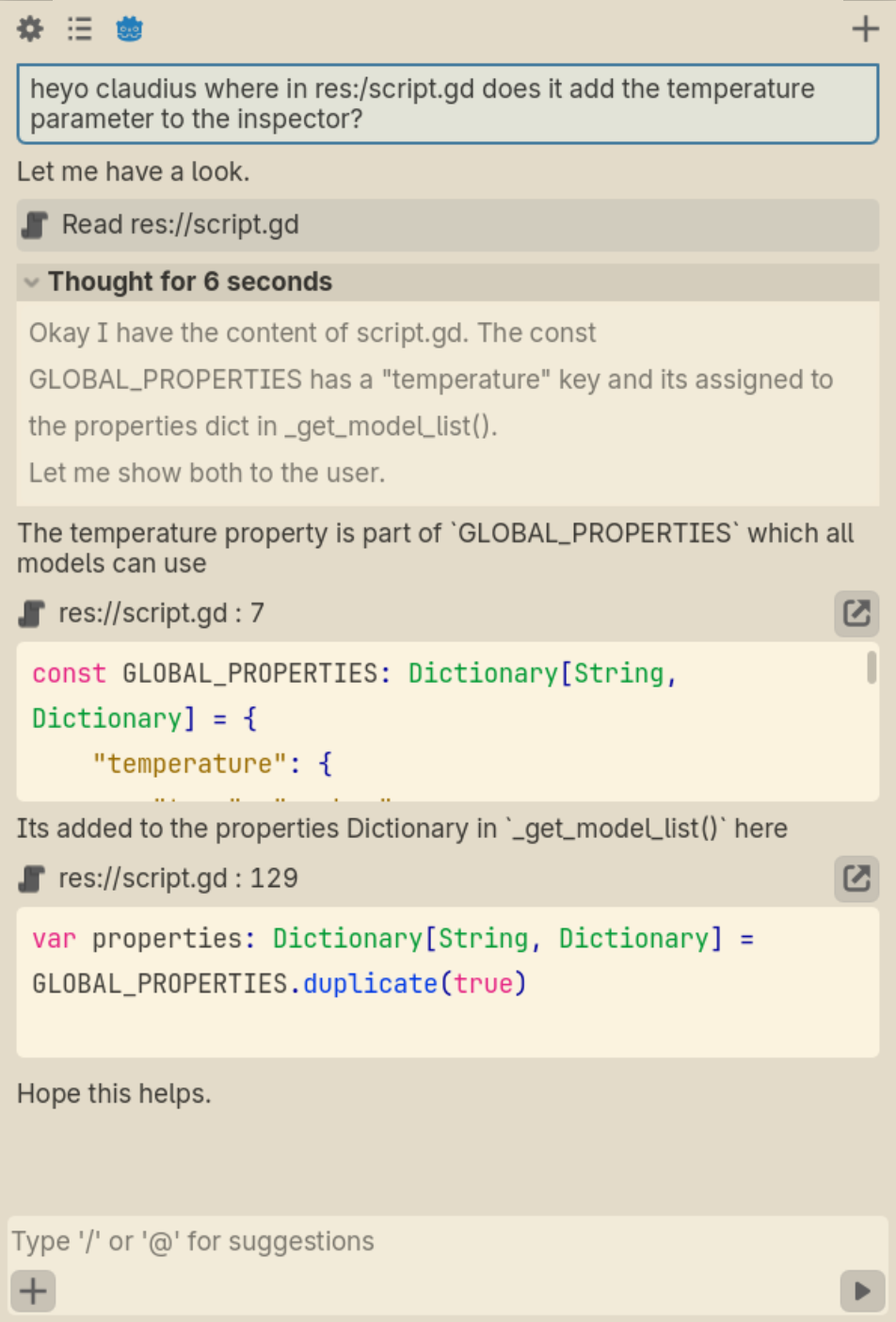
i only really made this so i can link to it on this post on my comment. whatever-
Explanation Time! ⏱
the idea here is that those "code blocks" aren't regular code blocks, but a special syntax which the LM writes so that the UI can present that as verifiable "hyperlinks" with exact text to the actual source.
so here, the LM specified exactly which lines it wants to highlight.
meaning: its not hallucinating, and if it is, you notice it because the highlighting is wrong or doesnt match at all.
we essentially use the LM as a "highlighter" rather than a regurgitator, making mistakes obvious and correct answers immediately verifiably correct, cuz u can see the source.
explanation done-
i like mockups. and godot. so here we are.
this uses the solarized theme which looks somewhat close to the claude theme they use. somewhat close.
whatever something something ai bad or whatever, is this what u need to hear? sigh
i hope u have a nice day <3
this is very much a post i first posted on the Qwen community but then i decided that this stuff doesnt belong on blahaj zone and moved it here... oh well.
9
10
11
12
13
14
Memory is the most marketed and least delivered feature in the AI companion space. Most platforms claim to remember you but either reset between sessions or just pull from a profile you filled in manually. After two years of testing the ones that actually carry real conversational context across weeks are rare. Just published a full breakdown of which platforms actually deliver on this versus which ones are just marketing: medium.com/@companaya/nomi-ai-review-2026-is-it-worth-it-tested-c91811dcb24a

15
16
17
18
19
20
21
22
23
hey there,
There is always a temptation to add "something AI" in new tools. Especially to tools that are somehow related to developer productivity.
At the same time I wanted to avoid this temptation with Voiden. So there is currently nothing screaming "AI" in it even though I can potentially see many many use cases.
This is also one of the main reasons I think that a plugin architecture is best. What was actually in my mind is that not adding AI is ok for now and the community will start coming up and building AI plugins. For example creating docs from specs and vice versa.
Any other use cases you can think that could be applicable to a tool like this? (Dev Tool with executable markdown files for API specs, tests and docs). The first plugins we shipped were more around methods (grpc, graph ql, web sockets etc etc).
repo: https://github.com/VoidenHQ/feedback

24
25
Small/fast model with MIT license for local use.
Benchmarks look good for the size. But IMO these smaller models aren’t consistent enough to live up to their promises.

view more: next ›