linuxPIPEpower

joined 2 years ago
 

I am trying to use find (or a similar tool, I also really like fd)

  • to locate directories matching the query

  • only those directories which are the deepest match

  • the target directories are not all the same depth, so -maxdepth or -mindepth can't do it

  • it would be the opposite of -prune

Given the below directory tree, looking for directories with "red" in the name, the ones with Yes should be the matches:

$ tree
.
├── blue                = n
├── green               = n
│   ├── red-apple       = Yes
│   └── red-book        = n
│       └── red-pen     = Yes
├── red                 = n
│   └── red-strawberry  = Yes
│   └── 
└── yellow              = n
    └── basket          = n
        ├── flag        = n
        │   └── red     = Yes
        └── painted-red = Yes
            └── wagon   = n

So "red-book" does not match because it contains a subsequent match ("red-pen"). But it's OK to have a deeper non-matching directory (like "painted-red").

This is my basic command which finds 2 unwanted items:

$ find . -type d -name "*red*"
./green/red-apple
./green/red-book
./green/red-book/red-pen   # wrong
./yellow/basket/flag/red
./yellow/basket/red
./red                      # wrong
./red/red-strawberry

I think systemctl might be a way because I have read that things are dependent on other things but beyond that I don't know how to organize it.

[–] linuxPIPEpower@discuss.tchncs.de 1 points 2 months ago* (last edited 2 months ago)

Thunar file manager has volman. You can use it to manually unmount, including binds, but I'm not sure how to trigger it to know about them automatically. It's an extra step because it has to read the rest of the fstab file to find any dependencies and I don't know why it would do that.

I updated the OP to show my fstab

[–] linuxPIPEpower@discuss.tchncs.de 2 points 2 months ago (1 children)

Thanks, I am OK with issuing a command before physically unplugging the device. I was just finding too many uses of the word "mount" because it's a verb, a command and a noun in this situation lol. I added my fstab to the top so you can see that I am actually using a bind mount.

I investigated symlinks as an alternative and for some reason decided against them. One thing I like about bind mounts is that there is always a backup directory in the location, so if the USB isn't plugged in, accidentally saved files don't just fall into the void. But I don't remember if that was the reason.

I could write some kind of script but I thought it would make more sense to see if something had already been developed because usually in Linux, it has been.

[–] linuxPIPEpower@discuss.tchncs.de 2 points 2 months ago (2 children)

I use xfce4 on endeavor. How would you configure it in KDE?

8
automatic bind mount/unmount (discuss.tchncs.de)
submitted 2 months ago* (last edited 2 months ago) by linuxPIPEpower@discuss.tchncs.de to c/linux4noobs@programming.dev
 

I have bind mounts configured in my /etc/fstab. The source (i.e. where the files physically exist) is on a removable USB drive.

Right now it works but I have to mount/unmount everything individually when I plug/unplug the drive. I would like to be able to have the bind mounts follow the state of of the USB drive automatically.

Is there a way?

Edit here is relevant section of fstab:

/dev/mapper/external-crypt	/mount/external		auto	nosuid,nodev,nofail,x-systemd.device-timeout=5	0 0
/mount/external/realfolder	/home/user/folder	none	bind,nofail	0 0

So when I run sudo mount "/mount/external" I want sudo mount /home/user/folder to be implied; likewise for umount.

[–] linuxPIPEpower@discuss.tchncs.de 2 points 3 months ago (1 children)

That's nice. But Borg isn't rsync and can't replace it. Rsync is a thousand times more versatile. Not to mention usable.

[–] linuxPIPEpower@discuss.tchncs.de 2 points 4 months ago (1 children)

How many Lemmy users are on chrome.

Any admins have stats?

[–] linuxPIPEpower@discuss.tchncs.de 5 points 4 months ago* (last edited 4 months ago) (1 children)

People use the tools they have to get their tasks done. Not everyone wants to have the same weird hobbies we do.

Limiting resources sounds cool. I wish I could at least determine why Firefox sometimes goes out of control eating everything. Setting a resource limit per page would be good too. Sometimes my whole computer is ground to a halt, but closing a single tab fixes it. Often not a page that is obviously doing much. Certain ecommerce sites are frequent culprits. Doing something in the background.

Firefox can tile two pages now: https://blog.mozilla.org/en/firefox/split-view/

What I love is when the thread is concluded by saying the problem was solved by a patch 10 years ago. OP says "just upgraded, it works!" But here I am in the future and the problem is still happening.

After being told (at length) the answer was in the very long complex documentation, I said I had tried to find it but couldn't piece it together. And posted some of the sections I had looked in. Then my interlocutor said there is no reason why I should want to do such a thing.

"Please mark your thread as SOLVED."

I have found my own posts this way from 2 or 3 years prior. Makes me wonder if I am getting anywhere.

RTFM of a different software which the software you are actually interacting with employs. (E.g. having problems with an application that downloads stuff, need to read curl docs because thats what it is using under the hood.)


I having a hard time updating my arch-based computer because the downloads are so painfully slow. It takes hours and hours. Eventually some kind of error happens and Ive already left my computer to do something else so the task times out. Or download stalls to nothing and the process kills itself.

I have already adjusted the settings in yay to be more tolerant of slow connection, but can hardly ever manage to complete the upgrade. And the longer you wait, the more updates there are.

Does anyone else have this issue? I don't have a great connection but this is ridiculous. I do have a VPN running on router. This could be affecting it as github in particular seems to make downloads a slow trickle on certain VPN endpoints but lately I can't find any that satisfy it.

I start at least 1 upgrade task every day, sometimes multiple attempts but I have only had 1 successful full system upgrade in the past 2 or 3 weeks.


cross-posted from: https://discuss.tchncs.de/post/56895639

My friend who uses google wants to share their calendar (read-only). I don't use google. How can they do that?


My friend who uses google wants to share their calendar (read-only). I don't use google. How can they do that?


I find Firefox Translator doesn't pick up a lot of pages. The location bar button doesn't appear.

It works if I access via the hamburger menu. It is very slow to have to go via the menu for each individual page. I find no shortcut key or anything.

Sometimes this will correctly guess the original language but often not. It is saying pages are English even when they have little to no english, even using different alphabets.

Is there something the website admins can do to tell firefox what language it is? Encoding? Meta tag?

Can I force the location-bar translate button to persist on all pages regardless of what language it thinks the page is in? Then I could save going through the menu.

Here is an example: https://cn.chinadaily.com.cn/


I have a lowend netbook with debian-type linux only (no dualboot). Power management should be via XFCE4's xfce4-power-manager-settings.

I'm having weird behavior with suspend and trying to identify/troubleshoot it. It seems to be usually draining power and never charging when the lid is closed for many hours.

I tried explicitly entering power off, hibernate and suspend followed by unplugging then leaving it a few hours but couldn't replicate. It seems to be doing something on its own after being unplugged a long time.

What logs can I look at to see when my device changes its power modes, what were the triggers, what settings are governing it etc?

I can't tell if it's a software issue or there is some sort of power saving thing going on in the hardware or what.

Just hoping for some investigation tips here, I know its not enough info to solve.

Edit to clarify no dual boot.


I want to move a directory with a bunch of subdirectories and files. But I have the feeling there might be some symlinks to a few of them elsewhere on the file system. (As in the directory contains the targets of symlinks.)

How do I search all files for symlinks pointing to them?

Some combination of find, stat, ls, realpath, readlink and maybe xargs? I can't quite figure it out.


I have 2 directories which both have stuff in them:

  • /home/user/folderApple

  • /mnt/drive/folderBanana

I want to mount folderBanana onto folderApple like this:

sudo mount --bind "/mnt/drive/folderBanana" "/home/user/folderApple"

But I still want to be able to access the contents of folderApple while this is activated. From what I am reading, binding the original directory to a new location should make it available, like this:

mkdir "/home/user/folderApple-original"
sudo mount --bind  "/home/user/folderApple" "/home/user/folderApple-original"

But this just binds /mnt/drive/folderBanana to /home/user/folderApple-original as well. I tried reversing the order and result is the same.

How do I tell mount to look for the underlying directory?

I am happy to use symlinks or something else if it'll reliably get the job done, I am not wedded to this mechanism.

(The purpose of all this is that when an external drive is connected, I can have the storage conveniently available, but when it is not connected, the system will fallback to internal storage. But then I will want to move files between the fallback and external locations when both are available. So I need to see both locations at once.)
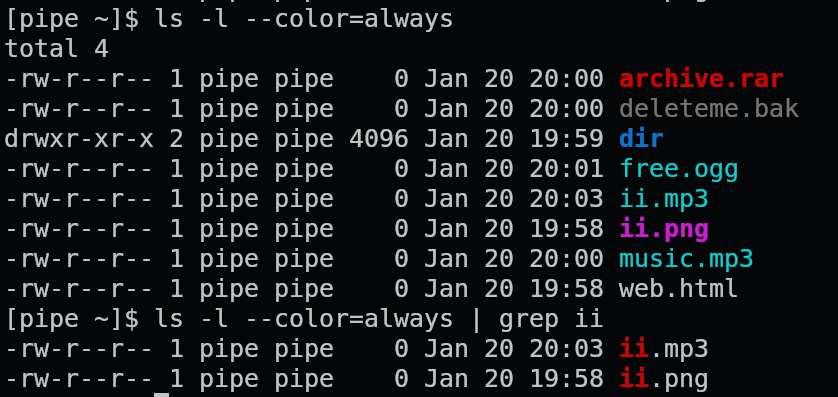
 

Is there anyway to pass terminal colors through a pipe?

As a simple example, ls -l --color=always | grep ii.

When you just run the ls -l --color=always part alone, you get the filenames color coded. But adding grep ii removes the color coding and just has the grep match highlighting.

Screenshot of both examples:

In the above example I would want ii.mp3 and ii.png filenames to retain the cyan and magenta highlighting, respectively. With or without the grep match highlighting.

Question is not specific to ls or grep.

If this is possible, is there a correct term/name for it? I am unable to locate anything.


Once again I try to get a handle of my various dotfiles and configs. This time I take another stab at gnu stow as it is often recommended. I do not understand it.

Here's how I understand it: I'm supposed to manually move all my files into a new directory where the original are. So for ~ I make like this:

~
  - dotfiles
      - bash
         dot-bashrc
         dot-bash_profile
      - xdg
            - dot-config
                user-dirs.dirs
      - tealdeer
            - dot-config
                - tealdeer
                       config.toml

then cd ~/dotfiles && stow --dotfiles .

Then (if I very carefully created each directory tree) it will symlink those files back to where they came from like this:

~
  .bashrc
  .bash_profile
   - .config
        user-dirs.dirs
      - tealdeer
          config.toml

I don't really understand what this application is doing because setting up the dotfiles directory is a lot more work than making symlinks afterwards. Every instructions tells me to make up this directory structure by hand but that seems to tedious with so many configs; isn't there some kind of automation to it?

Once the symlinks are created then what?

  • Tutorials don't really mention it but the actual manual gives me the impression this is a packager manager in some way and that's confusing. Lots of stuff about compiling

  • I see about how to combine it with git. Tried git-oriented dotfile systems before and they just aren't practical for me. And again I don't see what stow contributing; git would be doing all the work there.

  • Is there anything here about sharing configs between non-identical devices? Not everything can be copy/pasted exactly. Are you supposed to be making git branches or something?

The manual is not gentle enough to learn from scratch. OTOH there are very very short tutorials which offer little information.

I feel that I'm really missing the magic that's obvious to everyone else.


Some packages install in under a minute, while alternatives which seem functionally similar, take hours.

Sometimes there are several available options to fit a use case and I would like to use it now. Is it possible to anticipate which one will likely be the fastest to get rolling?

Generally I like to install via yay.

Searching around here is what I learned. Agree?:

  • AUR will be slower
  • Certain categories of package, like web browser, are inherently slow
  • Selecting -bin will be faster if available

Is there some way to guess beyond that? Certain programing languages take longer than others? Is it in relationship to existing packages on the system? Other characteristic? Some kind of dry-run feature to estimate?

Obviously I don't have the fastest computer. I have added MAKEFLAGS="-j4" to /etc/makepkg.conf so at least all 4 cores can get used.

Once I realize a package is going to take ages to get ready, is it possible to safely intervene to stop the process? I try to avoid it because in general I understand arch-based distros don't like "partial" installs. But is it safe to stop compiling? No changes have yet been made, right?

view more: next ›