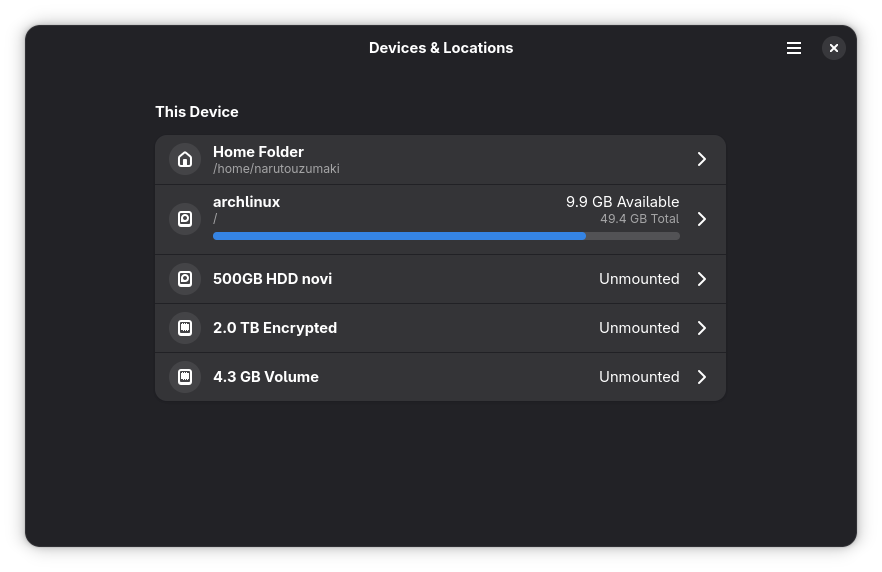
I was using pop os and was able to see my storage here. But now on arch with gnome it doesnt show the same. It shows only root particion space, and not my main space that i use for programs, games and stuff..
Why is that and can i fix it somehow..?
Welcome to c/linux!
Welcome to our thriving Linux community! Whether you're a seasoned Linux enthusiast or just starting your journey, we're excited to have you here. Explore, learn, and collaborate with like-minded individuals who share a passion for open-source software and the endless possibilities it offers. Together, let's dive into the world of Linux and embrace the power of freedom, customization, and innovation. Enjoy your stay and feel free to join the vibrant discussions that await you!
Rules:
Stay on topic: Posts and discussions should be related to Linux, open source software, and related technologies.
Be respectful: Treat fellow community members with respect and courtesy.
Quality over quantity: Share informative and thought-provoking content.
No spam or self-promotion: Avoid excessive self-promotion or spamming.
No NSFW adult content
Follow general lemmy guidelines.
I was using pop os and was able to see my storage here. But now on arch with gnome it doesnt show the same. It shows only root particion space, and not my main space that i use for programs, games and stuff..
Why is that and can i fix it somehow..?
If partitions are unmounted it's normal it can not display info about them. Go into Thunar or whatever and double click the partition/volume devices to mount them?
No i dont need those particions, those are my other drives. I have one nvme 2TB ssd than 1TB regular ssd, one 500GB regular ssd (Arch is installed on that one) and one 500GB hdd.
Other drives are curently unmounted and i dont need them. Just want to see this one 500GB ssd properly displayed. I have no idea how much space i have left on it, and i plan to install some game expesions, so this is the time to fix it..
Is everything set up correctly in fstab?
What about permissions for the directories?
I use baobab on Arch, try that too
I realised why it was displayed like that. When i installed the system i chose opcion make separeta particion for home directory or something like that, thats why it was displayed this way. Now i reinstalled my system and chose no dont use separate particion for home and now its displayed as usual..