Nothing that I've noticed
this post was submitted on 13 Mar 2026
11 points (92.3% liked)
Linux Gaming
24869 readers
244 users here now
Discussions and news about gaming on the GNU/Linux family of operating systems (including the Steam Deck). Potentially a $HOME away from home for disgruntled /r/linux_gaming denizens of the redditarian demesne.
This page can be subscribed to via RSS.
Original /r/linux_gaming pengwing by uoou.
No memes/shitposts/low-effort posts, please.
Resources
WWW:
- Linux Gaming wiki
- Gaming on Linux
- ProtonDB
- Lutris
- PCGamingWiki
- LibreGameWiki
- Boiling Steam
- Phoronix
- Linux VR Adventures
Discord:
IRC:
Matrix:
Telegram:
founded 2 years ago
MODERATORS
sudo systemctl restart systemd-resolved
I looked up the commands. Does systemd-resolved normally run - or would this be starting a new service?
Please ignore, this post just reminded me of a rant i had with this service, which by running this command solved something similar to this issue.
It has nothing to do with your issue.
Spiders are friends, they look after your packets.
ping spikes
If you're talking about the game-server time, I'd want to isolate that to the WiFi network first, to be sure that it's not something related to the router-ISP connection or a network issue even further out. You can do something like run mtr (which does repeated traceroutes) to see at what hop the latency starts increasing. Or leave ping running pinging your router's IP address, the first hop you see if you run a traceroute or mtr. If it's your WiFi connection, then the latency should be spiking specifically to your router, at the first hop, and you might see packet loss. If it's an issue further down the network, then that's where you'll start seeing latency increase and packet loss.
You might need to install mtr
I don't know whether Fedora has it installed by default.
Please help. I don’t want to go beneath house to run cat6. It’s dark and there are spiders.
Honestly, I think that everyone should use wired Ethernet unless they need their device to be able to move around, as it maintains more-consistent and lower network latency, provides higher bandwidth, and keeps the Ethernet traffic off the air; 2.4 GHz is used for all sorts of other useful things, like gamepad controllers (I have a Logitech F710 that uses a proprietary 2.4GHz protocol, and at some point, when some other 2.4GHz device showed up, it caused loss of connectivity for a few seconds, which was immensely frustrating). And you have interference from stuff like microwaves and all that at the same frequency range. Avoids some security issues; we've had problems discovered with wireless protocols.
But, all right. I won't lecture. It's your network.
If you think that it's Fedora and maybe your driver is at fault, one thing you might check is your kernel logs. If the driver is hitting some kind of problem and then recovering by resetting the interface, that might cause momentary drop-outs. After it happens, take a gander at $ journalctl -krb which will show your kernel log for the current boot in reverse order, with the most-recent stuff up top. If you have messages about your wireless driver, that'd be pretty suspicious.
If the driver is at fault, I probably don't have a magic fix, unless you want to try booting into an older kernel, which may still be viable; if you still have it installed and GRUB, the bootloader that Linux distros typically use, is set up to show your list of kernels at boot, then you can try choosing that older kernel and see if it works with your newer distro release and if the problem goes away. I don't know if Fedora defaults to showing such a list or hides it behind some splash screen; it used to do so, but I haven't used Fedora in quite some years. You might want to whack Shift or an arrow key during boot to get boot to stop at GRUB. If you discover that it's a regression in the driver, I'd submit a bug report ("no problems with kernel version X, these messages and momentary loss of connectivity with kernel version Y") which would probably help get it actually fixed in an update.
You might also try just using a different wireless Ethernet interface, like a USB wireless Ethernet interface, and seeing if that magically makes it go away. Inexpensive USB interfaces are maybe $10 or $15. I'd probably look for some indication that it's a driver problem before doing that.
mtr is probably the best first step, it'll let you know where the issue is happening.
You can also keep a terminal open with # journalctl -f running, it'll show you a live view of your system log. This would make it easy to look over at the log when the lag is happening. # dmesg -w may also be useful if your hardware is dying and restarting.
I've had problems like this on 6GHz wifi with my Intel AX201 card. Have you tried using 2.4/5GHz only to see if you have the same behaviour?
Yup! I have a 2.4 ghz ssid and same issues
Is it always exactly 10 seconds? That would sound like a timeout somewhere, maybe unrelated to WiFi. Does it occur in regular times? Maybe DNS lookups after the TTL ended and the next lookup has problems.
I’ve had similar issues on Linux only (but not on Windows). However I have two routers using the same SSID on WiFi for roaming. So it kept “scanning” trying to determine whether or not to roam to the next connection. This for me resulted in packets loss and high ping in games for like 10 seconds every 5 min. Maybe it will do these scans even if you do not have access to multiple of the same SSIDs?
For me the solution was to select the “BSSID” of the router I want to be connected to. It’s a setting under “advanced settings” if you drill down into the WiFi you’re connected to. If you have multiple routers as well you might need to experiment or otherwise understand which BSSI gives the stronger connection of course.
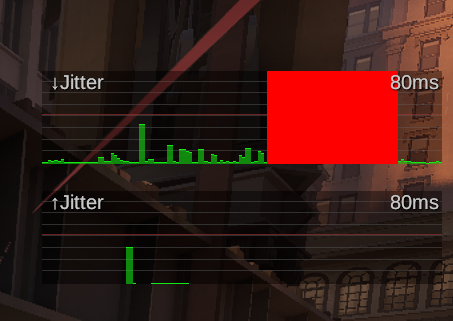
Deadlock spotted strong possibility it's just valve servers they still have a lot of issues.
Yes, actually! Not so much gaming, but it seems like I'll be surfing or whatever, and then... Dialup speed for a few seconds... Then normal again. My router is about 15' away, just upstairs. Hmmm... I dual boot the laptop, I'll see if it's just Fedora.
I tried editing powersave.conf config file to turn that off. That - as of a few years ago - seemed to be causing ping spikes. No dice so far.
Who in their right mind games on wifi?
your mum
Even my mom knows wifi sucks
If the router is one room over just drill a hole through the wall and run cat6 through the wall. No need for below the house.
there's a hallway. cant run along floor or ceiling without being visible.
I use these (spiders under my house too :<):

If you own the house, there are cable runs that replace the quarter round molding (and there is often extra space in the space between the wall and flooring) so it's entirely out of sight.