Ubuntu

326 readers
6 users here now

The Ubuntu community

Matrix space: https://matrix.to/#/#ubuntu-space:xentonix.net

founded 2 years ago
MODERATORS
1
2


cross-posted from: https://lemmy.world/post/44456705

I am in the very strange situation, since I installed Ubuntu, in which my laptop is connecting to the wifi, but if I open the wifi settings page it stays on "searching for networks" forever. Since I am planning to use this laptop at a conference where I would need a connection, I would like to solve this somehow.

I have used the "wireless-info" tool and the pastebin can be found here .

Only things I noticed are the Intel AX201 controller that in other forums is said to not work at all (not my case), and the fact that my home network connection is defined by a networkd yaml, as opposed to the others (my parent's house) that are defined by a NetworkManager yaml.

I am a beginner so these are all just guesses from me.

Is there a fix or even a separate software I can use to manage my connections, like adding a new one without having to write myself a new yaml file?

3


We’re happy to announce that BusKill can be installed on Linux directly with apt

BusKill Now available in Debian apt Repos

What is BusKill?

BusKill is a laptop kill-cord. It's a USB cable with a magnetic breakaway that you attach to your body and connect to your computer.

What is BusKill? (Explainer Video)
Watch the BusKill Explainer Video for more info youtube.com/v/qPwyoD_cQR4

If the connection between you to your computer is severed, then your device will lock, shutdown, or shred its encryption keys -- thus keeping your encrypted data safe from thieves that steal your device.

Debian

BusKill can be installed on Debian with apt.
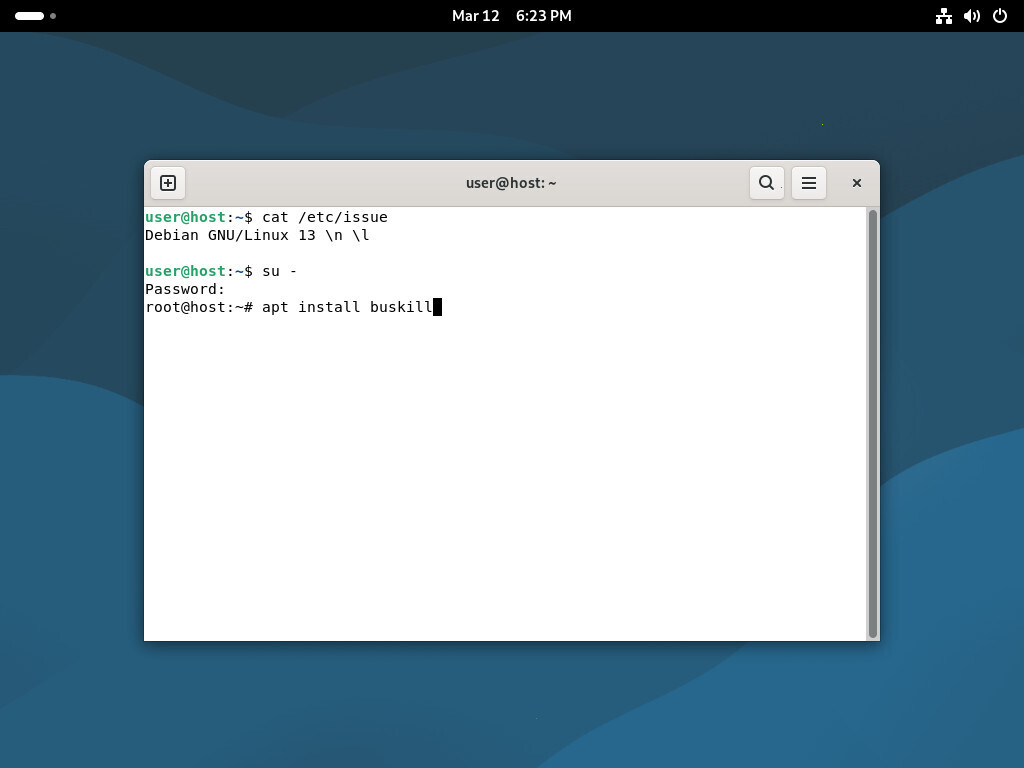
Screenshot of Debian, showing the command to install BusKill)
To install BusKill in Debian, execute su - and then apt install buskill

To install BusKill on Debian, execute the command

su -
apt install buskill

Read the full article here:

Support BusKill

We're looking forward to continuing to improve the BusKill software and looking for other avenues to distribute our hardware BusKill cable to make it more accessible this year.

If you want to help, please consider purchasing a BusKill cable for yourself or a loved one. It helps us fund further development, and you get your own BusKill cable to keep you or your loved ones safe.

Buy a BusKill Cable
https://buskill.in/buy

You can also buy a BusKill cable with bitcoin, monero, and other altcoins from our BusKill Store's .onion site.


Bitcoin Accepted Here

Monero Accepted Here

Stay safe,
The BusKill Team
https://www.buskill.in/
http://www.buskillvampfih2iucxhit3qp36i2zzql3u6pmkeafvlxs3tlmot5yad.onion/

4
5
6


It was a very interesting year for Ubuntu Linux. Ahead of the important Ubuntu 26.04 LTS release due out this coming April, Ubuntu Linux this year was expeditiously migrating to new Rust-based system tools like sudo-rs and Rust Coreutils, new performance optimizations continued to be explored for bettering the out-of-the-box Ubuntu performance, better ARM64 support with its desktop ISO, and enhancing the Snapdragon X Elite laptop support were among the Ubuntu highlights in 2025.

Out of the 120+ original Ubuntu Linux news articles on Phoronix -- and not counting the hundreds of reviews / featured benchmark articles using Ubuntu -- below is a look at the most popular Ubuntu news on Phoronix for this calendar year. It will be interesting to see what more Canonical rolls out in the coming months for the all-important Ubuntu 26.04 LTS release. Also if we hear anything more in 2026 about a potential Canonical IPO.

7
8


Ubuntu’s roadmap for the upcoming Ubuntu 26.04 LTS “Resolute Raccoon” (scheduled for release on April 23, 2026) has been published, revealing some interesting details.

The release will ship with GNOME 50, which is scheduled to appear a month earlier on March 18. Two new default applications will be introduced: Showtime, replacing Totem as the video player, and Resources, replacing the current system monitor. Both are designed to provide a more modern and consistent GNOME-native experience.

Wayland remains the default graphics session, and this cycle targets smoother performance and better reliability on a wider range of Nvidia hardware.

9
10


Canonical announced today the Ubuntu 26.04 "Resolute Raccoon" Snapshot 1 images as their first monthly ISO snapshots of the upcoming Ubuntu 26.04 LTS release.

Earlier this year Canonical decided to begin publishing monthly Ubuntu Linux snapshot ISOs as part of building out their release automation and other infrastructure. With it being a month and a half since the Ubuntu 25.10 stable release, the first snapshot of Ubuntu 26.04 is now available before closing out November

11
12
8
Ubuntu 26.04 LTS - The Roadmap (discourse.ubuntu.com)
submitted 4 months ago* (last edited 4 months ago) by cm0002@digipres.cafe to c/ubuntu@discuss.tchncs.de
13
14


just run: sudo apt update && sudo apt upgrade to fix the issue.

15


Besides the early fallout of switching to Rust Coreutils on Ubuntu 25.10 causing some breakage, a more pressing issue has been discovered: Ubuntu 25.10's unattended upgrades functionality for automatic security updates is currently broken due to a Rust Coreutils bug.

Earlier this month it was reported that the date -r command can report the wrong date on Ubuntu 25.10 due to a Rust Coreutils difference compared to GNU Coreutils. It was noted that this could cause issues for backup scripts and other software relying on the "date -r" output and behavior being the same as GNU Coreutils

16
17
18


cross-posted from: https://subscribeto.me/videos/watch/b2e85aad-a5ea-44fd-9f91-69fa64ba4933

Ubuntu 25.10 Questing Quokka released last week and it's still a very important distro. So here are 7 things I did with my fresh install of Ubuntu 25.10 > > Get hardware similar to the one I installed Ubuntu on: https://amzn.to/3KRKrL0 > > 00:24 #1 Install media codecs > 01:19 #2 Upgrade your system > 02:07 #3 Install additional drivers > 02:51 #4 Get set up for gaming > 03:46 #5 Enable Flatpak support > 05:30 #6 Enable AppImage support > 06:14 #7 Configuring Backups > > > > My Game > ❯ Get the source code: https://github.com/heavyelementinc/dudelings-foss > ❯ Dudelings on Humble: https://humblebundleinc.sjv.io/9LWQeW > ❯ Dudelings: Arcade Sportsball: https://store.steampowered.com/bundle/41202/Dudelings_Arcade_Sportsball_Deluxe_Edition/ > ❯ Dudelings on Google Play: https://play.google.com/store/apps/details?id=io.heavyelement.dudelings > ❯ Dudelings on Itch.io: https://heavy-element.itch.io/dudelings > > Affiliate links > Services I Recommend: > ❯ RackNerd Affiliate Link: https://my.racknerd.com/aff.php?aff=15496 > ❯ RackNerd Virtual Private Servers: https://my.racknerd.com/aff.php?aff=15496&pid=25 > ❯ RackNerd 200GB Shared Hosting: https://my.racknerd.com/aff.php?aff=15496&pid=83 > ❯ RackNerd Intel Xeon Bare Metal Server: https://my.racknerd.com/aff.php?aff=15496&pid=12 > > Private Email & More: > ❯ Proton Drive: https://go.getproton.me/aff_c?offer_id=43&aff_id=10074 > ❯ Proton Pass: https://go.getproton.me/aff_c?offer_id=38&aff_id=10074 > ❯ Proton VPN: https://go.getproton.me/aff_c?offer_id=26&aff_id=10074 > ❯ Proton Mail: https://go.getproton.me/aff_c?offer_id=7&aff_id=10074 > > Best Steam Deck Accessories: > ❯ SanDisk 1 TB card: https://amzn.to/3z8mMfH > ❯ Steam Deck Dock: https://amzn.to/3PDjgkt > ❯ Steam Deck accessories: https://amzn.to/4c2XKkM > ❯ DualSense: https://amzn.to/3WR1u1R > ❯ Gulikit KK3 Max controller https://amzn.to/4dqRaoC > ❯ DualSense Edge: https://amzn.to/4cuzIyd > ❯ 8Bitdo Pro 2: https://amzn.to/46R7hcz > ❯ Amazon Suggested Products: https://amzn.to/4fAha2h > > Elsewhere on the Web > ❯ ✍🏻 My Writings: https://gardinerbryant.com/ > ❯ 🎙️ My Podcast: https://podcast.subscribeto.me/ > ❯ ✉️ Email Newsletter: https://heavyelement.com/newsletter > ❯ 🐘 Mastodon: https://mastodon.online/@gardiner_bryant > ❯ 💬 Revolt: https://rvlt.gg/gk6w4G3P > ❯ 🌐 Heavy Element: https://heavyelement.com/ > > Support the Show > ❯ ✒️ Become a Member: https://gardinerbryant.com/#/portal > ❯ 🕴️My Games: https://store.steampowered.com/search/?publisher=Heavy+Element > ❯ 🎮 Humble affiliate: https://humblebundleinc.sjv.io/4GmJdL > ❯ 🕹️ GOG affiliate: https://adtr.co/ct8fzu > ❯ 🛒 Amazon affiliate: https://amzn.to/3iYb4gd > ❯ ✉️ Proton affiliate: https://go.getproton.me/aff_c?offer_id=7&aff_id=10074 > ❯ 🪙 Bitcoin: bc1qgz3r4yhzvxm7s8srutkvlnm2c70n8gga4j259e > > About Gardiner Bryant: A native Maine resident, Gardiner (yes, that's his first name) is an enthusiastic Linux evangelist, a believer in the efficacy and superiority of the Free and Open Source way, and President of Heavy Element. Heavy Element offers web design, media production, and YouTube consulting services to individuals and companies in Maine and beyond. > > https://heavyelement.com/ > > Gardiner Bryant is a privacy advocate and public speaker on the topic. Learn more about his speaking series and schedule an engagement at your institution at https://gardinerbryant.com/

19
20
21
22
23
24
25
view more: next ›