Sysadmin

7283 readers
1 users here now

A community dedicated to the profession of IT Systems Administration

founded 7 years ago
MODERATORS
51


cross-posted from: https://lemmy.run/post/8710

Beginner's Guide to htop

Introduction

htop is an interactive process viewer and system monitor for Linux systems. It provides a real-time overview of your system's processes, resource usage, and other vital system information. This guide will help you get started with htop and understand its various features.

Installation

We are assuming that you are using ubuntu or debain based distros here.

To install htop, follow these steps:

  1. Open the terminal.
  2. Update the package list by running the command: sudo apt update.
  3. Install htop by running the command: sudo apt install htop.
  4. Enter your password when prompted.
  5. Wait for the installation to complete.

Launching htop

Once htop is installed, you can launch it by following these steps:

  1. Open the terminal.
  2. Type htop and press Enter.

Understanding the htop Interface

After launching htop, you'll see the following information on your screen:

  1. A header displaying the system's uptime, load average, and total number of tasks.
  2. A list of processes, each represented by a row.
  3. A footer showing various system-related information.

Navigating htop

htop provides several keyboard shortcuts for navigating and interacting with the interface. Here are some common shortcuts:

  • Arrow keys: Move the cursor up and down the process list.
  • Enter: Expand or collapse a process to show or hide its children.
  • Space: Tag or untag a process.
  • F1: Display the help screen with a list of available shortcuts.
  • F2: Change the setup options, such as columns displayed and sorting methods.
  • F3: Search for a specific process by name.
  • F4: Filter the process list by process owner.
  • F5: Tree view - display the process hierarchy as a tree.
  • F6: Sort the process list by different columns, such as CPU usage or memory.
  • F9: Send a signal to a selected process, such as terminating it.
  • F10: Quit htop and exit the program.

Customizing htop

htop allows you to customize its appearance and behavior. You can modify settings such as colors, columns displayed, and more. To access the setup menu, press the F2 key. Here are a few options you can modify:

  • Columns: Select which columns to display in the process list.
  • Colors: Customize the color scheme used by htop.
  • Meters: Choose which system meters to display in the header and footer.
  • Sorting: Set the default sorting method for the process list.

Exiting htop

To exit htop and return to the terminal, press the F10 key or simply close the terminal window.

Conclusion

Congratulations! You now have a basic understanding of how to use htop on the Linux bash terminal. With htop, you can efficiently monitor system processes, resource usage, and gain valuable insights into your Linux system. Explore the various features and options available in htop to get the most out of this powerful tool.

Remember, you can always refer to the built-in help screen (F1) for a complete list of available shortcuts and commands.

Enjoy using htop and happy monitoring!

52


cross-posted from: https://lemmy.run/post/9328

  1. Introduction to awk:

    awk is a powerful text processing tool that allows you to manipulate structured data and perform various operations on it. It uses a simple pattern-action paradigm, where you define patterns to match and corresponding actions to be performed.

  2. Basic Syntax:

    The basic syntax of awk is as follows:

    awk 'pattern { action }' input_file
    
    • The pattern specifies the conditions that must be met for the action to be performed.
    • The action specifies the operations to be carried out when the pattern is matched.
    • The input_file is the file on which you want to perform the awk operation. If not specified, awk reads from standard input.
  3. Printing Lines:

    To start with, let's see how to print lines in Markdown using awk. Suppose you have a Markdown file named input.md.

    • To print all lines, use the following command:
      awk '{ print }' input.md
      
    • To print lines that match a specific pattern, use:
      awk '/pattern/ { print }' input.md
      
  4. Field Separation:

    By default, awk treats each line as a sequence of fields separated by whitespace. You can access and manipulate these fields using the $ symbol.

    • To print the first field of each line, use:
      awk '{ print $1 }' input.md
      
  5. Conditional Statements:

    awk allows you to perform conditional operations using if statements.

    • To print lines where a specific field matches a condition, use:
      awk '$2 == "value" { print }' input.md
      
  6. Editing Markdown Files:

    Markdown files often contain structured elements such as headings, lists, and links. You can use awk to modify and manipulate these elements.

    • To change all occurrences of a specific word, use the gsub function:
      awk '{ gsub("old_word", "new_word"); print }' input.md
      
  7. Saving Output:

    By default, awk prints the result on the console. If you want to save it to a file, use the redirection operator (>).

    • To save the output to a file, use:
      awk '{ print }' input.md > output.md
      
  8. Further Learning:

    This guide provides a basic introduction to using awk for text manipulation in Markdown. To learn more advanced features and techniques, refer to the awk documentation and explore additional resources and examples available online.

Remember, awk is a versatile tool, and its applications extend beyond Markdown manipulation. It can be used for various text processing tasks in different contexts.

53


Hi guys, I recently started working at a company with about 50 people that has grown to large for their current IT setup. They have no documentation or any SOPs. Has anyone been in a similar situation and how did you go about creating documentation, especially when you are new and don't fully understand all of the services they have in place?

Thankfully it's mostly a Microsoft shop and pretty low tech but there are dozens of exchange rules in place that no one knows why they exist or what they do, dozens of SharePoint sites with critical information strewn about them and so on. It's hard to think where to even start and decide what the best way to organize this information will be, and keep in a place a system where we will update it regularly. Any advice would be greatly appreciated.

54
1
FOS emulation (lemmy.world)
submitted 3 years ago* (last edited 3 years ago) by databender@lemmy.world to c/sysadmin@lemmy.ml


I started a new job as a systems engineer not too long ago and am looking for a way to get comfortable with FOS as I've never had to manage FC switches before. Anyone know of a way to emulate it, or should I just resign myself to buying an old switch on ebay and throwing it in the rack?

55


Hi, all!

For those of you who work in organizations that do decent documentation, what are you using?

We currently just have a bunch of word docs in a SharePoint document library. I've previously used dedicated solutions for this such as Bookstack and Confluence. The company is very anti-Atlassian, so Confluence is out.

Just want to see what y'all are using as I search for a better solution.

Thanks!

56


Here come the helpdesk tickets!

57


cross-posted from: https://lemmy.world/post/158455

I sometimes have to use remote systems that I don't have root access to. I often find that I need to install packages in my home directory, so either I build from source or copy over my own pre-compiled versions.

Recently I've found out about pkgsrc. I'm looking for opinions from anyone who has used it to install packages without root access. Any feedback is useful!

58


A buffer overflow vulnerability was found within SSL-VPN in FortiOS leading to unauthorized code execution. Options are either to disable SSL-VPN or upgrade to a patched version.

59


cross-posted from: https://sh.itjust.works/post/87144

Received this QNAP security bulletin this morning. Update your QNAP products!

June 14, 2023 - QNAP® had published security enhancement against security vulnerabilities that could affect specific versions of QNAP products. Please use the following information and solutions to correct the security issues and vulnerabilities.

Vulnerabilities in Samba

Release date: June 14, 2023 Security ID: QSA-23-05 Severity: Medium CVE identifier: CVE-2022-37966 | CVE-2022-37967 | CVE-2022-38023 | CVE-2022-45141 Affected products: Certain QNAP Devices

Summary

The Samba Team has released security updates to address vulnerabilities in multiple versions of Samba, including vulnerabilities related to RC4 encryption. If exploited, some of these vulnerabilities allow an attacker to take control of an affected system. The following QNAP operating systems are affected:

• QTS, QuTS hero, QuTScloud, QVP (QVR Pro appliances) QES is not affected.

Only QNAP devices that run the affected operating systems and also act as a domain controller or AD member are affected.

Standalone QNAP devices are not affected by the vulnerabilities.

QNAP is currently fixing the vulnerabilities in QTS, QuTS hero, QuTScloud and QVP (QVR Pro appliances).

Please check this security advisory regularly for updates and promptly update your QNAP operating system to the latest version as soon as it is available.

Recommendation

Because RC4 encryption poses a high security risk, we strongly recommend replacing RC4 with the more secure AES algorithm when using a QNAP device as a domain controller or AD member.

• When the QNAP device acts as a domain controller, we strongly recommend enforcing AES encryption. • When the QNAP device acts as an AD member, the encryption method should follow that of the domain controller. We also strongly recommend that the domain controller is configured to enforce AES encryption. Before security updates are available, depending on the AD domain role of your QNAP device, we recommend enforcing AES encryption only or at least allowing both AES and RC4 encryption to mitigate the risks posed by the vulnerabilities.

60


cross-posted from: https://lemmy.cloudhub.social/post/14149

What's everyone using for status monitoring and/or status pages either in their lab or at work?

I setup a status page for my fediverse instances using Uptime Robot (have an existing subscription), and the features are kinda lacking. I feel like they haven't really updated anything in the last 5 years which is unfortunate.

61
1
submitted 3 years ago* (last edited 3 years ago) by Tempiz@sh.itjust.works to c/sysadmin@lemmy.ml


Just a reminder that Windows 10 21H2 home and pro editions are EoL today. Make sure you get updated to 22H2.

22H2 will be the final release of Windows 10, with an EoL of Oct. 14, 2025.

Enterprise 21H2 still has one year of support which will end June 11, 2024.

62


cross-posted from: https://reddthat.com/post/19103

So you want to know how we host lemmy?

I bought a server for 12 months, cloned this repository, edited the smtp details, modified the host vars, and ran the deploy!

The lemmy stack uses nginx, docker, and certbot. Inside docker it runs, lemmy, lemmy-ui, pictrs, postgresql, and postfix.

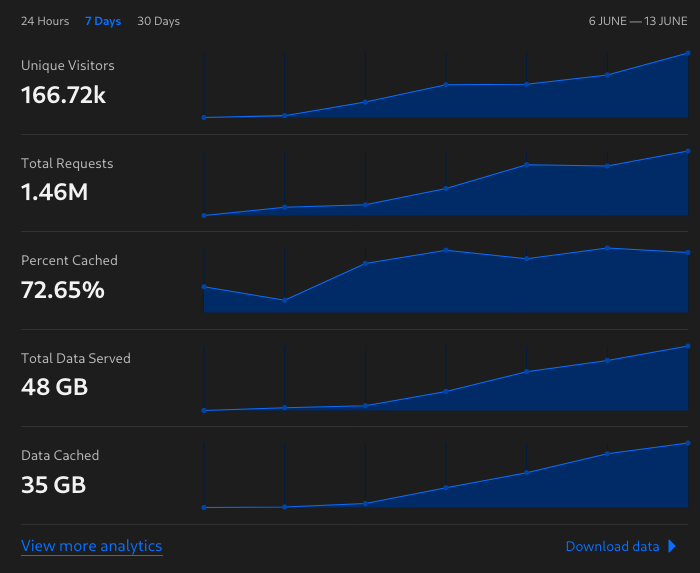
For our CDN we are using the "dreaded" cloudflare for caching. Here's a pretty picture of our analytics for the past 7 days (the whole life time of reddthat.com):
Screenshot of cloudflare analytics Incase you hate me for using cloudflare, don't worry I don't like using it either, but it's free for the time being. We are planning to move to BunnyCDN once we become funded. We've enabled Strict SSL to ensure all communications are secure. We also allow Tor users to access the site, and have our cloudflare "security" setting to minimal.

We are using UptimeRobot for our status page; status.reddthat.com.

Emails are hosted via my Mailcow instance.

The git repo linked here has been forked to a git repo and I'll be looking at making some changes in the coming days. Mainly to add the nginx configuration to be part of the code as well. It will then be completely under code, not just partly under code as it is now.
This is a gitea instance utilising gitea_runners, so once I get that done, I'll be creating gitea actions for:

  • Adding renovate to automatically check for new versions of the docker files and notify of passing tests
  • Once the PR is merged, automatically deploy it.

& that's about it.

Tiff

63


Hello,

I'm in the early planning / testing phase of preparing to migrate our staff from on-prem DC's & Exchange 2013 to MS365 and Exchange Online.

Looking to have a hybrid AD solution in the end so authentication can occur on premise using our DC's, and when off-net they can use AzureAD. I believe the AzureAD Sync Tool will assist with 2-way synchronization so account records are kept up to date.

We have around 100 staff, that will be migrated, and we'll be setting up a domain alias because our on-prem domain was a ".local" domain.

Has anyone gone through this sort of process before, if so what was your experience like?

Were there any gotcha's or major issues that you came across?

After completing your migration, was there something you wish you knew at the beginning that would have saved you time?

Thanks in advance for any feedback.

64


Just a heads up and a list of patches. Have a look and keep patching people :) <in your test environment 1st of course.>

65


It's happening! AWS issues in us-east-1 feel like a snow day almost

66


Just started for me. entra.microsoft.com (specifically user list atm) is loading slowly or not at all.

Anyone else or just me?

67


So I've got a weird situation. We have one iOS (iphone 13 with 16.5) device only that is having issues completing the enrollment process.

download and sign into company portal

sign into the company portal

installed the management profile (confirmed)

device reports as not registered by company portal

the device not being registered is causing CA policies to fail for the device so the user can't setup their apps like outlook or teams.

I've also confirmed there isn't another management profile installed for another mdm.

I've walked the user through the enrollment process a few times, with and without the authenticator app installed and setup. the device doesn't show as registered in the authenticator app either. trying to register the device in authenticator just gives an generic error saying something went wrong.

I did come across something online about supervised devices in this state when the device id in azure ad is all zeros (https://learn.microsoft.com/en-us/mem/intune/apps/app-configuration-policies-use-ios#configure-the-company-portal-app-to-support-ios-and-ipados-devices-enrolled-with-automated-device-enrollment) however in this case the device id is populated.

I've re-enrolled one of my devices to walk through the setup process to make sure it's not something with the CA policies or something else. as far as I can tell this person is setup just like everyone else that is using mdm.

Hopefully someone has an idea, because i'm out of ideas on this.

68


Let's get this community popping with some useful information. Reddit's sysadmin subreddit seemed like a place of complainers, I look forward to having actual productive conversation in this community.

69
70
71


System administrators and IT operations pros might want to rethink their careers, because analyst firm IDC is predicting substantial drops in the number of people employed in such roles.

The firm this week published its first "Worldwide xOps Census and Forecast" – a study that predicts "a substantial shift in the responsibilities of IT professionals will occur over the next five years."

"IT professionals in the most purely operational roles are facing a transition to a more technical or focused role that very often may involve some level of software development work," the firm asserts.

72


Debian 12 remains on track for releasing next week even with around 100 known RC bugs that likely won't be resolved pre-release. The Debian release team says overall things are on-track.

73


No, we will not be going dark. The reasons are simple:

  1. This form of protest has proven ineffective on reddit repeatedly.

  2. Shutting down the sub on a Monday will have an adverse impact on our readers, including possible production issues.

  3. We have avoided reddit "politics" intentionally and will continue to do so.

You are more than welcome to avoid participating on that day which will make the message far clearer to reddit through their metrics than shutting down the sub to folks in need who would be here anyways.

It's disappointing to see the r/sysadmin mods take this stance, but I guess in a way it's a good thing that they've shown their true colors.

Here's hoping that c/sysadmin thrives and replaces it in the near future as the go-to place for all sysadmin stuff.

74


Microsoft kicked off its Build developer conference yesterday, where it unveiled several new features for enterprise customers. The company also announced a preview of Windows 365 Boot, which lets users log directly into their Cloud PCs at startup instead of the local install of Windows 11.

Windows 365 Boot is designed for Windows devices that are shared between multiple people (such as frontline workers and temporary employees). The feature eliminates the need for IT admins to configure Windows PCs for individual users.

“When you power on your device, Windows 365 Boot will take you to your Windows 11 login experience. After login, you will be directly connected to your Windows 365 Cloud PC with no additional steps. This is a great solution for shared devices, where logging in with a unique user identity can take you to your own personal and secure Cloud PC,” Microsoft explained.

75


A backup tool.

view more: ‹ prev next ›