OS: Debian
VPS: 4 CPU, 8 GB RAM
PieFed v1.7.8
Observed higher than normal CPU usage, eventually rising to 100% and the site would no longer load for a number of hours. I panicked and tried rolling back changes to v1.7.7 but the high CPU load persisted. I gave up this AM and restored to v1.7.8.
So far CPU usage dropped to the point I could load up PieFed again to write this message. I'm hoping the load tapers off now and I'll just carry on like this.
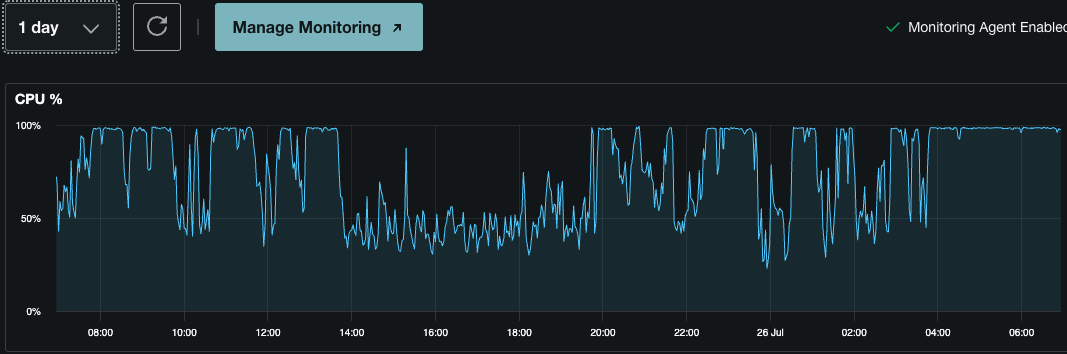
I'm happily back with normal load levels, PieFed is once again quite snappy.
Do some of us just keep the instance private from here on out after this experience?
Ok good, so we know it's scrapers and not something broken.
What you do next depends how much work you want to put into fighting scrapers. Switching to Private mode is extremely easy and very effective which is why I suggested it first. But makes it impossible for people to get a feel for what your instance is like before joining it, which sucks.
Often a couple of hours of private mode is all it takes for the latest wave of scrapers to give up and leave, so you can switch back later and see what happens.
I am thinking about making it possible for PieFed to automatically switch to private mode when CPU load crosses some kind of threshold. Then automatically switch back again later. Or have a cron job that switches to private mode on a schedule (during quiet times) just to fuck with whatever bots are hanging around.
But if you want to put in more effort there's many options which will help you keep Private mode to a minimum.