ErgoMechKeyboards

7211 readers
15 users here now

Ergonomic, split and other weird keyboards

Rules

Keep it ergo

Posts must be of/about keyboards that have a clear delineation between the left and right halves of the keyboard, column stagger, or both. This includes one-handed (one half doesn't exist, what clearer delineation is that!?)

i.e. no regular non-split¹ row-stagger and no non-split¹ ortholinear²

¹ split meaning a separation of the halves, whether fixed in place or entirely separate, both are fine.
² ortholinear meaning keys layed out in a grid

No Spam

No excessive posting/"shilling" for commercial purposes. Vendors are permitted to promote their products/services but keep it to a minimum and use the [vendor] flair. Posts that appear to be marketing without being transparent about it will be removed.

No Buy/Sell/Trade

This subreddit is not a marketplace, please post on r/mechmarket or other relevant marketplace.

Some useful links

founded 2 years ago
MODERATORS
1


This is an expensive, but worthwhile upgrade. The trackballs now move incredibly smoothly with negligible static friction (stiction). All that this upgrade required was six Bosch ball transfer units (BTUs), two 3D printed trackball holders, two static bearings, and a bit of glue. It is definitely louder than the stock configuration with only static bearings, but not as bad I had been expecting based on comments I had read online. As mentioned, it was rather expensive, costing me about 100€ after shipping for the six BTUs alone. But reading comments from other users who have done similar upgrades, it is well worth the extra cost (over cheaper BTU models) for something that you use daily. Printing the trackball holders (which were modeled by a fellow user) was also extremely simple. Printing certain Svalboard components requires a tightly calibrated printer, but the trackball holders do not. I was able to print these after dusting off an Ender 3 that has been sitting unused on a shelf for a couple years.

8uRsQyae4dgy5bt.jpg
5ZlirDw3Em1Q1T4.jpg
uOr15zf9oHxG1IO.jpg

  • BTU used: Bosch Rexroth R053010810 Ball Transfer Unit Ball Transfer Unit Ku-B8-Ofk
  • Public Onshape repo for the trackball holder 3D model: Svalboard Open Trackball BTU HACKING - PMW3360/3389 - 2025-09-10
  • Stabilizer bearing: 1/8-inch Ceramic Bearing Balls ZrO2 Zirconium Oxide Ball G5
2


After working on it for more than a year, I'm starting to see the finish line of this project. So it seemed like a good time to share an update and some renders on my GitHub development branch. If I don't hit any major snags, I expect to build the first prototypes in March or April and publish the final design and a build guide later this spring.

3


How are you guys, gals and catpeople doing this? Are you using Sway or Hyprland for this? Anyone else using udev already?

4


Recently assembled my first split keyboard - keycaps are from Yuzu Keycaps, and the case is 3D printed in wood PLA and then sanded, stained, and varnished.

PCB ordered from https://fingerpunch.xyz/

5


Maybe slightly off topic, but does anyone know anything about any DIY ergo mice projects?

6


Curious if anyone else has reached out to frame.work about the idea for a more ergonomic option on the keyboard & touchpad deck? I really hate switching to standard QWERTY on my surface device provided by work, and I'd be very interested in a better option.

They already offer some international options with more keys on the 13, so I don't see why a modified layout would pose any further challenge. Let alone on the 16 with the modular deck

7


Just wanted to share a render for a keyboard I'm making. It's coming end of this year. I didn't show it in the pictures, but it would have legends on the keycaps. I've used dactyls and dactyl-likes before and I've always wanted one that feels solid with high quality injection molded cases instead of the 3D printed ones.

Join the waitlist here: https://taiko.taikohub.com/

Our discord is here: https://discord.gg/ByZyyZDb

Materials: Injection molded ASA plastic.

Target price: ~$350.

Wired/Wireless: The product would come wired. Wireless module to come afterwards.

Hotswappable

8


I am looking to buy my first split keyboard. My first option was the zsa voyager and I was going to buy it until I stumbled on the whole world of split keyboards and now I can’t make up my mind. I have no experience in soldering or anything and I would prefer to get it fully assembled but if it’s way cheaper to get a kit I guess I can learn but I’m scared to mess it up. I’ll be ordering it to France so I’m looking to get the keyboard with shipping and taxes and duties for a maximum budget of 300-350€. There are so many options and websites and I don’t know which one to go for and which will be worth it. I know the quality of the voyager is the best but I’m okay with not having the greatest quality if it’s a good keyboard. Let me know if you have any advice for me since I really need the help and hoping to order the keyboard soon.

9


I’ve been looking at the voyager for close to a year now and I chose to order it. But now that I’m about to order it, I’m considering maybe getting a corne keyboard instead. This will be my first ever split keyboard and I’m very excited to get it and start the journey and I know a Corne has less keys which will make the switch even harder but I’m up for it. Now I just want some advice if anyone has tried both and can help me make the decision easier. I just found that having 3 thumb keys on the corne instead of 2 on the voyager would make things easier to navigate but feel free to correct me if that’s not the case. Any information can help!

10


My daily driver setup. Using clamps like this allows me to mount to the chair without having to drill into it (or any other permanent modification like that). My biggest complaint about this setup is the USB cable reaching from the chair to the computer. I always need to be aware of where the cable is when rotating the chair and whatnot.

  • Svalboard Lightly with 52mm trackballs
  • Herman Miller Embody
  • SMALLRIG magic arms and crab-claw clamps

11


  • Kinesis Advantage360 Professional
  • Kensington SlimBlade Pro

Modifications:

  • I remapped the Kinesis to Colemak layout, both in the firmware and by just swapping around the physical key caps. I do not necessarily mind the fact that the lighter home row keys are now out of place.
  • I used a tiny dab of hot glue on each half of the Kinesis to add tactile homing bumps
  • On the function layer of the Kinesis, I set the T, S, and R keys to left click, middle click, and right click (respectively). I do not use the buttons on the Kensington at all; I just make use of its trackball for pointing/scrolling, then click with the Kinesis
  • I tented the Kensington using a double magnetic ring phone stand. I also placed a sheet of scrap metal under the desk mat to help keep the magnetic stand in place

I tend to have a very pointer-heavy workflow, so it is important to me to have an efficient pointing solution. Because of that, I do prefer my Svalboard with its integrated trackballs situated just millimeters away. But this is a sufficient secondary setup that has the bonus of being wireless.

12


cross-posted from: https://lemmy.world/post/37481146

I'm making a custom keyboard with a Raspberry Pi Pico as the MCU, and i don't understand what all the different pins are for and how they should be wired up to my key matrix and trackpoint.

My current understanding is that GPIO are normal pins that can be wired to the rows and columns, but what of VBUS, VSYS, 3V3, and all the others that aren't just GPIO or GND? And how should the ground pins be used here?

The schematic currently doesn't include the trackpoint because i'm planning to hand wire it and the MCU to the PCB, so i can put them under the PCB in the case and i don't have to try to fit them onto the board. Is there a better way to connect these that won't require adding a bunch of space to the board to fit the MCU?

13


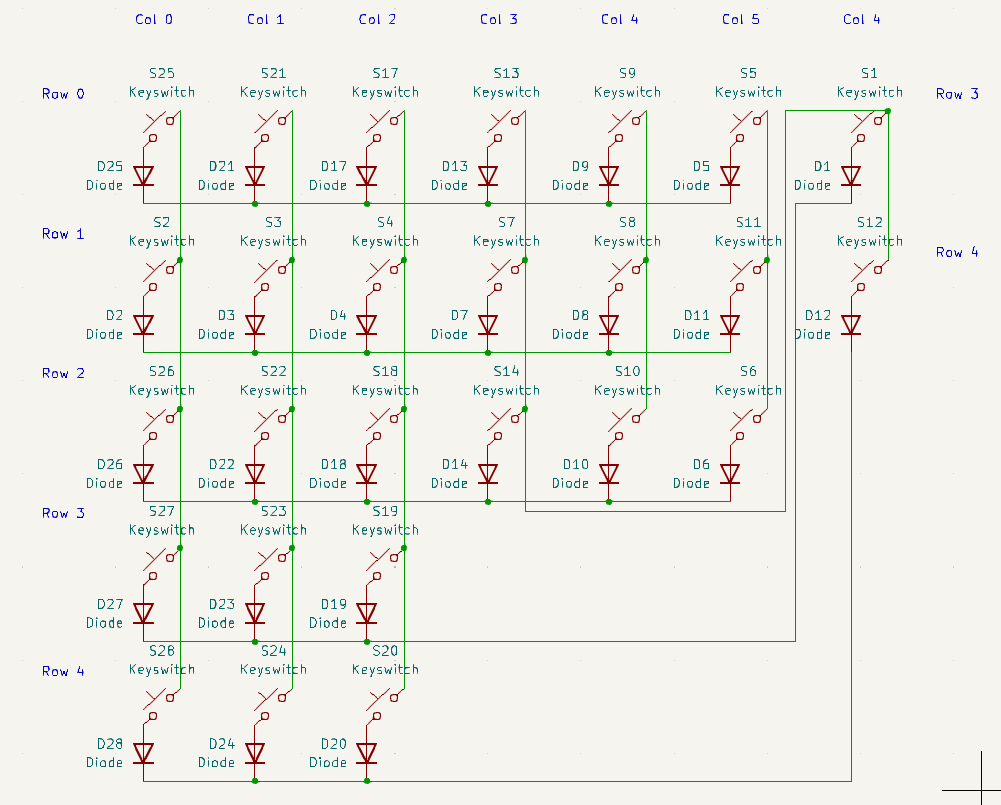
Here's what the layout should look like when it's done, and what the schematic for the right half looks like now. I've seen Joe Scotto's tutorial on the subject.

I'm currently making a schematic for this keyboard in KiCad v7.0. The schematic has the power & backspace keys moved down near the thumb keys to use one fewer pin on the controller, hence the slightly messy wiring.

  • What controller should i use for a keyboard like this? How many more pins will it need than just the 5 columns and 6 rows on each side?
  • What USB connector ports should i use? What are the differences between one USB-C port and another?
  • Do i need a controller for each part of the keyboard, or only for the part that plus into the computer?
  • Where can i get KiCad files for a trackpoint so i can add that to the schematic and PCB?
  • I've only ever owned one mechanical keyboard (Chouchou by dlip) and it doesn't look like it has any diodes. Do i need those or not?
  • Can i hide the controller and ports in a case if i'm using low-profile switches and caps?

Thanks in advance.

14
40
submitted 4 months ago* (last edited 4 months ago) by MouldyC@slrpnk.net to c/ergomechkeyboards@lemmy.world


I have made myself a wireless, 30-key keyboard, and have decided to make things more complicated by learning a new layout as well. This was my first time ordering PCBs and sourcing components locally, so am feeling a bit chuffed. I had to bolt everything down to a board, as the case snaps around the PCB, and was tight enough to start bowing the sides up, but this fix works and I'm happy with the aesthetic.

Check out my modified Hands Down Vibranium-f layout.

15
16


My current project is a "Writer Deck," a low-powered computer that boots directly to a text editor or word processor (RPi Zero booting to Wordgrinder, btw). Being the weirdo that I am, I also want to use this as an opportunity to try a split layout again, and see if I can get myself used to something other than the "Advanced Hunt and Peck" that I do now and that tops out at 60 or maaaaybe 70 wpm. The deasign I've come up with is a split monoblock based heavily on a Corne, but with a very modest split angle and the thumb cluster (1) shoved a bit farther under the hands and (2) built around 1.25u keys because they can be adapted to switch-stabilized 2.25u or 2.75u (see the green outlines). The whole thing fits in the Pok3r/GH60 footprint.

So, ergo-mech people, is this a completely silly layout? I have always felt that "literally never moving your hands" isn't necessarily as ergonomic for the average typist as has been promoted, and I do like a good nav cluster, but I also wonder if I've compromised too much to hit that footprint, especially with moving the thumb cluster away from the center. The intended use case will be much more prose (journaling and other creative writing) than code, so I'm less concerned about optimizing for programming. I've never had major RSI issues myself, just needing to switch from a mouse to a trackball for a little bit every year or two.

17


Like many of you, I've wrestled with the tap-hold dilemma: set a short TAPPING_TERM for quick holds at the cost of accidental activations, or lengthen it for more reliable tapping, which can make holds feel sluggish. While there are many clever settings to tweak, I often felt I had to significantly adapt my typing style to the algorithm, rather than the algorithm to me.

To explore a different approach, I'd like to share a QMK community module I've been working on called Predictive Tap-Hold (PTH). To predict whether a tap or a hold was intended, PTH analyzes event sequences, timing between presses, and which hand is used. For ambiguous cases, it relies on generated decision trees and evolved functions.

With the training dataset, these functions reached about 96% accuracy in distinguishing taps from holds. With another dataset, they still performed similarly. While that number might not sound ideal, it's important to know that the dataset included a wide variety of typing styles and required a lot of filtering (77,614 of 168,593 participant datasets were used). While better data will lead to future improvements, no prediction is flawless, and there will likely always be an adjustment period.

PTH is also highly configurable, which I hope makes it easy to handle edge cases and match your personal typing style. For instance, an Instant Hold feature allows the hold function (even LT) to activate the moment you press the key, which is useful for things like holding LCTL_T and using the scroll wheel to zoom without any delay.

The module is designed with ergonomics in mind. By default, when a key like RSFT_T(KC_H) from the right side is pressed, it will only choose hold if the next keypress comes from the other side and no third key is pressed. This can help prevent same-hand fatigue and make taps more reliable.

I've also aimed to make PTH compatible with other great QMK features like Combos and Tap Dance.

My hope is that this module might help make powerful setups like home-row mods feel more accessible and intuitive. It's now available as a QMK Community Module if you're willing to experiment. Thank you for checking it out, and I would genuinely appreciate any feedback you might have. If you run into any problems, I'd love a message or a report in the repository.

18


I have adapted so quickly to using 34 keys on my Re-gret, that it feels awkward going back to 46 keys on my Hillside. So, am now considering even fewer keys. Is anyone using a Hummingbird or Rufous? Anything similar in a wireless version? What has your experience been? Other suggestions?

19
53
submitted 5 months ago* (last edited 5 months ago) by F04118F@feddit.nl to c/ergomechkeyboards@lemmy.world


Alt text: POV you are sitting on a sofa, left half of a split ergomech keyboard resting against the left leg under an angle (tented) while a black cat provides wrist support

20


Ever since my 1st kit (a Beekeeb Hillside 46 splay) I have been wishing I had gone wireless, for better portability. I also progressed to the point where I wanted fewer keys, and a single board, but still wanted some decent splay. Thanks to keeb supply for stocking Ryan Schenk's Re-gret! It's a lovely compact keyboard, and meets my needs almost perfectly! And...it fits well in a Nintendo Switch case. ZMK was pretty quick to get working as well, though the error message after flashing each time had me worried for a bit. I did have to get a small rubber foot under the translucent cover plate to hold down the controller, as it tended to lift when charging via USB, breaking the touch connection to the battery, but I've got that dealt with now and everything's good.

21


Pictured: current TKL below, split ergomech above

Background

So I recently got my first ergomech keyboard: a used BastardKB TBKMini, 3x6+3 layout.

It came with the default keymap.

I have been crafting my own initial keymap, using some vim-based heuristics and Callum style one-shot mods.

Followed BastardKB's instructions and got my keymap to compile.

Then onto flashing. This is where the problem is.

The problem: flashing the board

Instructions: https://docs.bastardkb.com/fw/flashing.html

I managed to put the device into bootloader mode with both layer keys and the top-left key. Verified that it is in bootloader mode by checking that typing has no effect. Also lsusb shows "Atmega32u4 bootloader" instead of "BastardKB TBKMini keyboard".

But I don't get a disk device.

Things I tried

udev

I tried adding the udev rules that QMK docs recommend: https://docs.qmk.fm/faq_build#can-t-program-on-linux

But it still won't work.

OS

I even tried another pc with other OSes: same behavior on

  • Fedora
  • CachyOS
  • and even Windows 10

Help me please! 😥

Any ideas on what is going wrong here or what I could try to work around this? I really want to start using my split ergomech with a proper keymap.

Looking forward to reading your suggestions tomorrow morning (in about 9 hours for me, I'm in Europe). I wanted to post this now because I hope the Americans will be able to help me.


EDIT: Thanks, with your help and the help of some kind volunteers on the bastardkb discord I figured out that I have the old v1 elitec version and I managed to flash it with an old version of the bastardkb firmware. I got the layers working, as well as the combo, but callum’s oneshot modifiers aren’t working yet: https://github.com/fhoekstra/bastardkb-qmk/tree/main/keyboards/bastardkb/tbkmini/keymaps/fhoekstra


EDIT2: I finally listened and just followed the upstream QMK instructions, and it all just works, with Callum-style modifiers, combos, and a custom caps word:

https://github.com/fhoekstra/qmk_userspace

22
16
submitted 6 months ago* (last edited 5 months ago) by tequinhu@lemmy.world to c/ergomechkeyboards@lemmy.world


Hi there fellow people,

I was building an Aurora Sofle_v2 and I may have screwed things up. I melted one of the RGBs with the soldering iron and in the process of trying to remove it the solder pad was removed as well

After that I tried to "fix" it a handful of times, and now I believe that the connectors might be gone =(

Is there a way for me to salvage this RGB? (Or perhaps to link the previous one with the following one on the chain, so at least it works for the others)

I was thinking of connecting things using cables, is this an option?

Update: Bodge wiring worked! I got some spare cable pieces I had laying around and soldered it to the board The back doesn't look pretty, but at least it's lighting up (except the last RGB where I accidentally soldered two pins together, after this I'm not going through the troubles to fix it)

23


Something like this? The heavy stagger is great, 42 keys is almost perfect, but the thumb placement is -- for me -- horrible. Having to move my thumb to practically under my palm is just terrible ergonomics.

This thumb layout reminds me more of the ErgoDox variants, and is far better placement. Is there a layout close to this?

24


I'm looking for a keyboard with the following properties:

  • 34 keys, split (3x5 + 2)
  • choc switches (v1 or v2)
  • wireless (usb-c for charging/updating)
  • angled thumb keys (like a dactyl / skeletyl)
  • aggressive pinky stagger (similar to a ferris sweep)

Something like this, but with angled thumb keys:

https://redlib.privacyredirect.com/r/ErgoMechKeyboards/comments/1iri03k/my_custom_wireless_34_key_split/

Does such a keyboard exist?

25


I am using the Silakka54 keyboard with great pleasure. I configured the keyboard in such a way that I am using the Colemak-DH layout for English. However, I also speak other languages which do not use the Latin alphabet. For those languages, the operating system deals with translating the key presses. The problem is that my keyboard sends key signals according to the Colemak-DH layout while the system expects the QWERTY layout. Ergo, I get nonsense when I type.

To illustrate what I mean, let's say that pressing "L" on the QWERTY keyboard corresponds to the letter "Λ" being typed out. Since Colemak-DH moves the location of "L" to the "U" key, in order to type that character again, I'd have to press "U" on QWERTY, not "L" anymore. This breaks the layout.

One of the solutions I can think of is to make a macro that switches the keyboard over to a QWERTY layout and toggles the language change in the system. However, that would require me to reconfigure home row mods and other keys twice. Is there a more elegant solution for this problem, such as allowing the keyboard to send Unicode symbols? My keyboard uses VIAL for the firmware, by the way.

view more: next ›