cybersecurity

5922 readers
14 users here now

An umbrella community for all things cybersecurity / infosec. News, research, questions, are all welcome!

Community Rules

Enjoy!

founded 2 years ago
MODERATORS
1
2
3
4


Hi all, first post.

I moved to The Netherlands a few years ago, and am wanting to prepare for a career change from helpdesk to cyber security. I'm also doing a Dutch language course 1 day every week, ik moet het leren.

Long ago, I held a CompTIA A+ cert. I don't have any at this point. Not strong on networking or programming skills, either.

Got any good suggestions on getting into the field in 2026? I'm a GNU/Debian guy, and have free time to study. Any good meetups in The Netherlands to seek mentorship or sharing of knowledge? Hoping some Dutchies and Duitsers can chime in.

Goal is to become a CISO but if I don't make it that far, I'll still land amongst the stars.

Alvast bedankt! Thanks in advance! -LOLseas

5


Wanna chat about something non-infosec amongst those of us who frequent /c/cybersecurity? Here’s your chance! (Keep things civil & respectful please)

6


Weekly thread to discuss whatever you’re working on, big or small, at work or in your free time.

7


Introduction

This vulnerability report has been generated using data aggregated on Vulnerability-Lookup, with contributions from the platform’s community.

It highlights the most frequently mentioned vulnerability for January 2026, based on sightings collected from various sources, including MISP, Exploit-DB, Bluesky, Mastodon, GitHub Gists,The Shadowserver Foundation, Nuclei, SPLOITUS, Metasploit, and more.

For further details, please visit this page.

The Month at a Glance

January 2026 saw two vulnerabilities tied for most frequently sighted with 110 sightings each: CVE-2026-21858, a Critical-severity vulnerability in n8n-io's n8n workflow automation platform, and CVE-2026-24061, a Critical vulnerability affecting GNU Inetutils. The n8n vulnerability was extensively covered in contributor insights, notably in "The Ni8mare Test: n8n RCE Under the Microscope".

Other critical vulnerabilities in the top 10 include CVE-2025-55182 in Meta's react-server-dom-webpack (97 sightings), CVE-2026-20045 in Cisco Unified Communications Manager (80 sightings), CVE-2026-24858 in Fortinet FortiManager (80 sightings), CVE-2026-1281 in Ivanti Endpoint Manager Mobile (70 sightings), and CVE-2017-18368, an older but still active vulnerability in billion 5200w-t devices (62 sightings).

January was a busy month for actively exploited vulnerabilities, with 15 new entries added to the CISA Known Exploited Vulnerabilities catalog. Notable additions include:

No new entries were added to the ENISA KEV catalog in January.

The Ghost CVE Report reveals early detection of vulnerabilities with limited public information. CVE-2025-58151 (Xen Security Advisory) and CVE-2026-23456 (YoSmart YoLink Smart Hub) led with 5 sightings each, followed by CVE-2024-31884 (4 sightings) and several GHSA identifiers and CVEs with 3 sightings.

Contributor insights covered a diverse range of topics, including EPMM detection techniques, PAN-OS firewall vulnerabilities, CVEs affecting the Svelte ecosystem, security advisories for Ivanti Endpoint Manager Mobile, GNU C Library updates, Trend Micro Apex Central vulnerabilities, and multiple vulnerabilities in GnuPG (gpg.fail).

Top 10 Vendors of the Month

Top 10 Assigners of the Month

Top 10 vulnerabilities of the Month

Vulnerability Sighting Count Vendor Product VLAI Severity
CVE-2026-21858 110 n8n-io n8n Critical (confidence: 0.8071)
CVE-2026-24061 110 GNU Inetutils Critical (confidence: 0.9534)
CVE-2025-55182 97 Meta react-server-dom-webpack Critical (confidence: 0.9914)
CVE-2026-21509 94 Microsoft Microsoft 365 Apps for Enterprise High (confidence: 0.9735)
CVE-2025-8088 84 win.rar GmbH WinRAR High (confidence: 0.9881)
CVE-2026-20045 80 Cisco Cisco Unified Communications Manager Critical (confidence: 0.5226)
CVE-2026-24858 80 Fortinet FortiManager Critical (confidence: 0.9378)
CVE-2025-14847 76 MongoDB Inc. MongoDB Server High (confidence: 0.9349)
CVE-2026-1281 70 Ivanti Endpoint Manager Mobile Critical (confidence: 0.9914)
CVE-2017-18368 62 billion 5200w-t Critical (confidence: 0.9748)

Known Exploited Vulnerabilities

New entries have been added to major Known Exploited Vulnerabilities catalogs.

CISA

CVE ID Date Added Vendor Product VLAI Severity
CVE-2026-24858 2026-01-27 Fortinet FortiManager Critical (confidence: 0.9378)
CVE-2025-52691 2026-01-26 SmarterTools SmarterMail Critical (confidence: 0.7545)
CVE-2018-14634 2026-01-26 The Linux Foundation kernel High (confidence: 0.8719)
CVE-2026-23760 2026-01-26 SmarterTools SmarterMail Critical (confidence: 0.9916)
CVE-2026-21509 2026-01-26 Microsoft Microsoft 365 Apps for Enterprise High (confidence: 0.9735)
CVE-2026-24061 2026-01-26 GNU Inetutils Critical (confidence: 0.9534)
CVE-2024-37079 2026-01-23 vmware vcenter_server Critical (confidence: 0.9302)
CVE-2025-54313 2026-01-22 prettier eslint-config-prettier High (confidence: 0.8864)
CVE-2025-34026 2026-01-22 Versa Concerto Critical (confidence: 0.9819)
CVE-2025-31125 2026-01-22 vitejs vite Medium (confidence: 0.6523)
CVE-2026-20045 2026-01-21 Cisco Cisco Unified Communications Manager Critical (confidence: 0.5226)
CVE-2026-20805 2026-01-13 Microsoft Windows 10 Version 1607 Medium (confidence: 0.995)
CVE-2025-8110 2026-01-12 Gogs Gogs High (confidence: 0.9905)
CVE-2009-0556 2026-01-07 Microsoft Office High (confidence: 0.8535)
CVE-2025-37164 2026-01-07 Hewlett Packard Enterprise (HPE) HPE OneView High (confidence: 0.6929)

ENISA

No new entry in January.

Top 10 Weaknesses of the Month

Click the image for more information.

Ghost CVE Report

A ghost CVE is a vulnerability identifier that's already popped up in the wild but is still listed as RESERVED or NOT_FOUND in official registries like NVD or MITRE.

Sightings detected between 2026-01-01 and 2026-01-31 that are associated with vulnerabilities without public records.

Vulnerability ID Occurrences Comment
CVE-2025-58151 5 Xen Security Advisory 478 v2
CVE-2026-23456 5 Critical Vulnerabilities in YoSmart YoLink Smart Hub Expose Smart Homes to Remote Attacks
CVE-2024-31884 4 Incorrect usage of certificate checking via Pybind
GHSA-7hf5-mc28-xmcv 3 CVE-2026-22794: Trust Issues: Hijacking Appsmith Accounts via Origin Header Abuse
GHSA-7g7f-ff96-5gcw 3 CVE-2025-8217: Amazon Q's Self-Sabotage: The Backdoor That Couldn't Code
CVE-2026-23594 3 Remote Privilege Elevation in HPE Alletra & Nimble Storage
CVE-2026-1220 3 Google Chrome 144 Update Patches High-Severity V8 Vulnerability
CVE-2023-42344 2 XXE in OpenCMS
CVE-2026-12345 2 Zero-day RCE in NexusFlow API Gateway is actively exploited
CVE-2025-53086 2 The recent patch for HarfBuzz (CVE-2025-53086) addresses a classic yet dangerous heap corruption bug
CVE-2025-134655 1 prototype pollution flaw
CVE-2025-63261 3 vulnerability in AWStats as shipped with cPanel

Insights from Contributors

Thank you

Thank you to all the contributors and our diverse sources!

If you want to contribute to the next report, you can create your account.

Feedback and Support

If you have suggestions, please feel free to open a ticket on our GitHub repository. Your feedback is invaluable to us!
https://github.com/vulnerability-lookup/vulnerability-lookup/issues/

Funding

eu_funded_en

The main objective of Federated European Team for Threat Analysis (FETTA) is improvement of Cyber Threat Intelligence (CTI) products available to the public and private sector in Poland, Luxembourg, and the European Union as a whole.
Developing actionable CTI products (reports, indicators, etc) is a complex task and requires an in-depth understanding of the threat landscape and the ability to analyse and interpret large amounts of data. Many SOCs and CSIRTs build their capabilities in this area independently, leading to a fragmented approach and duplication of work.

The Computer Incident Response Center Luxembourg (CIRCL) is a government-driven initiative designed to provide a systematic response facility to computer security threats and incidents. The organization brings to the table its extensive experience in cybersecurity incident management, threat intelligence, and proactive response strategies. With a strong background in developing innovative open source cybersecurity tools and solutions, CIRCL’s contribution to the FETTA project is instrumental in achieving enhanced collaboration and intelligence sharing across Europe.

Press release

8
9


ETH Zurich researchers have discovered major security flaws in three popular cloud-based password managers - Bitwarden, LastPass, and Dashlane - which together serve 60 million users[^1]. The team demonstrated 25 different attacks that could compromise user passwords, including 12 on Bitwarden, 7 on LastPass, and 6 on Dashlane.

The researchers found they could view and modify stored passwords by setting up servers that mimicked compromised password manager servers[^1]. These attacks worked through routine user actions like logging in, viewing passwords, or syncing data. "We were surprised by the severity of the security vulnerabilities," said Professor Kenneth Paterson of ETH Zurich[^1].

The vulnerabilities stem from complex code designed to enhance user-friendliness, such as password recovery and family sharing features. The providers were given 90 days to fix the security issues before publication[^1].

The researchers recommend users choose password managers that:

  • Are transparent about security vulnerabilities
  • Undergo external audits
  • Have end-to-end encryption enabled by default[^1]

[^1]: ETH Zurich - Password managers less secure than promised

10


Weekly thread for any and all career, learning and general guidance questions. Thinking of taking a training or going for a cert? Wondering how to level up your career? Wondering what NOT to do? Got other questions? This is the time and place to ask!

11


Today we’re releasing Vulnerability-Lookup 4.0.0, and this is a big one.

🔄 Remote Instance Synchronization

This version is paving the way for federated deployments of Vulnerability-Lookup instances. You can now synchronize multiple Vulnerability-Lookup instances and share:

  • 💬 Comments
  • 📦 Bundles
  • 👁️ Sightings
  • 🚨 KEV entries (GCVE BCP-07)

This introduces a true federated model for vulnerability intelligence sharing.

Full breakdown available here:

👉 https://www.vulnerability-lookup.org/2026/02/16/vulnerability-lookup-4-0-0/

Let’s take a look at all the notable changes.

🔁 Remote Instance Synchronization – What’s Inside

This release introduces a complete sync engine designed for reliability, transparency, and operational control.

A local instance can now pull objects — including bundles, comments, sightings, and KEV entries — from configured remote Vulnerability-Lookup instances via their public APIs.

The synchronization engine includes:

  • Remote instance management with per-object-type synchronization controls
  • Timestamp-based update detection to keep data consistent
  • Asynchronous scheduler with graceful shutdown support
  • CLI command and systemd service template for automation
  • Administrative controls to trigger synchronization manually
  • Visual indicators in the interface to clearly identify synchronized objects

🔌 Feeder Improvements

Expanded data ingestion:

  • New RustSec OSV feeder
  • New OSS-Fuzz feeder (with YAML support in OSV)
  • More generic CSAF and OSV templates

This strengthens Vulnerability-Lookup’s position as a correlation hub across heterogeneous vulnerability sources.

🎨 UI Improvements

  • Redesigned global dashboard layout for better visibility and structure.

More details:

👉 https://www.vulnerability-lookup.org/2026/02/16/vulnerability-lookup-4-0-0/

If you're running Vulnerability-Lookup and interested in interconnecting instances across organizations or teams — this release is for you.

🔗 Project: https://www.vulnerability-lookup.org/ 📦 Code: https://github.com/vulnerability-lookup/vulnerability-lookup

Feedback, experiments, and federated setups welcome.

Feel free to create an account on the instance operated by CIRCL (Computer Incident Response Center Luxembourg):

https://vulnerability.circl.lu/

💶🇪🇺 Funding

Vulnerability-Lookup is co-funded by CIRCL (Computer Incident Response Center Luxembourg) and by the European Union via the hashtag hashtag#NGSOTI project. More information on the page from Restena Foundation: https://www.restena.lu/en/project/ngsoti

#VulnerabilityManagement #CVE #KEV #GCVE #CVD #CyberSecurity #Federation

12


A malicious campaign of 30 Chrome extensions masquerading as AI assistants has infected over 300,000 users, stealing credentials, email content, and browsing data[^1]. The extensions, dubbed "AiFrame" by LayerX researchers, share common infrastructure under the domain tapnetic[.]pro and use iframes to load remote content rather than implementing actual AI functionality[^1].

Popular malicious extensions still available on the Chrome Web Store include:

  • AI Sidebar (70,000 users)
  • AI Assistant (60,000 users)
  • ChatGPT Translate (30,000 users)
  • AI GPT (20,000 users)

The extensions specifically target Gmail data through content scripts that extract email content, drafts, and thread text. They can also capture voice recordings using Web Speech API and transmit data to remote servers controlled by the operators[^1].

[^1]: BleepingComputer - Fake AI Chrome extensions with 300K users steal credentials, emails

13


Wanna chat about something non-infosec amongst those of us who frequent /c/cybersecurity? Here’s your chance! (Keep things civil & respectful please)

14


Original Post for context: https://programming.dev/post/45440011

I want to start off by saying I make a lot of assumptions here. I know virtually nothing about cybersecurity, less about viruses and I just threw names of viruses that popped on ClamAV into a search engine and fell down a rabbit hole. So, take absolutely everything with like six teaspoons of salt. I got into linux and FOSS stuff about 2 years ago and spent the first year mainly breaking and reinstalling Mint and Ubuntu and learning about all the different ways Apple does not want you to use linux on old hardware. Make of this what you will.

Okay, update. I got busy yesterday and today, first thing I did was pull the syslogs from the 28th to the 4th of February. As you can imagine, this was a metric shit tonne of information, like over 250,000 entries. After some specific grepping, I managed to get down to some usable data.

Fig.1 https://ibb.co/nq0gVVGt

There’s this repeated pattern of:

Jan 13 07:59:50 xerces systemd[1]: Finished schroot.service - Recover schroot sessions.

Jan 17 09:20:28 xerces systemd[1]: Starting schroot.service - Recover schroot sessions...

Jan 17 09:20:30 xerces schroot-init[1056]: * Recovering schroot sessions

Jan 17 09:20:31 xerces schroot-init[1056]: ...done.

Jan 17 09:20:31 xerces systemd[1]: Finished schroot.service - Recover schroot sessions.

Jan 18 05:40:14 xerces systemd[1]: Starting schroot.service - Recover schroot sessions...

Jan 18 05:40:17 xerces schroot-init[1066]: * Recovering schroot sessions

Which corresponded with my working on my computer. This is a normal service, but I have never had to perform a secure change of root on this machine. I did just a plain change of root from a live install once just to fix some display drivers. There's also a huge gap around the 19th where it doesn't start at all for several days. From the 29th of January this service would start along with a secure change of root session every time I opened my laptop. Which makes me think potentially some of this shit has been on my machine since early this year and maybe, since I only use WINE when I'm writing music that it just didn’t get enough uptime to run to completion. I am leaning heavily on the .DLL as being the seed for all the poison I've since found on this machine. I think because It installs as a .DLL the writes to the registry and WINE is only ever in use when I’m using Ardour. I have Mastering Software, DAWS, other VSTs from back in the day and I like to use them still. I run 64x WINE in a Bottles container. This, plus a fantastic little program called yabridge lets you run windows VSTs on Linux with pretty good latency. (Read the manual it’s not as difficult to configure. You’ll beat your head off the table trying to get it to work without it.) Anyway, because that bottle needed access to the network to ping a server with my license whenever I use some of this stuff. Coupled with the fact I kept my samples in my Desktop, that’s what gave them access to the Network and my filesystem. Then on the 29th you can see where they start executing an attempt to exfiltrate my data.

Fig2. https://ibb.co/ynfNtBmz

Jan 29 21:35:13 xerces systemd[1]: Finished schroot.service - Recover schroot sessions.

Feb 01 00:43:06 xerces systemd[1]: Starting privoxy.service - Privacy enhancing HTTP Proxy...

Feb 01 00:43:07 xerces systemd[1]: Started privoxy.service - Privacy enhancing HTTP Proxy.

Feb 04 20:39:01 xerces systemd[1]: Starting schroot.service - Recover schroot sessions...

Feb 04 20:39:03 xerces schroot-init[1273]: * Recovering schroot sessions

Feb 04 20:39:03 xerces schroot-init[1523]: E: 20copyfiles: realpath: /run/schroot/mount/ubuntu_i386-09dc1b7f-395b-4c0b-af5c-d071bb580c18/etc/resolv.conf: No such file or directory

Feb 04 20:39:03 xerces schroot-init[1523]: E: 20copyfiles: dirname: missing operand

Feb 04 20:39:03 xerces schroot-init[1523]: E: 20copyfiles: Try 'dirname --help' for more information.

First the program re-establishes itself as root, then it starts privoxy.service. Privoxy is the default proxy for the Tor Network. Which is why the ports read 0.0.0.0 and they were proxied to 127.0.0.0 because that’s localhost. I’m just guessing, but I’d say, because it’s Tor, we were the exit node. Ergo, any connection from it would appear as if it was local. After that you can see the 20copyfiles :realpath: /run/schroot/mount/ubuntu_i386-09dc1b7f-395b-4c0b-af5c-d071bb580c18/etc/resolv.conf. This is where they attempt to start copying from my SSD, just after schroot-init, it’s a service that was loaded at startup and this attempt fails. I think that 20copyfiles is probably a call for a script and the missing operand is like a missing flag, or an object that hasn’t been defined correctly. I am not familiar with Windows terminal at all. I initially entertained the idea that 20copyfiles, was maybe referring to either a numbered directory on Windows, like the home folder could be numbered 20 or something. I also speculated maybe it's saying to copy 20 directories deep recursively. I am of the mindset that a big part of this is crime for hire, so pre-written scripts stapled together. This first part seems to be dynamically changing.

They rooted me with 32x Linux and the housemate was connected to a windows 10 server. There’s a shit tonne of trojans in here, but everything is windows. It proliferated and a lot of files have been infected, but I don’t think they can execute much of them because of the OS mismatch. Since this was loaded by a malicious .DLL file in WINE, it would make sense for the instructions to be CMD and not executable in Linux. Smart enough to use a virtual machine to backend me with a 32x ubuntu server, but not smart enough to have:

if [ "$os" = "linux" ]; then sudo su cp ~/home/ fi

Again, guessing, but crime to buy shit. Probably targeting Windows because of Market Share. I just happened to have a program that can accept .DLL’s and has a registry to write to. Fuck me, right?

Fig. 3 https://ibb.co/dwT0CGCn

As you can see here the program repeatedly attempts to mount their filesystem to /run/. But they can’t get into it until they turn off Network Monitoring which is the line that reads:

"Intializing Network Drop Monitor.Service."

So, they forced a Kernel level drop for Network Monitoring. Then we have “reached target remote-fs.target.” So, they have achieved access to my filesystem and then immediately after that, it looks to me like that's when they got access to my network connection through systemd. They created an anacron service to redo these commands every hour. In case the connection drops, in case they get kicked from the Network. Every hour this cron job will execute to re-establish that connection to the filesystem and the Network. Again, every single person on this Network was admin, so just absolutely asking for it. You can see at the bottom there running at reboot under Cron Info.

Fig. 4 https://ibb.co/1tJQPgjM

Here you can see they umount /home/ /proc/ /sys/ /tmp/ /dev/ as they schroot into these directories. It’s interesting because they clearly have a way of matching the OS, probably a script that runs a virtual machine for them, that seems to be the most flexible part about this whole thing. So far, with the exception of being able to get access. I don’t think they’ve been able to actually do much, because it’s all pre-made for Windows. They loaded SSH keys as well and got root, but so far straight copy commands appear to have all failed. Which checks out for a mish-mash of scripts someone has cobbled together off of Github and a small a server farm. I don’t believe for a second these people wrote these programs. This is totally like an office sized operation. I would guess Russia, but I haven’t figured that out. I also believe in addition to capturing data that this is supposed to be about creating a botnet to harvest compute. Probably for a DDOS attack, I’ll get into that when I get to ClamAV, but first we have to talk about more persistence I discovered today.

Fig. 5 https://ibb.co/KzWkSsC5

So, I grepped for chroot and I found this service called avahi-chroot helper. The avahi-daemon is another user on this machine. This service has never appeared before, I could be wrong but I don’t think avahi ships with it. I killed it, disabled it and deleted it and didn’t actually look to see what it was doing which I regret now. I wonder if that service was related to dropping Network Manager to allow access to the remote filesystem. It ran at startup, it doesn’t run anywhere now.

Fig. 6 https://ibb.co/j9FT73Gy

Here in the logs you can see they didn’t just start Privoxy as a service and load a cron job to restart it. They added it to the users group and gave it permissions. Luckily, from what I can tell, I can’t see if it was able to connect from my machine. Maybe I’m wrong and I’ll uncover that they managed to connect, they certainly appeared as localhost on the ports they opened, so anything’s possible at this stage. I hope I can find the uncovered IP somewhere in the logs, but I haven’t decided how I want to search them for that yet. If anyone has any ideas, let me know.

Fig. 7 https://ibb.co/206CZ6mB

Privoxy was on here as a user. Again, they were (at least through my system) attempting to capture network traffic, input data and files on the SSD. I believe, since they had full remote access to my desktop they probably manually copied my data using the GUI. I don’t think they’d just say “the scripts didn’t execute properly we’re not having it.” So, if that’s true, anyone know if I might be able to find an IP somewhere that’ll point me to the right country? If they're connected and they couldn't get their proxy started, maybe they'd show up unmasked somewhere. Maybe, also in the viruses themselves once I get some of them open. Anyway, I removed privoxy as a user and I purged it from the system. This corresponds to the cron jobs which ran scripts to re-establish chroot and privoxy at boot.

Fig. 8 https://ibb.co/V05WVj1m

I used photorec to mine my data back. It’s a great bit of software that’s free. It’s a simplified file carver that parses a disk and extracts data by the segment of the disk it was written to. This is great for recovering documents, photos, files. But, pretty much useless for anything else. They did a quick wipe of all of my user data, but they didn’t overwrite anything with 0s. So, everything still exists on disk, but you can’t do much with a bunch of contextless elf files, java containers and .sqlite extensions. They fucked my whole audio stack, removed my midi configurations (really angry about that one actually). It’s not the personal info I’m sore about the most, it’s the hours of tuning. They remove the config files, the display preferences. I run old apple hardware, like over a decade. Which takes a lot of additional tuning to get a decent performance out of it. You need extra services for the fan, need to spoof an OS from apple in RefiND in order to boot the iGPU. You need to tune applications like, MPV and anything that requires graphics acceleration to get the hardware to work properly for video decoding and low-latency audio. They destroyed my audio stack, lost my stored sample folders for projects I was working on. They’re just a big error now. You have to build the deprecated nVidia driver yourself against the headers and patch it in, because the kernel no longer supports it. Why did I not encrypt my drive? Bluntly, I’m an idiot. I didn’t think anyone would bother me on my home network. Back on track.

Fig. 9 https://ibb.co/jZhg4PcF

Since there’s over 4 and a half thousand directories of files organised by segment they were found on the next thing I did was run this:

sudo find /media/nemo/c9133831-7bbb-4230-a339-8f441c9ffe50/ -type d -name "* Directories *" -print0 | while IFS= read -r -d '' dir; do     find "$dir" -type f -print0 | while IFS= read -r -d '' file; do         ext="${file## *.}";         if [[ "$file" == " $ext" ]]; then             ext=".noext";         fi;         mkdir -p "/media/nemo/c9133831-7bbb-4230-a339-8f441c9ffe50/$ext";         mv "$file" "/media/nemo/c9133831-7bbb-4230-a339-8f441c9ffe50/$ext/";     done; done

This is just telling the computer to find every single directory with “* Directories *” in its name that exists on the removable drive and sort through their contents recursively and order them by file extensions. I wanted to carve out .DLLs and .exe files In the process of doing this I found a tonne of files whose file extensions were unreadable, a lot of _DLL and _exe going on. Which forced my choice how I decided to run ClamAV. ClamAV is a free antivirus for linux. It is available with a GUI (I think). I’ve only ever used it from the command line and it’s great. It combs through your system by file, line by line of the Hash in order to find viruses. I got worms, trojans, downloaders, RATS all of them. I am going to assume you know all this, but since I read the wikipedia page for computer viruses after running a few of these names through startpage.com, please enjoy this tangent.

There are viruses which attach to a file and are executed when that program/file is executed, run, or selected. Inserts a malicious piece of code into a file and copies itself and spreads to other files from there. Trojans are programs that look like one thing, but are actually another. Keyloggers, microphone recorders, information stealers, Remote Access Trojans. Sometimes they send out calls to download more viruses. Worms are self-replicating, they copy themselves without needing a host file. I’m beginning to warm to the hypothesis that the worms are the delivery method for the Trojans.

Fig. 10 https://ibb.co/21VZKJgG

After I sorted through all the “.Directories” directories. I just opened a terminal in the folder of the external drive and did:

'sudo rm -d Directories'

from the directory they were in on the drive.

Which just deletes everything containing the term “Directories” the ‘*’ either side just mean all things that may come before or after. So, as long as they have “Directories” in their name, they're gone.

Fig. 11 https://ibb.co/MDKtYxMb

This is ClamAV currently scanning and quarantining all files contained on the external drive to a folder contained on that drive as well. My plan is boot into Tails OS from a live install USB and open them up with a text editor, image viewer and less to find out what they actually do and where they’re set to connect to. If any of you have any software recommendations to view these guys, let me know, I’m just fumbling through this blind. I did this using the command below which just tells clamscan to search recursively, flag infected files and move them to the quarantine folder I created. You have to create the directory before hand, clamav can’t make the directory in path.

clamscan -r --infected --move="/media/nemo/c9133831-7bbb-4230-a339-8f441c9ffe50/scan results" /media/nemo/c9133831-7bbb-4230-a339-8f441c9ffe50/

Fig. 12 https://ibb.co/JwSzQJXF

These are files that ClamAV flagged as infected and they are infected. From what you can see In the Screen grab of ClamAV my external storage is RIDDLED with trojans, all based on Windows. There’s (what I’m assuming are) Keyloggers like Word.Digger-1. There’s Remote Access Trojans. Take a look at this guy.

Fig. 13 https://ibb.co/GQcwSN31

Mydoom was everywhere in early 2000's. One of the original famous botnets. It’s a worm, Network worms can copy through your Network to other devices on it. They’ll copy themselves to torrent clients and spread that way, they’ll read your email contacts and send themselves as emails to everyone in the list. MyDoom happened in 2004. It came from Russia and it did two big things. First, it spread and propagated, creating backdoors into people’s systems that were then exploited further by later viruses that followed MyDoom.b and DoomJuice. They embedded remote access trojans to create a Botnet and DDOS the SCO group and Microsoft. Within a week MyDoom infected more than 500,000 computers in the US. It spread itself through an email and when you clicked on the link it would install itself as a phony .DLL and write itself to the registry.

Fig. 14 https://ibb.co/fwFjRVM

Ding Ding Ding! Hmmmm, interesting. I should point out this was not the thing that popped as a remote access Trojan the first time I discovered this on February 4th. That Virus in the .DLL read something along the lines of WinExpiro. But, This is actually just a tonne of shit. I don't know how many files exactly but I had over 5.5G of infected files quarantined before I posted this. If you look at the ClamAV screen, I believe they all propagated outwards from a worm like this. I also noticed some interesting interrupts.

Fig. 15 https://ibb.co/5hVD6LCW

An Interrupt request is sent to the Programmable Interrupt Card to cause a drop out in one function and an to be taken over by an interrupt handler. (learned this yesterday). Useful for, “Hey, this has disconnected, so we’re closing the directory you’re in” or “This thing isn’t working right, so we restarted it.” All guess work, obligatory, "I am not a sysadmin", but that might be how it brought down Network Manager with that .service. Anyway, Interupt 37 is for the xhci_hcd, my USB 3.0. I have over 1,000,000 and they climb by the thousands every second something is plugged into the USB port. That ain't is normal. I looked it up and the first suggestion was failing hardware. Well, it’s not just my 2tb SSD, it’s my 1tb HD, my 500gb, my flip phone and every flash disk 32 gigs and under that I have in the house. Or, something else. Out of everything so far, I think it’s this guy:

Fig. 16 https://ibb.co/h1ZQzFkf

I have the suspicion, once this is finally done and I load these from the quarantine folder into Tails and actually get a look at them, this guy is gonna be the one that spreads this shit from device to device. I bet you it’s gonna have a trigger, for when a new device is connected, mount it as a Windows rw filesystem and then copy yourself and propagate there. I think this because of this image.

Fig. 17 https://ibb.co/W4kVxDvB

This is a newer external drive I have, formatted for ext4, but here it’s mounted as exFAT. The scaling is still all fucked up on my machine, so you’ll have to zoom in. I 100% think that’s the cause of IRQ 37. I think a worm mounts it as exFAT tries to copy itself and then can’t because it’s ext4 and so, it disconnects and tries again. That’s what’s spiking the CPU. For anyone who remembers WannaCry, how it took over the entire NHS in the UK. Then it took over the HSE in Ireland. They hadn’t had security updates in 3 years. Nobody cared, because it was a closed network with no access to the Internet from the outside. It got on a flash drive, or on someone’s phone and they plugged it in to a computer at work. Something entirely innocuous. Took over ventilators, MRI machines, Employee records, Patient Records. Anything that was connected became completely unusable. Then ransomed them for Bitcoin. Even if the worm can’t root onto your machine, if you’re running an old version of iOS or android that could be a problem. They could get root access to Linux. Is android 11 really unthinkable? I’m guessing the worm backdoors into the system and then the dynamic part of this stuff detects the operating system and launches a matching Virtual Machine that it then allows remote access through. It had services for networkd as well as network manager. So, it’s a lot of try and see what sticks. Then just load up trojans directly from your /schroot/ also loaded fake SSH keys and tunnel in that way. Nasty shit, really. There’s dozens of worms. What really tripped me out. I keep Bluetooth disabled, generally. So, if I am connecting to something for sound, it’s through HDMI, or the Audio Jack. I connected a little speaker to my machine, audio jack. Speaker started to die, so I plugged it into my computer and this was the sound it made.

Fig. 18 https://jumpshare.com/s/lWPFdR9Mbii26Oh6zfgk (This link will expire in 24 hours Do NOT listen to this with headphones on, you will hurt yourself.)

Below is the spectrograph of the exported .wav. You can see the point I plug this in and there’s all this noise. That’s the IRQ interrupts. I think the worm is trying to mount the speaker and copy itself to it. It’s just a power port and it’s old, micro usb, but the cable is a data and power cord. The next thing I gotta do after everything on this drive is quarantine. Is re-run ClamAV from / with my drives connected and add a flag to delete as soon as it’s found. I’m gonna have to do a few passes because I have big files here, so I upped the file size and scan size to 2GB and the max files to 30000 from 10000 and the recursive directories from 15 to 50. That is what is taking so long. The results so far though, just from the one external drive that held the data dump, There’s almost 3GB of infected files quarantined on that drive so far. Since I have removed the schroot, the backdoors meant to re-establish it, the services that were loaded for Network Manager and Networkd. I don’t think this thing can access my network, because they can’t drop the network manager. Again, just guessing.

Fig. 19 https://ibb.co/m5RkFZgj

I do linux for fun, this is a hobby, I just really hate people with fucking with my stuff. Thanks for reading, most of you guys seem all right, I’ll keep you updated as this progresses and If anyone has a recommendation for a tool to view these things, let me know.

Update: Right, I wrote this two days ago and was ready to post it. But, I got to about 5.5GB of viruses quarantined on that drive and decided that was a bit much. So, I did:

sudo rm -f /path/to/quarantine

Immediately kicked me from the drive, locked it too so only root could open it up. My guess is that that was just one avenue for locking the user out. I think because they did a secure change root, it would have locked me out completely had I not gotten all their persistence, ssh keys and gotten root back for myself. I should add, my user is still listed as owner, however the directory now says it uses advanced permissions and those are blank. Escalating to root allows me access again. I think the idea is that if this happened on my main hard drive it would lock me out of the system completely and if they were still root it would mean they could still have access to everything and buy them some time to finish copying whatever data they wanted. I think if they had control of root still I wouldn’t have been able to escalate privileges and get entry again. Also, that command removed the new password manager file I created for the first account I made here a couple days ago. Near as I can tell, it deleted everything in my recents folder. That's why I got a new account for this followup. So, now I’m starting a full system wide pass of ClamAV again. This time using clamdscan to see if I can speed it up a little. I used:

sudo clamdscan --fdpass --infected --move=/media/nemo/3d8c1d75-73cd-4d6a-9c5f-daf4fd8d825 a/Poison/ /

--fpass is to ignore ownership of the file so clam doesn’t get locked out by permissions –-infected tells it to flag only infected files and not do a verbose output. Then the –move= directory is an external flash drive I have. This scan is gonna take a couple days probably because I am doing everything from root, all mounted media, everything from the home folder and below. I have the recursive set to 30 directories which should reach just about everything on the machine currently. Max File Size I have at 2G. Then for my other SDD, I’m gonna do a separate pass and up it to 12GB. I have a lot of 4k video files, session project files and just generally big stuff. I am also going to take a break from this for a couple days to rest and do real life shit. I have the tendency to hyperfixate on shit like this. If any of you nerds can suggest me some tools I can use to look at all this malware on Tails, let me know, I want to Scooby Doo this shit as much as possible. I will update again when I've gotten to tails.

-ushiftye

15


Parrot OS, a Debian-based Linux distribution for ethical hackers and cybersecurity professionals, has released version 7.1 less than two months after the major 7.0 launch. This is the first maintenance update in the 7.x series.

A key fix in this release addresses GRUB bugs that stopped some laptops from booting. Parrot OS 7.1 includes GRUB 2.14, updated DKMS drivers, and the Linux kernel 6.17.

Importantly, limited i386 support has been restored. While full support is not restored, some 32-bit dependencies needed for tools like Steam are available again.

16


cross-posted from: https://lemmy.sdf.org/post/50660067

Archived

[...]

Rehearsing attacks on critical infrastructure offers China a potential advantage by allowing cyber operations to be planned and practiced in advance rather than improvised in real time.

[...]

The existence of such a platform, focused on offensive rather than defensive operations, raises questions about repeated claims by Chinese officials that their government does not conduct cyberattacks.

[...]

The platform was developed by a company called CyberPeace (赛宁网安), which celebrates extensive links to the country’s government and military on its website. CyberPeace did not respond to a request for comment, sent in both English and Chinese, when contacted about this article.

The documents do not identify which state authority commissioned the company to build Expedition Cloud. There are numerous independent agencies — from units of the People’s Liberation Army (PLA) to regional bureaus of the Ministries of Public Security and State Security — who could have been initially responsible, said several independent experts consulted by Recorded Future News. The experts also suggested that CyberPeace could have sold the platform to multiple customers.

The specialist researchers told Recorded Future News they regarded the find as extraordinary, and said there was no possible alternative to the Chinese state’s involvement. “This was created to meet the needs of a state customer. We don’t see the purchase order, but we see what they built,” said Dakota Cary, a specialist on China for cybersecurity company SentinelOne.

[...]

Mei Danowski, a cyberthreat intelligence professional and the co-founder of Natto Thoughts, described the documents as “really valuable,” noting they provided an unprecedented amount of detail about China’s use of cyber ranges.

“The Chinese Communist Party wants to be seen as promoting peace and not as an aggressor,” added Cary. “Their public statements reflect that. Their observable actions do not.”

[...]

17
18
19


Weekly thread for any and all career, learning and general guidance questions. Thinking of taking a training or going for a cert? Wondering how to level up your career? Wondering what NOT to do? Got other questions? This is the time and place to ask!

20


cross-posted from: https://lemmy.sdf.org/post/50538405

Archived

Here is the report: National Threat Assessment (pdf)

[...]

The Norwegian government has accused the Chinese-backed hacking group known as Salt Typhoon of breaking into several organizations in the country.

In a report published on Friday, the Norwegian Police Security Service said the hacking group, believed to be working for the Chinese government, targeted vulnerable network devices to conduct espionage.

Norway is the latest country to confirm a Salt Typhoon-related intrusion.

Salt Typhoon [...] has for years stealthily hacked into the networks of critical infrastructure organizations around the world, including telecom providers in Canada and the United States, where they allegedly intercepted the communications of senior politicians. This series of breaches put pressure on telcos to improve their security.

The report did not provide many details about the hacking campaign targeting the country. A spokesperson for Norway’s embassy in the U.S. did not immediately respond to a request for comment.

[...]

21


Originally Posted in linux@lemmy.ml but it turns out the largest linux community on lemmy doesn't understand half the things I am trying to explain.

Okay, here’s a shit story. I was doing a routine scan with ClamAV feb 4th. Out of nowhere it popped for a trojan. Thought it was a bit weird, probably a false positive. Nope. I discovered a weird .DLL in WINE, not in their repos, not something I installed. listed as .BRM for windows 6. I hashed it and ran it against everything I’d pulled from my .DLL files. No match. I went digging and found the schroot under /run/ I took a look at the properties and the env showed 128.7TB of storage. The program I use with WINE requires network access to authenticate and because it was for audio production, it had access to my filesystem for samples.

Broke out wireshark and confirmed they were exfiltrating data. I always have the camera covered and the Mic disabled, but only through a blacklist. As soon as they saw me, they wiped everything from my home folder, everything that wasn’t a base part of kde was gone. They got my passport, resumes, had just downloaded all my data from google and deleted my accounts. Wedding photos, contact lists, phone numbers, Everything. Immediately unplugged the router, disconnected the modem.

Found the roommate, he uses windows 10. No security updates, no antivirus. Rooted into his machine as well. 7 foreign IPs routing traffic over privoxy, shut down all the ports, airplane mode, took his important data and burned a windows 10 iso. He’s okay now. I’m currently running photorec, foremost and autopsy on an image of my drive trying to get what I can. Reopened a bank account, changed the phone number now I’m paranoid. Network password was stupid easy (not my connection, I don’t own it) and he had it set up so everyone with the password was admin. Every machine in the house is potentially compromised. He had a whole host of web 3.0 bullshit, chinese wifi camera,(probably watching through that) old google home assistant, ps4, xbox, light controls.

We ditched the router, the people I share this place with have no idea what a computer even is and I am trying to explain to them why this is a problem. My synthesiser’s OS is based on montevista linux, I connect it to the laptop all the time. There’s a server farm out there trying to get into insecure connections. I was rooted with 32x linux using a fake .DLL in WINE which loaded SSH keys onto my machine. He was rooted into by a Windows 10 machine. Of course he uses an admin account for everything. I pulled a shit tonne of persistence off my computer. Cron jobs, Startup scripts for privoxy and schroot, services, grub configuration, SSH keys, User Logins, Key loggers. This is sophisticated enough that they could tailor something on a per machine basis and I never would have found it if I hadn’t been actively looking because since they schroot, none of those processes were available to me to view. I just had a funny feeling the last time I used WINE because the configuration kept updating and it normally only does that if you add a library, or make a change to the program and I hadn’t done that in a month.

I need some help, fellas because I went to the cops and the cybercrime unit stops at “He posted my nudes on Facebook.” This was not intended for me, this is meant to spread across as many machines as possible. ISP in our area recently put in fibre in a bunch of different houses and I’m worried they may be piggy backing our connection off our neighbours. How many people out there are using older versions of android with no security updates? What if they get someone who works in power generation, law enforcement, a nurse on the way to the hospital. It is so bad and I cannot get any one to listen to me. They think I’m a lunatic. Last thing, can you give me some advice on containerising applications in docker, command line docker. I’m not giving a company my personal information to use their stupid GUI and I want to cut this off at the head. No more free access to the file system, every application and all the files I use with them on their own container. How do I build something from source in a leak proof Docker environment? how do I install a web browser with no access to geoclue, date and time or files? Resources, if you can, would be incredibly helpful. I am only doing linux for 2 years as a hobby, this is out of my wheelhouse. Just a blank container with one program, so I can inspect files coming in and out of and decide if something gets access to my home directory or not. stay frosty out there.

Edit: finally figured out how to add pictures to this. You’ll notice the tree from home folder that it’s basically fucking empty. You’ll also see ventoy which I had to have to get my housemate’s stupid ASUS laptop to let me burn Microsoft’s spyware onto it. You’ll also see photorec which is currently digging through all the data left on the disk.img, you’ll also see the output of my first attempt using foremost, which failed because the disk was mounted and live. Here is the audit.txt https://files.catbox.moe/picf4y.txt If you scroll down just a little bit, you will see the poisoned .DLL and the .exe that was hidden in it. Listed as created year 2000 and 1998. I don’t use social media, like at ALL because it’s all poison. Please, don’t call me a fucking liar. You have ABSOLUTELY no idea what I have been through in the last 3 days. I have talked to local police, state police, had to img my entire drive and send it to them. I have lost copies of all my personal identification documents, immigration documents, I have had law enforcement visit me repeatedly. THIS IS NOT a fucking joke.

Edit: Christ the way this website handles image hosting, I can’t. 3 days of chainsmoking, talking to cops, reinstalling OSes and explaining to a 45 year old man that your router password cannot be 1love[name of his cat that he posts about on instagram]

Here all the images in one place. Sorry, incredibly stressful period right now, I use GNUicecat and since all of my user settings are gone I don’t know what’s working and what isn’t because I haven’t had 3 hours to sit down and configure it yet:

https://ibb.co/ns66L9WH

https://ibb.co/k6VKWkbn

https://ibb.co/Y7p1SxJK

https://ibb.co/nN0RKhF1

https://ibb.co/nMCHYpbQ

https://ibb.co/Lzjfs2dP

https://ibb.co/zH8c86jv

I need a fucking smoke

22


cross-posted from: https://lemmy.sdf.org/post/50394868

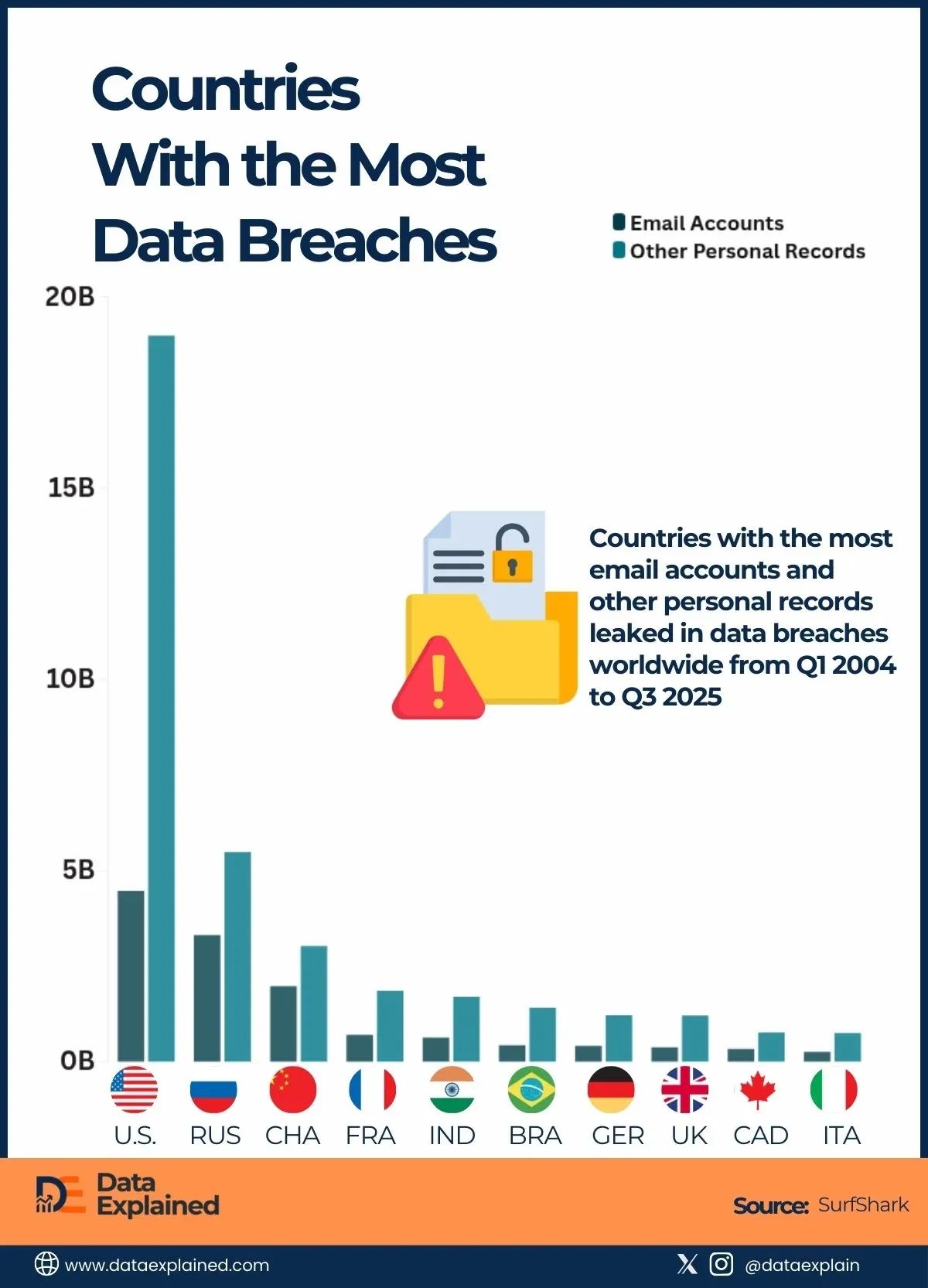
The exposed Elasticsearch cluster, which contained over 160 indices, held billions of primarily Chinese records, ranging from national citizen ID numbers to various business records. The massive leak is among the largest single Elasticsearch exposures ever recorded.

Archived

  • Cybernews researchers discovered 8.7 billion exposed Chinese records on an unsecured Elasticsearch cluster, one of history's largest data leaks.
  • The leaked data includes national ID numbers, home addresses, plaintext passwords, and social media identifiers, creating severe identity theft risks.
  • The exposed database remained publicly accessible for over three weeks before being closed, giving attackers ample time to scrape data.
  • Researchers believe the dataset was intentionally aggregated on bulletproof hosting, suggesting data broker activity or malicious intent.

[...]

According to the team, the exposed data aggregates personal identifiers, contact information, government-style identifiers, online account references, and credentials at an unprecedented scale.

The geographic distribution of the leaked records is limited, predominantly focusing on mainland China, with regional metadata spanning multiple Chinese provinces and cities.

[...]

Personally Identifiable Information (PII):

  • Full names
  • Mobile phone numbers
  • National ID numbers
  • Home addresses
  • Date and place of birth
  • Gender and demographic attributes

Account and platform data:

  • Messaging and social media identifiers
  • Email addresses
  • Usernames
  • Platform-specific account references

Authentication data:

  • Plaintext and weakly protected passwords in multiple datasets

Corporate and Business Records:

  • Company registration details
  • Legal representatives
  • Business contact information
  • Registration addresses and licensing metadata

Largest Chinese data leak: What are its implications?

Even though the 8.7 billion-record-strong dataset is no longer accessible, it was open for over three weeks, giving malicious actors ample time to scrape it. Our researchers believe attackers could utilize the data for multiple purposes.

For one, the exposed records included plaintext credentials, some with poorly protected passwords. This type of data is extremely useful for account takeovers, with cybercriminals accessing additional user details. Password information enables cybercrooks to carry out credential stuffing attacks, as users often reuse the same passwords for multiple accounts.

Another major risk for individuals is identity theft. Since the dataset included tremendous amounts of PII, together with national identifiers, malicious actors may attempt to set up fraudulent accounts. ID numbers are often the key metric that organizations and businesses demand upon setting up accounts.

[...]

23
7
submitted 2 weeks ago* (last edited 2 weeks ago) by cm0002@literature.cafe to c/cybersecurity@infosec.pub


Shadow Campaigns: Modern State-Sponsored Cyber Espionage

The search results reveal an intensifying landscape of state-sponsored cyber espionage campaigns in 2024-2026, with three major threat actors emerging:

North Korea's Lazarus Group

Between January-July 2025, Lazarus Group deployed 234 malicious packages across npm and PyPI repositories, targeting developers through compromised open source software[^1]. Their "BeaverTail" malware used sophisticated multi-stage loading techniques to steal credentials and maintain persistent access.

Earth Freybug APT

Operating as an offshoot of APT41, Earth Freybug conducts espionage against government agencies, defense contractors, and critical infrastructure[^4]. Their "Shadowhammer" malware specifically targets software supply chains, using stealth techniques to remain undetected within compromised systems.

Russia's GRU Campaign

Russia's military intelligence (GRU) nearly tripled its sabotage and subversion attacks in Europe between 2023-2024[^3]. Their operations targeted:

  • Transportation (27% of attacks)
  • Government facilities (27%)
  • Critical infrastructure (21%)
  • Industrial targets (21%)

The GRU campaign uses multiple attack vectors including explosives (35%), physical tools like anchors to cut undersea cables (27%), and electronic attacks (15%)[^3].

[^1]: Sonatype - Global Espionage: Lazarus Group Targets OSS Ecosystems [^3]: CSIS - Russia's Shadow War Against the West [^4]: Cyber Centaurs - Shadow Ops – Unveiling the Stealth Tactics of Earth Freybug

24


A digital intruder broke into an AWS cloud environment and in just under 10 minutes went from initial access to administrative privileges, thanks to an AI speed assist.

The Sysdig Threat Research Team said they observed the break-in on November 28, and noted it stood out not only for its speed, but also for the "multiple indicators" suggesting the criminals used large language models to automate most phases of the attack, from reconnaissance and privilege escalation to lateral movement, malicious code writing, and LLMjacking - using a compromised cloud account to access cloud-hosted LLMs.

"The threat actor achieved administrative privileges in under 10 minutes, compromised 19 distinct AWS principals, and abused both Bedrock models and GPU compute resources," Sysdig's threat research director Michael Clark and researcher Alessandro Brucato said in a blog post about the cloud intrusion. "The LLM-generated code with Serbian comments, hallucinated AWS account IDs, and non-existent GitHub repository references all point to AI-assisted offensive operations."

25


Weekly thread to discuss whatever you’re working on, big or small, at work or in your free time.

view more: next ›