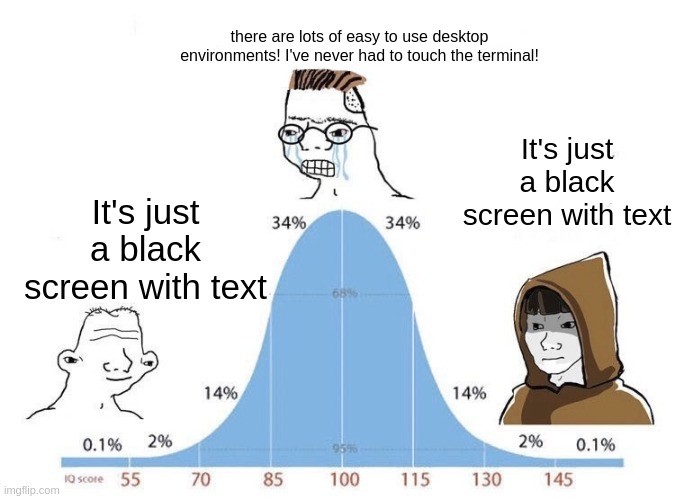
You don't have to touch the terminal. You just really, really should.
linuxmemes
Hint: :q!
Sister communities:
Community rules (click to expand)
1. Follow the site-wide rules
- Instance-wide TOS: https://legal.lemmy.world/tos/
- Lemmy code of conduct: https://join-lemmy.org/docs/code_of_conduct.html
2. Be civil
- Understand the difference between a joke and an insult.
- Do not harrass or attack users for any reason. This includes using blanket terms, like "every user of thing".
- Don't get baited into back-and-forth insults. We are not animals.
- Leave remarks of "peasantry" to the PCMR community. If you dislike an OS/service/application, attack the thing you dislike, not the individuals who use it. Some people may not have a choice.
- Bigotry of any kind will not be tolerated. This is an LGBTQ+-friendly community -- if that is a problem for you, you should leave.
3. Post Linux-related content
- Including Unix and BSD.
- Non-Linux content is acceptable as long as it makes a reference to Linux. For example, the poorly made mockery of
sudoin Windows. - No porn, no politics, no trolling or ragebaiting.
- Don't come looking for advice, this is not the right community.
4. No recent reposts
- Everybody uses Arch btw, can't quit Vim, <loves / tolerates / hates> systemd, and wants to interject for a moment. You can stop now.
5. π¬π§ Language/ΡΠ·ΡΠΊ/Sprache
- This is primarily an English-speaking community. π¬π§π¦πΊπΊπΈ
- Comments written in other languages are allowed.
- The substance of a post should be comprehensible for people who only speak English.
- Titles and post bodies written in other languages will be allowed, but only as long as the above rule is observed.
6. (NEW!) Regarding public figures
We all have our opinions, and certain public figures can be divisive. Keep in mind that this is a community for memes and light-hearted fun, not for airing grievances or leveling accusations. - Keep discussions polite and free of disparagement.
- We are never in possession of all of the facts. Defamatory comments will not be tolerated.
- Discussions that get too heated will be locked and offending comments removed. Β
Please report posts and comments that break these rules!
Important: never execute code or follow advice that you don't understand or can't verify, especially here. The word of the day is credibility. This is a meme community -- even the most helpful comments might just be shitposts that can damage your system. Be aware, be smart, don't remove France.
I'd like to meet a Linux user who's never had to touch the terminal.
The middle peak of Linux users is definitely not using GUI only workflows lmao
the issue with the terminal is that you can easily fuck up really badly if you don't know what you're doing.
the following look the same to a new user:
rcifconfig -r 0 -f puny -l all
rctrl -r all -i root -f
(both are imaginary made-up comments sothat you cannot just say "oh well obviously one does this and the other one does that)
then one goes on to nuke your home directory while the other one restarts the wifi adapter.
(and this can actually happen in practice. consider all the "always remove the french language pack" jokes that has been going around for years.)
for graphical user interfaces, you typically have icons to help you give a sense of what it's doing, typically warning signs before you do anything dangerous, etc.
I've heard the jokes about rm -rf /. I've never met anybody who's taken it seriously and nuked their system.
That command is legendary. It's one of the first bits of computer lore I ever learned, about 10 years before I ever touched Linux. In fact, at that time I knew two things about Linux: it's a free OS and don't do rm -rf /.
Of course you should do some research first, so that you're sure that you know what a command does, but if you're getting it from a forum like Stack Overflow or even reddit, you can be reasonably sure that if the commenter was trying to destroy your computer they'd get downvoted and one of the other commenters would warn you about it. Don't treat Linux like it's some kind of minefield that you have to tiptoe around. It isn't conducive to learning.
I think the real issue with the modern terminal, and Linux in general, is that we are using tools designed for programmers and system admins, who are expected to know exactly what they are doing, to build and run servers and treating them like they are end user tools. My grandmother was perfectly happy using a terminal for the only computer she owned because the tools it provided were simple and had those built in protections in a way that bash never will be.
Meanwhile many open source GUI apps are better or at least on par with their proprietary counterpart, but you can't flex with them onto noobs.
Terminal gang!
It does everything you need with ONE exception I've found: if you use it for your file manager (I do) and you find that you need to quickly select a few items based on image preview, it is not great. Now you can solve this with vifm or something, or just launch dolphin or something every once in awhile.
I use the terminal for terminal shit. File manager is not terminal shit (for me).
I usually open the terminal in my WM, then decide what I'm going to do. Force of habit
Have you used a terminal file manager with image preview like yazi? Or just a thumbnail viewer like lsix?
I didn't know a thumbnail viewer existed, I will have to try. Historically I have used sxiv in tabbed mode and just tried to remember filenames which is obnoxious.
Oof, yeah thatβs hard. yazi is a full tui file manager that can do image and other file previews, so you can flip through a directory, mark the files you want to move/delete/whatever, then hit the command to do it. lsix is basically ls for images, it generates and displays thumbnails for each file. Or can just do it from emacs.
It's not a blank screen. It's a canvas. You just don't know how to paint.
I have too sneezed with a nosebleed, those are spurious allegations
read the rfc. 'claude, what does the rfc say?' the what?
Me, not being a programmer or sysadmin or whatever, booting into TTY just for shits and giggles, playing videos via mpv with -vo=tct just cause I think it looks funny
my poor cpu. You don't even need to use -vo=tct as mpv will draw to the frame buffer if x server is not available. There's also fbi and fbpdf for displaying images and pdfs to the frame buffer
Look I just switched over from Windows, I'm new to this shit lol. I enjoy using commands while I'm learning them but mostly I just copy/paste from instruction manuals on how to install shit I want installed. Makes me feel like a master hacker.
I think itβs just been stigmatized by society as a whole for some mysterious reason. Didnβt a lot of our grandmothers slashed through terminals like fruit ninjas back in the day?
It was stigmatized by Windows, because the Windows terminal was terminally shitty. People swear to me that their new terminal is awesome, but I have my doubts. Microsoft seems to have a problem with making stuff that doesn't suck.
Heck yeah they did! I remember going over to my grandmothers house to use Word on her computer running DOS. She used that computer to keep her personal budget, do the accounting for her office supply business, write letters, and the newsletters for her church and social clubs. No gui, just a command line and some things that we would now call a TUI.
I feel like the meme got it backwards. People fussing over WMs in the middle, while newbies and veterans just using whatever comes by default on Fedora
Too often I see desktops where the only two graphical apps are some ultralight terminal and Mozilla. Why do they want to suffer?
Honestly yes. A few years ago when I was still getting into linux I'd customize the shit out of everything, wm with lengthy configuration, mostly terminal apps, "minimal" ui with custom made themes, and all that.
My current fedora system is almost default Sway with a few convienent shortcuts and a few tweaks, using GUIs where it makes sense or simply because I just want something nice. I just don't have time or the need for something so customized. Defaults are good.
Heck, I'm even considering switching to Plasma once I get a better PC (gonna need to sell a kidney or two for that to happen tho), since default Sway still requires considerable tweaking and there's a few quirks I just don't want to deal with.
I started on xfce because people said it was good for old systems. Turns out plasma runs fine on everything I've tried from the last 15 years!
Yeah, KDE is "bloated", but all that means is that there's some stuff bundled that purists aren't interested in. It doesn't seem to affect the speed at all.
I've heard so too. Might be worth giving Plasma a shot on my current shitbox of a laptop to see if it can handle it. Though that thing (about 6 years old, btw) chokes on anything that involves graphics, so I don't have any high hopes
Good luck!
Its black screen with green text
GUI is simpler because you have to remember a sequence of steps for every action you want to take and then memorize a bunch of keyboard shortcuts and then do it all again when they reinvent their product in two weeks.
CLI requires you to learn how your system is structured and where things are located and then you create scripts that last years. Not everyone wants to put in a bunch of effort just to use their computer.
Anyways Firefox just updated and they moved "save to collection" and a few other things so now I need to relearn some stuff. I hope my other apps don't reinvent themselves anytime soon. Every update I know how to use them less and less.
A regular user will never in a million years create a script.
I think that depends how you define "regular user".
(I assume this is like regulars in a "well regulated militia" right?)
GUI has the fundamental advantage that you can mostly find your way around without having to know commands, syntax, file paths etc. That's a huge advantage for the vast majority of users.
plus: most people learn graphically (visually) much easier than text-based. at least for me, it's much easier to build an intuition of something if i get a graphical display of the contents in a directory. that's why i always ls -alh every new directory that i enter, before i do anything else. for many people, it's better to use GUI file explorer because you also get image previews etc. but the same concept also applies to other issues:
like, if you want to configure various hardware on your machine, you open the settings app and get many icons that you can click on. meanwhile, on the terminal, there's no clear list of things that you can even configure.
yea as much as like using the command line, I'm having a hard time remembering all the options required, especially with things i use rarely. the discoverability is just better in GUIs
Discoverabilty is the point. That's what a GUI excels at. The focus of the terminal is "expressiveness" (I think that's the commonly used word). It is usually clear when you need one vs the other: bulk or compound tasks, repetitive tasks, or very particular tasks are where the terminal excels.
It sounds like you might benefit from man or tldr as a sidenote. Most people know man, but tldr is also a nice to have.
yeah tldr is great. and the idea of expressiveness vs discoverability is something I've to think about. thanks!
but i was more thinking about things like using ps2pdf to reduce the size of scanned (xsane) pdfs. remembering that ps2pdf can do this is difficult for me. i have my notes but it's still cumbersome.