this post was submitted on 27 Jul 2026
8 points (100.0% liked)

Ask Android

3842 readers
15 users here now

A place to ask your questions and seek help related to your Android device and the Android ecosystem.

Whether you're looking for app recommendations, phone buying advice, or want to explore rooting and tutorials, this is the place for you!

Rules
  1. Be descriptive: Help us help you by providing as many details as you can.
  2. Be patient: You're getting free help from Internet strangers, so you may have to wait for an answer.
  3. Be helpful: If someone asks you for more information, tell us what you can. If someone asks you for a screenshot, please provide one!
  4. Be nice: Treat others with respect, even if you don't agree with their advice. Accordingly, you should expect others to be nice to you as well. Report intentionally rude answers.
  5. No piracy: Sharing or discussing pirated content is strictly prohibited. Do not ask others for a paid app or about how to acquire one.
  6. No affiliate/marketing links: Posting affiliate links is not allowed.
  7. No URL shorteners: These can hide the true location of the page and lead people to malicious places.
  8. No lockscreen bypasses: Please do not comment, link, or assist with bypassing lock screens or factory reset protection.
  9. No cross-posting: Please take the time to make a proper post instead of cross-posting.
Other Communities

founded 3 years ago
MODERATORS
 

I use a password manager personally, but my work uses a different application. Both common names in this space.

Android lets me set one password filler, but I don't see how to go about having two active, if that's even possible.

Ideally, I'd like to keep the application/web credentials for work in the work password manager, and everything else in my personal one, and get recommendations/autofill from only the one with a matching app ID or URL saved.

Any tips?

I have both installed, but opening the work password manager every time I need it is annoying.

top 15 comments
sorted by: hot top controversial new old
[–] NigelFrobisher@aussie.zone 1 points 4 hours ago
[–] RogueBanana@piefed.zip 2 points 7 hours ago* (last edited 6 hours ago)

Definitely keep personal and work stuff separate. Doing otherwise might get you in trouble with your workplace. Credentials are absolutely sensitive so storing that in your personal device or personal cloud account can be a security risk, especially when it is mixed with your personal files.

I am currently using bitwarden but with 2 separate accounts and the work account is logged in a separate work profile. My personal account is not logged anywhere in work devices either. When I am switching jobs, I would probably mass delete everything without affecting my personal entries.

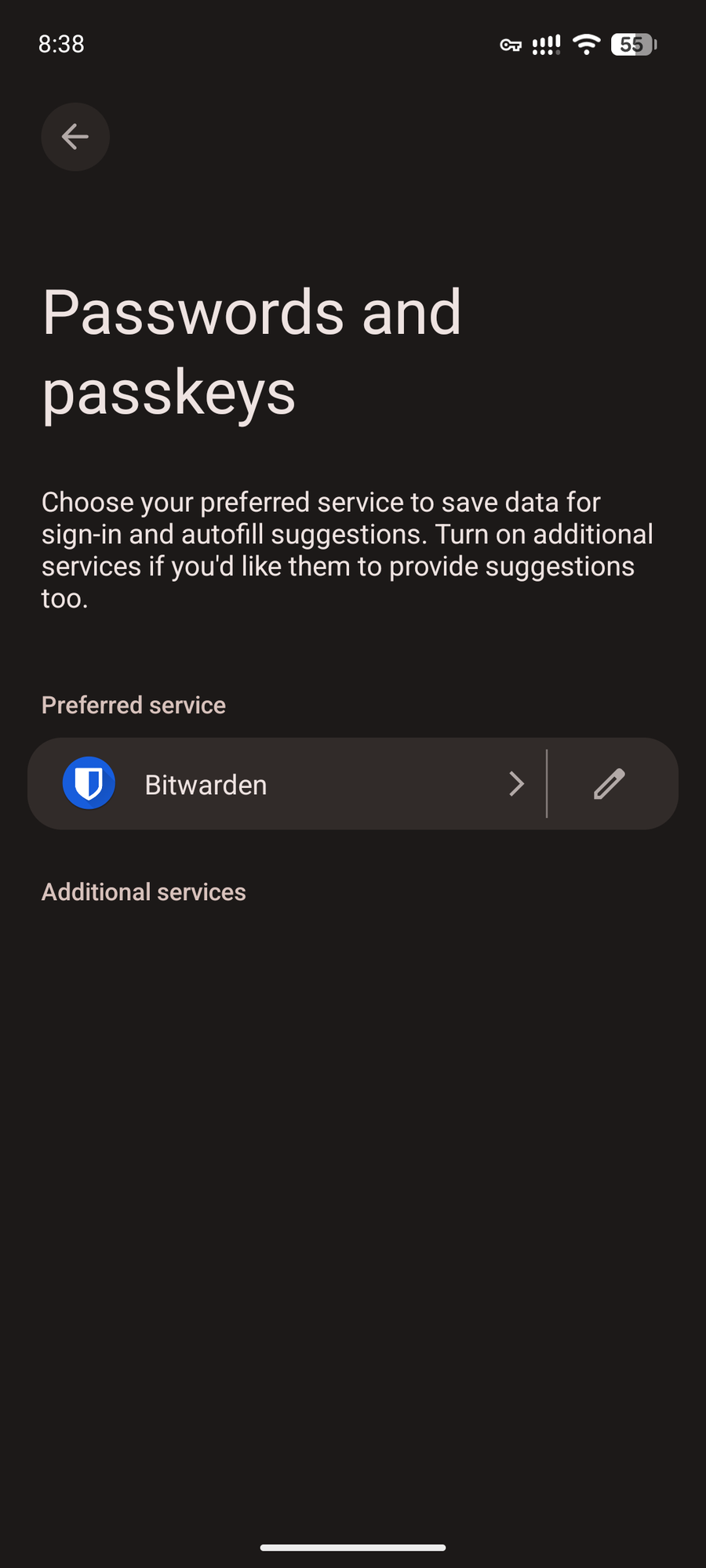
But coming to the actual autofill part, it is pretty much impossible to use 2 of them simultaneously as a service afaik. You can only keep 1 active and manually copy paste for the other. But if you are using the same app for both, bitwarden lets you log in 2 accounts but you still have to switch between the accounts for it to kick in. If you don't care about security risks then you could use share functionality to share one account's vault to the other and keep everything accessible with just 1 account but obviously not recommended.

Also any particular reason you cannot share the apps in question?

EDIT

Hold on, looks like you can have multiple password services enabled now, at least going by the description on my android 17 phone. Not sure if thats new or I just misunderstood it back then. altr
[–] Gladaed@feddit.org 1 points 18 hours ago* (last edited 18 hours ago) (1 children)

Having the need for a work password manager on a personal phone is spooky. Are you sure you actually need it? Or mightn't be better of with a work and personal phone?

I am having a bad enough pw manager experience on my android already so I often visit the pw manager app manually.

Googling indicates that's not possible.

[–] clay_pidgin@sh.itjust.works 0 points 17 hours ago (3 children)

I prefer to carry only one phone, but my company pays half of my bill and has no control over, or applications installed on, my phone. I don't think I'd generally recommend using a personal phone for work, but it works for me.

Yeah, my password manager doesn't autofill reliably either, and sometimes doesn't recognize that it already has a credential saved and so tries to save another one. It's pretty annoying, but I don't trust Google's password manager.

Googling indicates that’s not possible.

My searching led me to the same conclusion, but I was hoping someone had a good idea.

[–] Gladaed@feddit.org 2 points 17 hours ago (1 children)

I mean... I would warn against doing so... Buuuuut. In theory you could look for a password manager that runs them both in the background and provides their output to you. But that's a security hazard. Let's have a Google.

[–] clay_pidgin@sh.itjust.works 1 points 15 hours ago

Doesn't sound like a good idea, but good idea!

[–] Gladaed@feddit.org 0 points 17 hours ago (1 children)

Bonus: there is containerization: Some android work profile thingmabob. Googling "password manager two android facade that runs multiple work and personal" lead me there.

Google AI shorthand; To run multiple work and personal accounts on Android with isolated separation, use 1Password or Enpass as they support multiple independent vaults and accounts within a single app facade.Managing Work and Personal ProfilesMultiple Vaults/Accounts: Set up distinct vaults inside a single master application so that professional and private entries never mix.Android Work Profile Integration: Android isolates work apps inside a corporate container. You can install your chosen password manager inside your system work profile or link work-managed browsers to handle credential autofill safely across both environments.Biometric Lock: Secure the master application facade with fingerprint unlock, requiring authentication before switching context between professional and personal secrets.If you can share which specific password manager you currently prefer or if your work profile is managed by an IT administrator (EMM/MDM), I can provide the exact steps to configure autofill for your setup.

[–] clay_pidgin@sh.itjust.works 1 points 13 hours ago

Hmm, this might work. Thank you.

[–] Gladaed@feddit.org 0 points 17 hours ago (1 children)
[–] clay_pidgin@sh.itjust.works 1 points 15 hours ago

Sounds like things might improve, but the password managers need to support it. More reading needed.

[–] divingdonkey@sh.itjust.works 0 points 17 hours ago (1 children)

Have a look at running your work apps in a work profile, like you can do with Shelter or Island. This will enable you to use separate autofill solutions

[–] clay_pidgin@sh.itjust.works 0 points 13 hours ago (1 children)

I don't have any work apps other than the password manager and web browser. This might work if I use a different browser for work. Unless profiles work differently than I think - I'll read up on it!

[–] divingdonkey@sh.itjust.works 1 points 13 hours ago (1 children)

Yes, you'll have to run two instances of your browser, a private one with pw manager 1 and a work profile one with pw manager 2. They can be the same app. If things go ever south at work, you can just nuke the work profile and be done with it.

[–] clay_pidgin@sh.itjust.works 1 points 13 hours ago

Cool, thank you. I assumed I'd need a whole second browser.

[–] wesker@lemmy.sdf.org 3 points 17 hours ago

You can install two, but I only think you can have one active at a time to supply auto-fill. It might be possible if you leverage a work profile and install the work password manager in the work profile, but then it'd likely only autofill for apps that are installed in the work profile -- which honestly, is how you should be compartmentalizing things anyway, if you use one phone for personal and work functions.