homeassistant

20786 readers
111 users here now

Home Assistant is open source home automation that puts local control and privacy first.
Powered by a worldwide community of tinkerers and DIY enthusiasts.

Home Assistant can be self-installed on ProxMox, Raspberry Pi, or even purchased pre-installed: Home Assistant: Installation

Discussion of Home-Assistant adjacent topics is absolutely fine, within reason.
If you're not sure, DM @GreatAlbatross@feddit.uk

founded 3 years ago
MODERATORS
1
92
submitted 1 year ago* (last edited 1 year ago) by NarrativeBear@lemmy.world to c/homeassistant@lemmy.world


Hi there!

Let's gather all those recent inspiring Home Assistant dashboards that you have been working on into one thread.

Show off you creative layouts, and card choices, to hopefully give both new and current users ideas for their own setups!

Let's inspire one another! 😊

2
3
4
5


I want to leave HAOS live and also run docker for an arr stack sparately.

I got a good deal on a pi5 16gb. I wont get another and NUCs are expensive. I want to put an arr stack, deluge and Jellyfin for local single device viewing. I don't see HA using more than 6gb of RAM, or close to it, so tere should be room to manage this.

I have a 256gb sd, I will change eventually to ssd, so I think I have the resources.

I just need the know how, could anyone advise on some walkthroughs that could allow me to not knock HA while I build out the other side.

6
7


Hi!

**My ask up front: **Can someone walk me through the process of how a github project written in python winds up interacting with YAML on an ESP32? Looking for some orientation so I can "RTFM" better.

Background: I have Espectre up and running in my house, which is cool. What I also have in my house is LED crown molding controlled by WLED.

I think the ESP-32s I'm using for the lighting have enough juice to run both items of code (and probably a few other sensors). However, I don't know how to combine them.

What I'm specifically confused about is when I provision a device with ESPHome, I'm not actually clear on what it does. As in: I gather it's making a framework specific to the board to handle running the code in the YAML, but I'm not sure what that looks like specifically. Which means I don't know how to take the code from WLED or ESPectre and also include it (is it as simple as an include?) so that I can make YAMLs that utilize the functionality those to projects provide.

I am especially confused what is happening when YAML code calls specific github projects. Is it literally pulling code from the repository?

For context I have decent capability and experience, but mostly within code, bridging multiple architectures like this is new. I have stumbled on for years doing some fairly advanced projects, but I mostly am a very determined monkey banging on a type writer.

8


Hi All!

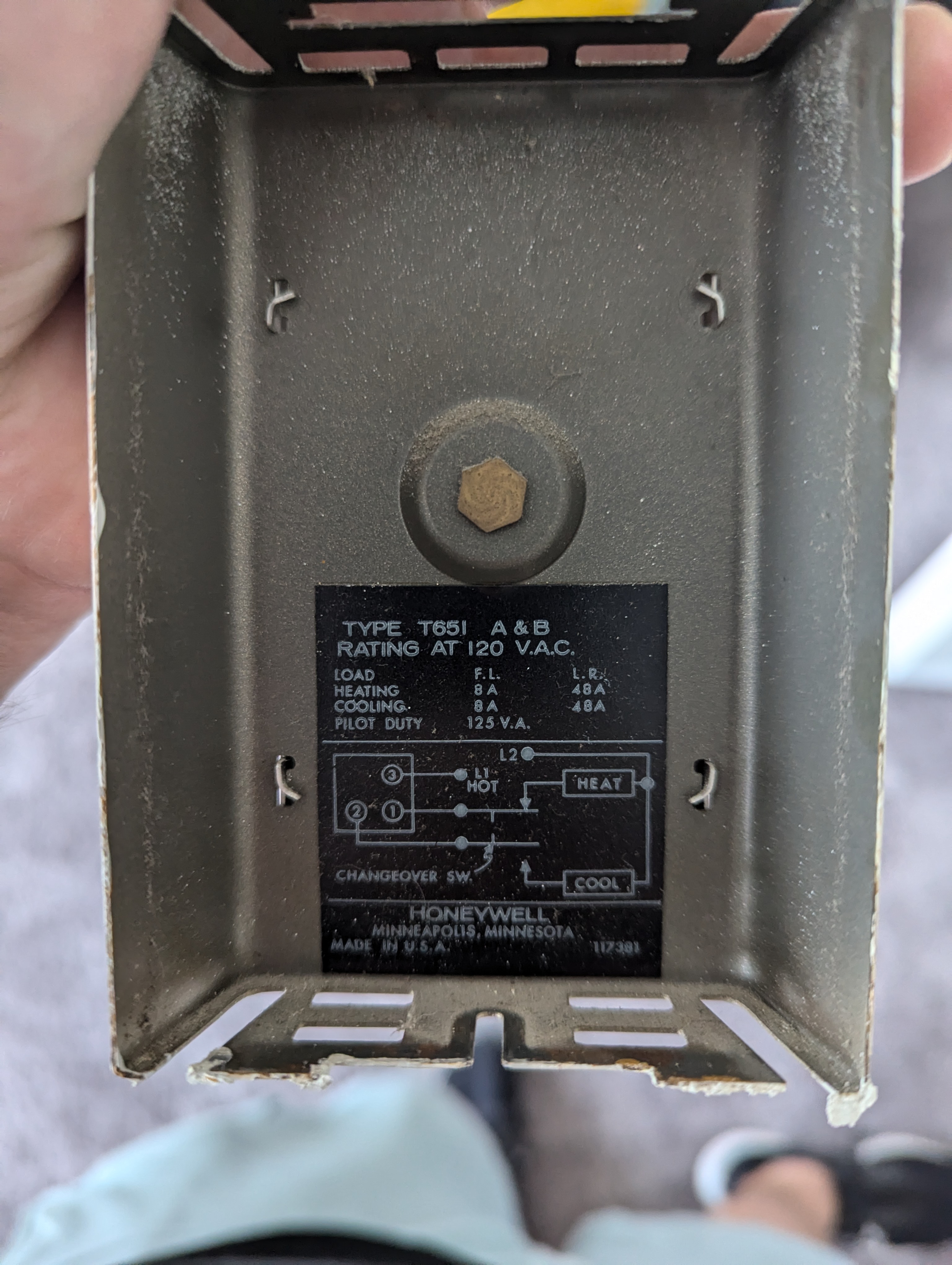
Recently purchased a Honeywell t6 Pro Z-wave thermostat, and a Zwave dongle to go with it.

I'm running HA in docker, so I spooled up the Z-wave JS UI in a seperate docker container as well. I then added the HA integration for Z-wave and got it talking to the ZwavejsUI

I can tell something went right because the thermostat shows up in the HA integration as "Node 2", but there aren't any exposed entities that have anything to do with thermostat functions; It shows things like "node status", "ping", etc.

Edit: It also shows up as a "unknown manufacturer" and product in ZwavsJSUI

So something is working... just not as a thermostat.

Any help? I'm a few steps away from returning it and just using a shelly relay to short the two wires together.

9


I have a KIA, it is decent but I would love more freedom ans I sont trust that access will remain free. VW is paid now.

I am in europe and looking to buy in2027.

10


My least favorite noise is the low battery chirp that normal smoke detectors emit when low at night. I'm looking to replace my 8 hardwired smoke alarms with new ones that don't have that. I just moved and miss my nest protects only bc this sound doesn't happen. I've read that protects have been discontinued and replaced with these sc5's from first alert . Since I've degoogled I don't really need the "protect integration"

So I need hardwired interconnects (US law afaik bc existing are hardwired) but mostly would like the voice alerts and no battery chirp. I've read that xsense is fairly decent but these new ones that have the voice alerts don't appear to be UL certified so that's a no-go, unless I've just missed it.

I was looking at the anyplace alarms as I saw them in another thread, but can't tell if the low battery notification is a chirp or not? Anyone had any experience with these? They also appear to be out of stock on home depot so no idea if/when they'll be available.

I'm open to all options that are hardwired.

ETA: I've reached out to x-sense to see if the XP0J-SA is UL/ETL certified. I'm waiting to hear back

11


I just picked up a 4K commercial display to upgrade my TV for cheap. It has an RS232C port on the back for control, and Home Assistant has a native integration to control it via a local Linux tty. The hitch is that my Home Assistant server is located in a spot not near the television, and running physical serial line to it would be inconvenient. But, since I have a Raspberry Pi connected as the streaming media box, I should be able to plug a USB adapter into it and route the serial data over the network, right?

Is there a a good way to do this in HAOS?

12
26
submitted 3 weeks ago* (last edited 3 weeks ago) by grue@lemmy.world to c/homeassistant@lemmy.world


I'm trying to start using Thread devices in Home Assistant for the first time. I've gotten a Sonoff Dongle Plus MG24, flashed it with OpenThread firmware, added it as an OpenThread Border Router in Home Assistant, and added the Matter integration.

However, when I try to commission a Matter/Thread device using the Home Assistant companion app on my GrapheneOS phone, I scan the QR code, get to the screen that says "power on your device and make sure it's in setup mode," and "connect your phone to your main 2.4GHz network" and tap the "I'm ready" button, but then it gives me an error that I have "no Wi-Fi connection" even though it is definitely connected to the correct (2.4Ghz, not 5GHz) network.

I've also checked that the Home Assistant app has all the necessary permissions (network, nearby sensors, etc.)

Help?


Edit: I just found these bug report threads that look like they're relevant, but I'm still reading through them:

13


What is your update policy? Are you on auto update, or do you manually go over stuff, do you pick a day to just flush it all though, or are you just on an old version?

Share why and how you run your updates? I would like to hear how you all manage them

14


Had an old iPad in a drawer that can't install anything from the App Store anymore, so it became a photo frame. It loads a fullscreen page from a Home Assistant add-on I wrote and cycles through family photos straight off the SMB share on my NAS. No cloud, no account.

In the morning the hallway motion sensor switches it into weather mode for a couple of hours, so every 8th photo becomes a weather screen with the next 12 hours. The latest version also has a small weather badge in the corner that can stay up all day, or only show up when rain, snow, frost or heat is coming. HA just pushes to it with two rest_commands - the frame itself has no token for HA.

The part I'm happiest with is the bin reminder. The frame tells you the day before which bin goes out, and you don't type the dates in: you upload the PDF leaflet from your municipality and it reads the dates out of it, locally, no OCR. It works off the coloured cells in the calendar grid (row = ISO week, column = weekday) and checks each one against the printed day number.

It does ingress now too, so it opens from the HA sidebar, and with Mosquitto running it creates MQTT entities for the next collection, photo count and weather mode on its own.

Most of the work honestly went into old Safari. iOS 9 silently ignores half of modern CSS, so everything has px fallbacks and the weather screen is laid out with tables.

Install: Settings > Add-ons > Add-on Store > three dots > Repositories > add https://github.com/emo546/ha-snapframe

If you have an ancient iPad and something looks broken on it, tell me the iOS version.

15


https://map.projectmonarch.org/

We now have tiny trackers that are being put on Monarch butterflies to track their migration. They use GPS and bluetooth. Citizen scientists download the app on their phone and when a tagged Monarch flies near their phone, the data is updated with its location and stored data.

Now that we have bluetooth working on Home Assistant, is there anyone who knows how we could get an integration to identify these butterflies and update the master database?

I'd definitely set some sensors up outside to help this project.

16
24
ZHA started randomly dropping devices (lemmy.linuxuserspace.show)
submitted 3 weeks ago* (last edited 3 weeks ago) by Strit@lemmy.linuxuserspace.show to c/homeassistant@lemmy.world


For years I have had my zigbee network functional with a ConBee2 zigbee coordinator in my home assistant box.

But this week, devices started to randomly drop off the zigbee network. I could re-pair them and get them in again. But yesterday, it suddenly dropped 24 devices... Sensors, buttons and lightbulbs seem to be the most common ones.

I've restarted the ZHA integration, restarted the docker container, even downgraded to 2026.8.3. Still the same.

I checked the Home-Assistant github repo issues and there are lots of issues regarding zigbee and dropped devices in the last 2-3 weeks.

Does anyone have any suggestions as to why this happened all of the sudden?

The zigbee network has been stable for years before this.

EDIT: At this time I have re-paired all the devices and will see if they start dropping off again.

17


Just read about this and was wondering if anyone has tried it. Pros/cons/notes? This seems pretty neat on the surface and I plan on trying it myself.

https://github.com/francescopace/espectre/tree/main

18


I put together a small browser-based tool for the Home Assistant 2026.9 release called Release Lens.

Select or paste the integrations you use, and it filters the release notes down to changes that may be relevant to your setup.

It does not need a Home Assistant login, URL, token, configuration upload, or installation. Every result links back to the corresponding official Home Assistant source.

https://release-lens-2026-9.sags-demo-0d.chatgpt.site/release-lens/index.html

It is meant to be a quicker way to scan a release, not a replacement for the official notes. If you spot anything classified or mapped incorrectly, let me know.

19
20
15
ZHA and buttons? (startrek.website)
submitted 1 month ago* (last edited 1 month ago) by Stampela@startrek.website to c/homeassistant@lemmy.world


Switched from a Conbee 2 with Phoscon, to a Sonoff Dongle Max and ZHA. Bit of pain remaking the network but now everything works as before or better. Aside from the showstopper that’s the buttons NOT having anything useful! What’s the point of a button that has to drop the battery past a certain point to trigger anything? That can’t be right. Help please? :(

Edit: solved! Thanks to the helpful comments, I found out my SNZB-01P has a blueprint. Didn’t know how to use them but wasn’t hard so I’m back to fully operational :D

21


I am looking at getting the voice thing from nabu casa.

I have seen people mess witb nests and echos and similar products either through jailbreaking or full on board replacements and I am trying to pick a lane.

I just want to be able to do simple commands for now but if I got the premium it would sit in the comms cabinet floors away from me. Does it act as just a brain and I can attach any mic, echo, nest to the system after?

22


I have had a bunch of little issues which ultimately come down to a knowledge gap, me just not knowing enough about Home Assistant to know where to even look. I've solved most of my problems with persistence and searching for other people's issues, but some issues are just not going anywhere.

It used to be that a project like this would have an IRC chatroom and tonnes of handy experts would be there chatting and helping to point you in the right direction. Now that IRC has largely gone by the wayside where do you all go to have that quick back and forth chatting to get a vague idea of where to go with next steps?

To be clear, I'm not so much asking about where on the system to find logs or the like, I more mean the community of people chatting and helping each other troubleshoot issues.

23


I got the ZBT-2 and there is very little setup or instruction involved.

Plugged in its one and only cable to my pi5. It installed open border thread integration and matter integration.

It flashes blue seemingly at random.

I cannot get any of the IKEA Myggbett, Bilresa or whatever the sockets are called to connect.

I am sat at my ZBT-2, connected to Pi via USB C. Pi is on LAN. I am on wifi.

I get one of two failures

1 unable to connect, check device, reset, check pairing mode etc.

2 setup requires an open border thread controller and then I check and the integration is bugging out.

Please tell me where I am being an idiot

24


I feel the aquarium hobby is a retro hobby. Sure, the lights and filters have got much more expensive, and now rimless tanks are popular online, but the standard size tanks like the 40 breeder and the 75 gallon are the same footprint from decades past.

What can I automate? Can I improve monitoring and alerting? There are some off-the-shelf options like Neptune Systems Apex, but what could a person do with Home Assistant? That's what I'm trying to figure out.

Hardware

My home automation platform of choice is Home Assistant. This runs bare metal on a little mini PC NUC with the following specs:

  • System76 Meerkat (Intel NUC10i3FNB board)
  • Intel Core i3-10110U @ 2.10GHz, 4 threads
  • 16 GB RAM
  • 228 GB disk
  • Home Assistant OS
  • Zigbee: ZBT-2 and ZHA
  • Z-Wave: ZWA-2 and Z-Wave JS

To enable all the automations I'm writing about here, each aquarium gets these smart devices. When relevant, I will call out the specific bit of aquarium gear I picked for how I need it to work with Home Assistant.

  • Power Strip: Zooz Zen20 Power Strip. This has 5 regular plugs and 2 USB plugs, all of which can be individually controlled. This runs on my Z-Wave network. Each aquarium gets one.
  • Temperature Sensor: Apollo TEMP-1 Temperature Sensor. This allows me to get the temperature into Home Assistant; it runs on ESPHome and connects via Wi-Fi. If aquariums are close enough together, a single sensor can have multiple probes.
  • Water Leak Sensor: Zooz Water Leak Sensor. At least one goes into each plant saucer/catch tray that I use with my canister filters.
  • Smart Button: Aqara Mini Switch. I can use these buttons at the tanks to trigger automations without having to fish out my phone. Single press, double press and long press are all available to do things like toggle the lights or activate maintenance mode.
  • Automatic Feeder: Avast Labs Plank MINI. These feeders have no built-in schedules or batteries and that's what I like. When there's power to the unit, the corkscrew turns, dispensing food. To stop dispensing, turn off the power.
  • Heater: Bulk Reef Supply Titanium Heater Element. These do not have built-in thermostats and plug directly into the Zen20. When the plug is powered on, it heats. To stop the heat, turn off the power. Easy peasy. The smallest these go are 100W and it's what I use in my 20 gallon long aquariums. In the 75 gallon display tank, I use two 200W heaters.
  • Filters: Eheim Classic Canister Filter & Aquarium Co-Op Coarse Sponge Filter. I like having both a canister and sponge filter in my tanks. If my canister is clogged and I don't notice, the sponge can carry things until I do. In the event of a power outage, I can run the air pump for the sponge filters off a battery pack for a good long time. Finally, having a seeded sponge filter at all times is nice for quickly spinning up a new tank.
  • Air Pump: Eheim Air. This pump has been the quietest in my experience.
  • Lights: Hygger HG999. This is just a budget light but it's a good price and my plants seem happy. Works fine powering it off and on from the power plug.

A well-decorated freshwater aquarium with green plants, driftwood, and a skull decoration on sandy substrate. Several small fish swim among the vegetation and ornaments under blue lighting.

Aquarium 2! This is my "shrimp tank", which I put white cloud mountain minnows with. I'm rehoming the shrimpies and the minnows into a hillstream tank which is cycling now! (Richmond, VA · August 2026)

Lighting

Probably one of the easiest and most forgiving things to automate is the lighting schedule. I use Hygger HG999 lights with my tanks and they're fine for the price. If I plug the light into a smart plug, then it's easy to set a simple schedule to turn the lights on and off. The HG999 does have its own little controller, but it restores its previous state on power restore. So I just turn it on for the first time, set the brightness I want, and control it with Home Assistant via the smart plug.

Helpers

  • Lights On Time: Date and/or time. Time only. Example: 7:30 a.m.
  • Lights Off Time: Date and/or time. Time only. Example: 4:30 p.m.
  • Lights On: Template binary sensor. It converts Lights On Time/Lights Off Time into an on/off state that then drives the automations. Example: On

Automations

Each tank gets two automations for lighting.

  • Lights On: When the Lights On template binary sensor turns On, this fires and turns the lights on.
  • Lights Off: This is the off version! When the Lights On template binary sensor turns Off, this fires and turns the lights off.

Dashboard

The dashboard gives me exactly one control for the lighting.

Dashboard for Aquarium #1 showing status alerts including a dry leak and overdue water change, with controls for main power, filter, heater, light, and feeder, along with settings for temperature setpoint (75.0°F), feed schedule (8:45 AM), and other aquarium parameters.

I have controls on each tank dashboard to do a manual feed, to adjust when the feed happens, a feeder master switch and the feed seconds.

Improvements

I plan to add a WLED light strip to each tank. The Hygger lights have morning, evening and night modes, which basically set the colors at a dim level. It's really more aesthetic, but I would like to be able to replicate that with my setup because I think it's cool. Plus, it seems the sudden on of the main light startles the fish, so I'd like to ramp up in the morning and ramp down in the evenings.

A vibrant blue and red betta fish swims among green aquatic plants and brown leaf litter on the dark substrate of an aquarium.

Tina! (Richmond, VA · August 2026)

Feeding

Feeding the fish is one of my favorite things about fish keeping. So why then would I want to automate it? Well, mostly to see if I can. But secondarily, it means I don't have to feed the fish every day if I don't want. I let the autofeeders dispense the dry pellets and I will supplement with frozen treats when I'm in the mood. Plus, if I automate the feeding like this, then I don't need to recruit anyone to come feed the fish while I'm away.

I knew I wanted to use automatic feeders with my fish. In my research, most hobbyists seemed to dismiss the idea as pointless and maybe even dangerous. Most of the anecdotes I saw were people using cheap barrel feeders like the Eheim Autofeeder while they were away, coming back to dead fish because the feeder dumped too much food into the aquarium.

Naively undeterred, I started experimenting with what was actually possible. I did try the cheap barrel feeders and yeah, they're not great. The dispensing bit is clunky and not very precise, plus there's no way to have a fasting day schedule with the barrel feeders I tried (Eheim and Aquarium Co-Op). That's where Home Assistant and the Avast Labs Plank MINI come in. This is a dumb feeder. If I plug it up, it runs the motor that spins the auger to dispense food. I then power off the plug to stop it. Hell yeah.

It actually took me a long time to find this feeder because I didn't know what to type into the search bar. Avast makes a regular-sized Plank, which is expensive. The mini is also expensive compared to the battery powered barrel feeders but I just squint my eyes and hit the buy button. Buy once, cry once, I always say.

This automation could be dangerous for my fishy friends so I spent a fair amount of time thinking through the edge cases and how this could fail. Accidentally dumping the full canister of food into the tank because a run got stuck would be a critical incident. Let's try not to do that.

The other failure mode is less critical. That's the feeder not dispensing food when I think it is, so I've also built some automations and monitors to try to catch this failure.

Helpers

  • Feeding Enabled: Toggle. This allows me to arm and disarm the automatic schedule, should I for some reason want to turn off the automatic feeder without having to go around disabling automations. Example: On
  • Feed Time: Date and/or time. This is when the food drops. Example: 7:45 a.m.
  • Feeder Seconds: Number. This is the number of seconds the motor should run. I ran a few test runs of the feeder to see how much it dispensed and I continue to tweak this as needed. Example: 35
  • Feeder Active: Toggle. The automations and scripts set this helper during legitimate feeding paths. Example: Off
  • Last Verified Feed: Date and/or time. I use this helper to work out whether a scheduled feed actually happened. Example: August 24, 2026 at 7:45 a.m.

Automations

  • Feed: The Feed Time helper triggers this automation. When the time arrives, it toggles the Feeder Active helper on, powers the feeder on, and the auger starts to dispense food. It waits the number of seconds I set in Feeder Seconds, then it powers the feeder off and toggles the Feeder Active helper off.
  • Cutoff: This automation monitors for every edge case that I could think of that would cause an outlet to be on when it shouldn't be, then turns off the feeder and sends out all the alerts to all the places. There are three triggers:
    • Overrun: If the outlet has been on past the max feed window, then this trigger executes. The max feed window is a hard-coded value of 120 seconds.
    • Unexpected on: This trigger fires if the outlet came on with no feed running. A ghost Z-Wave command, a hand tapping the strip, a stale state restore. This branch only works because the automation switches the Feeder Active toggle helper on during a real feeding session. So the condition boils down to this: the plug on the feeder is powered on and the Feeder Active toggle helper is off.
    • Startup recovery: This trigger fires if the outlet was already on when Home Assistant booted, which probably means HA rebooted mid-feed.
  • Feed Verify: This runs a few seconds into a feed and checks the outlet is actually drawing current. If it is, it stamps Last Verified Feed. A relay can report a perfectly clean feed into a dead outlet and this is the automation that catches it.
  • Feed Watchdog: This runs 15 minutes after the feed was due and alerts me if nothing stamped Last Verified Feed today. This one is for a feed that never ran at all.

Dashboard

Dashboard for Aquarium #1 showing status alerts including a dry leak and overdue water change, with controls for main power, filter, heater, light, and feeder, along with settings for temperature setpoint (75.0°F), feed schedule (8:45 AM), and other aquarium parameters.

I have controls on each tank dashboard to do a manual feed, to adjust when the feed happens, a feeder master switch and the feed seconds.

Heaters

Aquarium heaters are notoriously unreliable. The general advice on them is that they're so unreliable that fish keepers should replace theirs proactively, every 2 or 3 years. The main thing is the cheaply made thermostats on the heaters can fail in the on position, cooking all the fish in the tank. Or the glass can break, causing an electrocution risk.

Sources:

Hobbyists recommend using a separate controller, like an INKBIRD. Then I'd just turn the thermostat up on the aquarium heater and let the INKBIRD control the temp. The INKBIRD is higher quality, one presumes, so is less likely to catastrophically fail. Instead of an INKBIRD, I decided to use Home Assistant as my controller.

To run the heaters, I use the Zooz Zen20 Power Strip, Apollo TEMP-1 Temperature Sensor, and the Bulk Reef Supply Titanium Heater Element. I'm choosing the BRS heater because it does not have a built-in thermostat. I power on its plug to run the heater and I turn off its plug to turn off the heater.

I've seen people say to get a standard aquarium heater and to set the temp a few degrees above the target so the external controller can drive the heater, but if the controller fails in some way, then the built-in thermostat can be the backstop. I reject that because if I don't trust the thermostat enough to run the heater, why would I trust it to be the backstop?

This is the most dangerous automation. A heater stuck in the on position can kill the fish in hours, so I've really spent a lot of time and energy to ensure I've accounted for the failure modes and edge cases that could cause the automations to fail. So far so good.

A colorful fish with a reddish-orange chest and spotted gray-blue body swims in an aquarium among green aquatic plants, driftwood, and fallen leaves. The tank features dark water with hanging root systems visible at the top.

A male pearl gourami in the 75 gallon tank downstairs. (Richmond, VA · August 2026)

Helpers

If I were building this today, I'd just use the Generic Thermostat integration but I built this before I knew about the integration. There's little value that I can see to migrate to the integration so I'm just going to keep using my hand rolled solution.

  • Set Point: Number. This is the target temperature of the aquarium. Example: 78
  • Hysteresis: Number. I didn't know what this meant before working on this project but hysteresis is the gap you deliberately leave between the point where something switches on and the point where it switches off, so it doesn't flap back and forth every time the measurement wobbles across a single number. If I set the hysteresis at 1, then at 77.5, the heater turns on. At 78.5 it turns off. Hysteresis is basically the band of the swing. Example: 1
  • Call For Heat: Template binary sensor. It reads the temperature probe, then compares against the Set Point and half the Hysteresis, then returns true or false depending on the target temperature and the actual temperature. It also reads its own current state, which is what creates the band: once it's on it stays on until the top of the band, and once it's off it stays off until the bottom. If the sensor is not returning a value, say the probe got unplugged, then it falls back to false so a heater can't get stuck on.
  • Maintenance Mode: Toggle. Every tank gets a helper that allows me to put the tank into maintenance mode. This stops the filters and disables the heater so it's not running during a water change. It also holds off the temperature alerts, the sensor offline alert and the filter watchdog, because none of those are news while I've got my hands in the tank. Example: Off
  • Temp Offset Alert: Number. This is the maximum amount of temperature swing, compared to Set Point, allowed before the system starts alerting. Example: 3

Automations

I use several classes of automations to run the heaters and verify everything is working correctly.

  • Heater On: There are three triggers for this automation. When Call For Heat flips to true, when Home Assistant restarts, and when Maintenance Mode turns off. This automation is gated on Call For Heat, so when Home Assistant restarts, if Call For Heat is off then nothing happens. It's also gated on Maintenance Mode. If it's on, then do nothing because I'm doing a dang water change.
  • Heater Off: There are also three triggers for this automation. When Call For Heat flips to false, when Maintenance Mode turns on and when Home Assistant restarts. Both Heater On and Heater Off fire on a reboot, so this one also carries the appropriate conditions to let the correct mode win.
  • Low Temperature Alert: This triggers when a tank has drifted below setpoint by more than the alert offset.
  • High Temperature Alert: This triggers when a tank has drifted above setpoint by more than the alert offset.
  • Heater Stuck On: This triggers if the relay reads off while the heater outlet is still drawing over 20W. This is a critical automation and I've experienced this exact condition.
  • Temperature Sensor Offline: This triggers if the temperature sensor is offline for more than five minutes.

Dashboard

Dashboard for Aquarium #1 showing status indicators including temperature at 74.6°F, energy at 12W, and various system controls like main power, filter, heater, and light switches, along with settings for temperature setpoint and hysteresis levels.

The dashboard for aquarium 1. At the bottom are the controls and dials for the temperature automations and helpers.

Leak detection

I have no idea if canister filters are more prone to leaking than hang-on-back filters, but if one of mine springs a leak, I'd like to know it. So at a minimum, each of my tanks gets a Zooz Water Leak Sensor that goes into the leak tray of each filter. I have a holding/QT tank that uses an undergravel filter and a hang-on-back. For that one, I put the leak sensor right under the hang-on-back in case it overflows.

I treat leak detection alerts as critical, so they play no matter the time of day or night.

Helpers

  • Leak Detected: Toggle. When a leak sensor detects water, the automation toggles this On.
  • Leak Detected Time: Date and/or time. This records the date and time of an active leak.

Automations

  • Leak Alert: This automation fires when a leak sensor detects water. It repeats every 5 minutes while the probe reads wet, capped at 12 passes, so an unanswered leak nags for an hour and then stops. Each pass plays a prerecorded clip at full volume and sends a high-priority push alert to my phone.
  • Leak Latch: This automation fires when a leak sensor detects water. It turns on the Leak Detected helper and sets the Leak Detected Time helper. I do this so a leak detection must be manually cleared.
  • Leak Reset: This is actually a script, but it's what resets the Leak Detected and Leak Detected Time helpers. I clear the leak from the dashboard.

Dashboard

Dashboard displaying status of six aquariums with temperature and energy readings, operational modes, leak status, and a shared light schedule showing lights on from 8:00 AM to 4:00 PM.

I show the leak status in several places in the UI. Here on the fish dashboard, plus the alert dashboard and each individual tank dashboard.

Alerts

Since Home Assistant is running important life support for my fishy companions, I've put a fair amount of thought into making my alerting system as robust as possible.

Everything related to life support gets both a voice announcement played loudly over our house speakers and a high-priority alert sent to my phone, with no consideration for hour of the day. If I have a water leak, then yes I want to be woken up so I can deal with it.

I prefer the Nabu Casa voices over the Piper voices, so I do use a cloud-based service for my TTS. What happens if there's a critical alert during an internet outage? The alert fails is what! To mitigate that, I made prerecorded announcements with the Nabu Casa voices, then I just cast the announcement over my local network to my media devices, no internet required.

An orange and brown pleco catfish forages along the gravelly bottom of an aquarium, with aquatic plants, driftwood, and scattered pebbles visible in the tank.

Super Red Bristlenose in the 75 gallon display tank downstairs. (Richmond, VA · August 2026)

Conclusion

So what can I automate and monitor? A fair amount, but nothing really groundbreaking, it turns out. I'm happiest with my solution for the automatic feeders. All the rest of it is mostly just nice-to-haves.

When I first started, I thought I might be able to monitor my water parameters like pH, ammonia, nitrites and nitrates, but that still doesn't seem possible. I was hoping for some probes, connected via ESPHome and reporting to Home Assistant. Alas, I use the API Master Test Kit like everyone else.

I think dosing would be trivial if I had the right type of doser, like this BRS model or even an Apollo PUMP-1 Fluid Pump for close to half the price because both work from just being powered on or off from the switch. I just manually dose my tanks weekly, plus I run low-tech tanks, so it's not strictly necessary.

I run my aquariums like a fleet and I use blueprints because if I need to adjust something, I don't want to make the same adjustment six different times. I've tried to create a system that I can replicate and stamp down when I add a new tank. Get the tank and hardware, run the onboarding script and boom, I have a tank!

Are you in the fish keeping hobby? If yes, I'd be curious how you do it. Are you strictly old school or do you have some automations? I'd be interested in hearing.

25


I used the fdroid app through droidify and when I use the companion app to add a matter device it tells me to install the app.

I can only note that it requires the play store version.

Is this known, a bug or a necessary evil?

view more: next ›